Favorites: Subfolders Not Visible Under Top‑Level Folder
Favorites: Subfolders Not Visible Under Top‑Level Folder
1 vote

Hello,
I created a folder and a subfolder, and then added the top‑level folder to the Favorites (Screen_01).
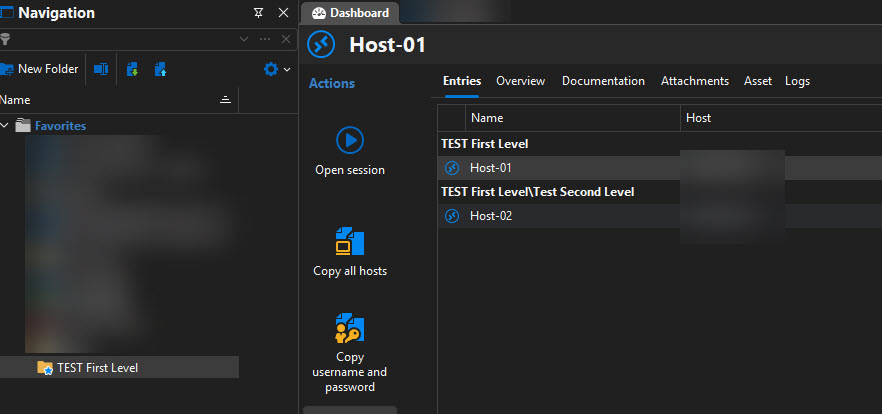
Into Favorites window the second‑level folder is not displayed (Screen_02). All hosts and their respective parent folders are correctly displayed on the right panel.
Is there a way to have the subfolders contained within the main folders displayed in Favorites, similarly to the behavior of the Default Connection?
Thank you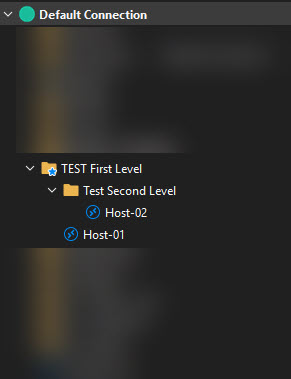
Screen_01.jpg
Screen_02.jpg
All Comments (4)
Hello,
Thank you for reaching out to us regarding this,
Currently, I'm afraid there would be no way to achieve this,
That being said, following a discussion with our development team, I have moved your topic to the feature request section.
Best regards,
Samuel Dery
Hello,
Thank you very much for your prompt feedback and for taking the time to investigate this further. I appreciate your efforts and the involvement of your development team.
Thank you also for moving the topic to the feature request section — that’s greatly appreciated.
Have a nice day, and thanks again for your support!
Best regards,
Paolo
Hello Paolo,
I wanted to let you know we've opened an internal ticket for this. For now I can't give you an estimate on when we will be able to work on this. Further, we will implement this as a setting that will need to be activated, as we don't want to change the default behavior for our current users.
Regards,
Hubert Mireault
Hello Hubert,
Excellent, and I agree with the methodology.
Thanks