RDP MCP server stopped

Hey there!
I have just upgraded to latest version and wanted to try AI features (RDM Free edition if that matters). I logged in with my GH copilot credentials
but RDM MCP doesnt start:  (Cannot find file specified). I tried restarting / starting as admin but no luck here
8e754bb6-548d-4542-9cd9-ab32a37d3510.png
All Comments (2)
Hi @alexpawlak
I'm Maxime, the Software Architect on the RDM MCP Server. I don't think I've encountered this error before using the AI Assistant entry.
Let me gather some information from you:
- What version of RDM are you using?
- When launching RDM with MCP Server started (either manually or via auto-start of MCP server in the settings), can you confirm that you see the same as the following image in the Tools - More Tools - MCP server (Experimental)
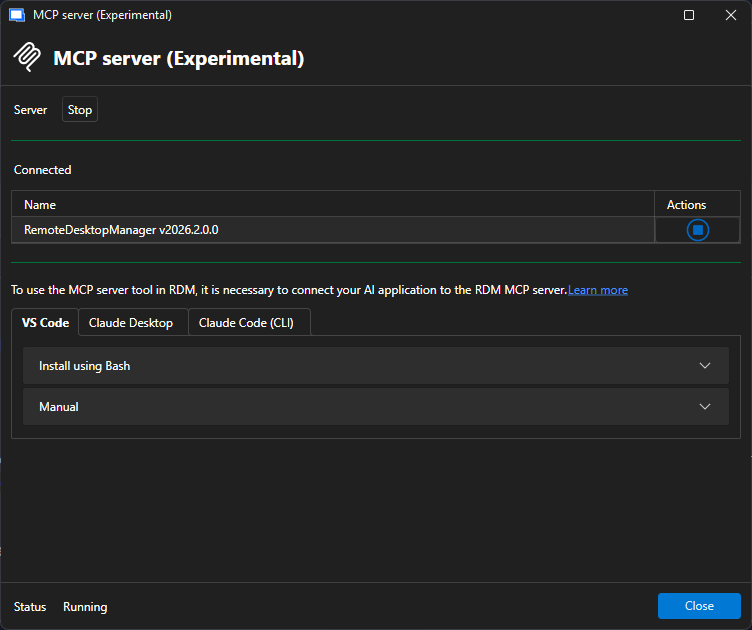 When launching RDM with MCP Server started (either manually or via auto-start of MCP server in the settings), could you tell me if you see RDM.MCP when running the following PowerShell command:
 [System.IO.Directory]::GetFiles("\\.\pipe\") | Where-Object { $_ -match "RDM" }- Are you using multiple instances of RDM?
While waiting for your response, I'll investigate further on my end.
Thanks,
Maxime Forest
176faedd-4080-4c7a-b2b0-0fe0878705ff.png
Hi @alexpawlak,
One of my colleagues was able to reproduce the same error you have in your RDM. I suppose that you are using the AI Assistant from the Window panel? If so, I'll try to get the fix included in one of the next RDM 2026.1 releases.
Best regards,
Maxime Forest