RDP MCP server stopped

Hey there!
I have just upgraded to latest version and wanted to try AI features (RDM Free edition if that matters). I logged in with my GH copilot credentials
but RDM MCP doesnt start:  (Cannot find file specified). I tried restarting / starting as admin but no luck here
8e754bb6-548d-4542-9cd9-ab32a37d3510.png
All Comments (1)
Hi @alexpawlak
I'm Maxime, the Software Architect on the RDM MCP Server. I don't think I've encountered this error before using the AI Assistant entry.
Let me gather some information from you:
- What version of RDM are you using?
- When launching RDM with MCP Server started (either manually or via auto-start of MCP server in the settings), can you confirm that you see the same as the following image in the Tools - More Tools - MCP server (Experimental)
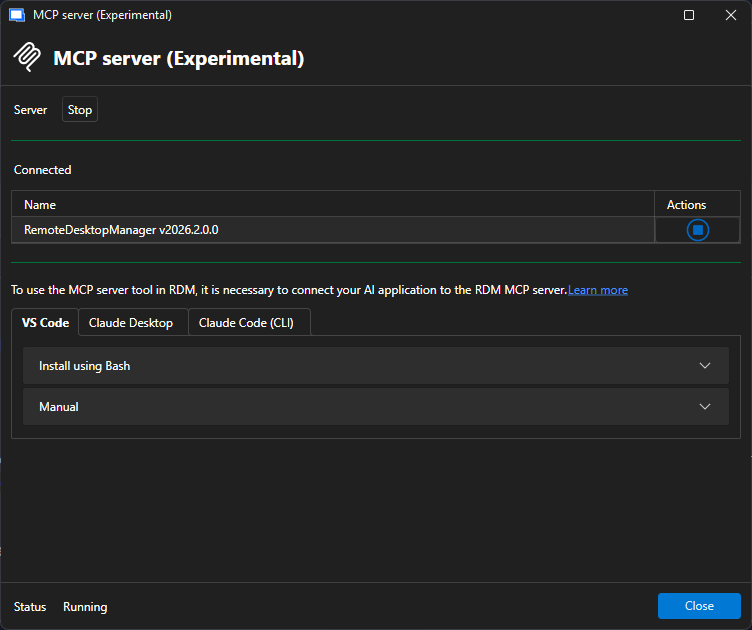 When launching RDM with MCP Server started (either manually or via auto-start of MCP server in the settings), could you tell me if you see RDM.MCP when running the following PowerShell command:
 [System.IO.Directory]::GetFiles("\\.\pipe\") | Where-Object { $_ -match "RDM" }- Are you using multiple instances of RDM?
While waiting for your response, I'll investigate further on my end.
Thanks,
Maxime Forest
176faedd-4080-4c7a-b2b0-0fe0878705ff.png