Web Browser Toolbar in iDRAC

Hello,
When using the entry type of Dell iDRAC (web) to connect to an iDRAC website, it seems there is no browser toolbar like there is with normal website entries, to do things such as force-refresh or re-fill credentials if the website logs out, etc. I can use Ctrl+Shift+R shortcut to force a browser refresh but I don't know if there's any keyboard shortcut to fill credentials? If so I wasn't able to find it. But it would be nice just to have the toolbar there anyway with the same options we have in the browser - I'm not sure if this entry type is much different from a regular web browser entry (presumably it's optimized for iDRAC in some way).
I did go in File -> Settings and set default browser type to Edge for website type entry, however I don't think that makes a difference for the iDRAC (web) type of entry.
I notice there's an option to set the web browser type in the iDRAC (web) entry type settings, but it's greyed-out for some reason: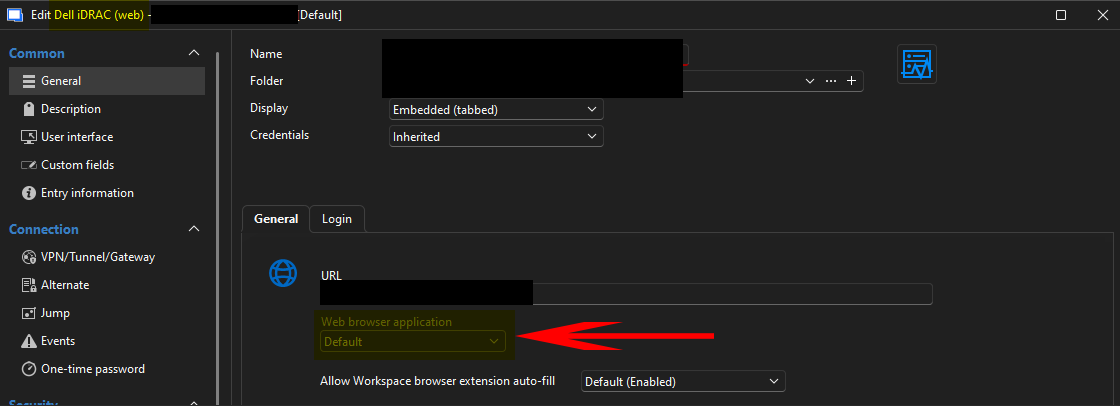
For comparison, this is what I mean - a regular website entry has this bar:
While the iDRAC (web) type entry does not: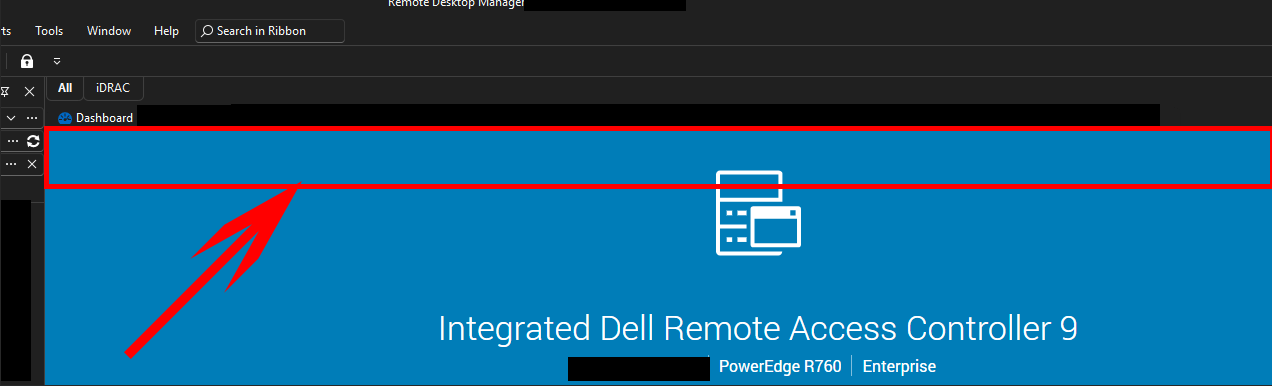
Does anyone know if there's a way to make this toolbar show up in this entry type, or would this have to be a new feature request? If it is not currently available, is there a keyboard shortcut to re-fill credentials in case iDRAC gets logged out, or do we just have to close and reopen the session?
EDIT - A sort of "part 2" (or part 3?) to this question, is there any way for the browser used in these iDRAC (web) session types to remember cert approvals and stuff like that? For example when I open iDRAC website using a self-signed cert I have to accept the warning every time it seems like, even though I've opened that session before and been to the same site many times.
Any help is much appreciated!
Best regards,
David Willis
dacd6bd0-5797-4dd3-aa54-57a25ccf545f.png
5d8f4a4a-cd44-4e91-9d9a-f7551c2d909d.png
da05290e-cac8-473b-b030-9f86f259e804.png
Recommended Answer
Hello,
Thank you for your reply,
I'm not aware of any benefit to using this entry type,
For users encountering issues with it, I usually recommend using the website-type entry to see if it works better for them.
Have you had the chance to test this?
Let me know,
Best regards,
Samuel Dery
All Comments (5)
Hello,
Thank you for reaching out to us regarding this,
Could you please specify the version of RDM you are currently using?
What type of data source are you using?
That said, I'm wondering if using a "Website" entry type instead of the "Dell iDrac Web" entry type might be better in your case?
Let me know,
Best regards,
Samuel Dery
Hi Samuel,
Thanks for the reply - sorry forgot to include that info - I am running v2025.3.20 currently, using SQL Server as a data source.
Indeed, I'm wondering if I should switch to a "website" type entry for these, to get the full browser feature set. FWIW, I have used the website entry on older iDRACs where the built-in iDRAC (web) entry type didn't seem to work, and those have worked well.
I guess that raises the question - what are the benefits (if any) of using the built-in "iDRAC (web)" entry type vs. the regular "website" type for iDRAC websites? Is there anything about the "iDRAC (web)" type that is specifically configured for better/smoother functionality with iDRAC websites?
Best regards,
David Willis
Hello,
Thank you for your reply,
I'm not aware of any benefit to using this entry type,
For users encountering issues with it, I usually recommend using the website-type entry to see if it works better for them.
Have you had the chance to test this?
Let me know,
Best regards,
Samuel Dery
Hi Samuel,
Thanks for the suggestion - that does work well, I'm in the process of converting all my iDRAC (web) entries to website (via templates) and so far the results have been great. I think we will just use those from now on. Appreciate the help!
Best regards,
David Willis
Hello David,
Thank you for your reply,
Perfect, glad to hear this is working for you!
Best regards,
Samuel Dery