permission issue? RDP session with linked credential from password list not working
permission issue? RDP session with linked credential from password list not working
1 vote

Hi there,
i have a user who is allowed to view a a RDP session entry but not the password list itself. The entry has a linked credential from the password list. As soon as the session is opened by that user a password prompt appears.
when entering the credential directly into the rdp session the user can access the RDP session. That user has no edit rights on the entry so the password is safe from viewing.
All our passwords are managed within different password lists, so using exceptions from this concept is pretty uncomfortable.
I need help to solve this problem.
All Comments (6)
Hello,
Thank you for your message.
Based on your description, it’s a bit difficult to pinpoint the exact root cause, but we can provide some guidance on what might be happening.
If you are using a third-party password manager (or even password lists with restricted access), the issue may stem from the fact that the user does not have sufficient access to the credential itself. In this situation, the credential cannot be retrieved and injected into the RDP session, which results in Remote Desktop Manager prompting for a username and password.
We recommend verifying that the affected user has the appropriate access permissions to the credential stored in the password list. Without access to the credential, RDM will not be able to supply it automatically to the session.
Please let us know how the credentials are stored (e.g., password list, external vault, etc.) if the issue persists, and we’ll be happy to assist further.
Best regards,
Carl Marien
Hi,
all password lists are stored within RDM.
I try to explain it more detailed.
i have two RDP sessions in RDM.
The first has its credentials stored in the RDP session (properties > general > tab general > user / domain / password)
The user has permission to view the RDP session object and is allowed to connect to it. as mentioned before the user has no rights to edit the RDP session, so he can't see the password
The second RDP session has the same permissions but this time the credentials are linked from a passwort list.
The User has no rights to view the passwort list.
My hope is that there is a solution without granting the view persmission.
If not possible then i might have an idea for a feature request
Hi Chris,
Thank you for the detailed explanation
What you’re experiencing is expected behavior in Remote Desktop Manager.
When credentials are stored directly inside an RDP session, RDM can inject them during connection without requiring additional permissions, since access is controlled at the session level.
However, when credentials are linked from a Password List, they are treated as a separate secure object. In this case, RDM must retrieve the credential at runtime, which requires the user to have at least permission to access that credential. If the user does not have access to the Password List, RDM cannot retrieve or inject the credential, and a prompt is shown instead.
So in short:
- Embedded credentials → controlled by session permissions → works
- Linked credentials → controlled by credential permissions → requires access to the Password List
At the moment, there isn’t a way to allow credential injection from a Password List without also granting access to that credential.
Let me know if you have any questions or want to explore alternative approaches.
Best regards,
Carl Marien
Hi Carl,
as you said
At the moment, there isn’t a way to allow credential injection from a Password List without also granting access to that credential.
Could it be a feature for future releases as an option within a session entry?
Is there a way to obfuscate additional attributes like description / host / name within a password list? This might be sufficient, so i could grant view permission.
Best Regards,
Chris
Hello,
Thanks for your suggestion.
I’ll go ahead and transfer this to our team as a feature request so it can be reviewed for a future enhancement.
We appreciate you taking the time to share this!
Best regards,
Carl Marien
Hello Chris,
Thank you for the request. I have a workaround as well as an interesting feature for you to look into that might work for what you need.
Workaround:
As a general best practice, I would recommend not putting any sensitive information in the non-sensitive/non-password fields of your entries to ensure they are not available to users without the appropriate permissions (View Sensitive and View Password, for example). From there, you could enable the "View" permission on the Password List entry, without fearing the user is able to see the passwords, as long as they don't have the "View password" permission.
If you really don't want your users to see any of this information, then this solution would not work for you.
Possible solution:
In 2026.1, we have recently added the proxy-based credential injection feature to our Gateway offering. You can read more about the feature on our knowledgebase here: https://docs.devolutions.net/gateway/kb/how-to-articles/configure-proxy-based-credential-injection/
Please note you need to be on a Devolutions Server or Hub data source.
Once you have this configured, you would need to configure your RDP to go through that Gateway. Then, in the RDP, ensure that the Password List is linked to, and that you have a dynamic link configured. The latter part is important for now, as without this link, the proxy-based injection will not occur and you'll be back to square one.
What I mean by the dynamic link, is the blue link that appears when you link to a password list: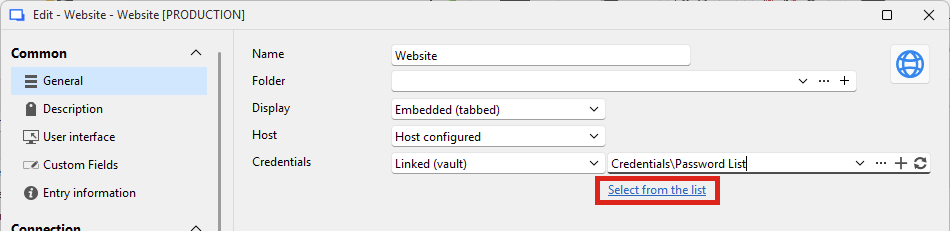
Using that link, you can select a specific value in your password list that will be used for the entry.
This way, you could then remove the "View" permission from the password list, and your users should be able to connect using that credential without ever having access to it, as the Gateway is the one performing the connection.
One small note, I mention the dynamic link being important. This is because we currently don't have a mechanism on the server (whether Devolutions Server or Hub) to prompt for the list, we only can do this for a single value at the moment. This would have to be implemented first, and I've asked the Gateway team if they could add this to an eventual roadmap.
Let me know what you think, as I think this solution is not only what you're asking for, but even more secure.
Regards,
Hubert Mireault
b98357f3-84e3-44cf-95c6-8e1e5afa8776.png