FortiClient Configuration Issue

Hey,
im using the FortiClient SSL VPN (7.2.13) for quite some time and in the past it worked great and as expected.
Update lately to the RDM 2026.1.14.0
Now I got an issue, when configuring the VPN connection, I have to set a "session name", which has to be configured within the FortiSSLVPNclient.exe application.
In the past I do not have to, cause it was enought to do it within RDM. I decompiled some source and checked and indeed there was an alternative way of using the Host/IP from RDM, but for this the session name has to be null, which is not possible due to the validation alert, so you have to set it.
So please remove the validation message for FortiClient SSL VPN session name field, so I can choose which way I want to go.
Thanks
best regards
Florian
All Comments (4)
Hello,
I've found the discrepancies between the version you've mentioned and the current one. I've fixed the problem, and you can expect this to take effect with the upcoming 2026.1.15 version.
Regards,
Jafran Majeau
Hey,
sorry to say, but this is now more wrong than before.
Now I can not even set a session name, there is just a dropdown list without purpose...
Before it was better, cause I could at least choose one if needed. Looks somehow like an "AI fix" which made it worse
Hello,
The session name field in FortiClient was not supposed to be editable (manual text input) in the first place, the field became editable as part of a migration that happened recently. This selection should be detecting your available session names automatically, and filling it up if it finds any. When none are found, it defaults to Session settings, which don't require any input from the user.
While you do need to have at least the Host field filled to save/use the entry, that behavior was always present in our application. You should now be able to save your entry without a session name (as was your original request), just as it was previously possible. I've simply brought back the original behavior.
Are you experiencing specific issues that are preventing you from using the entry?
If being able to edit the session name is something that was useful to you, I can bring back that behavior (and also make it possible to save without one).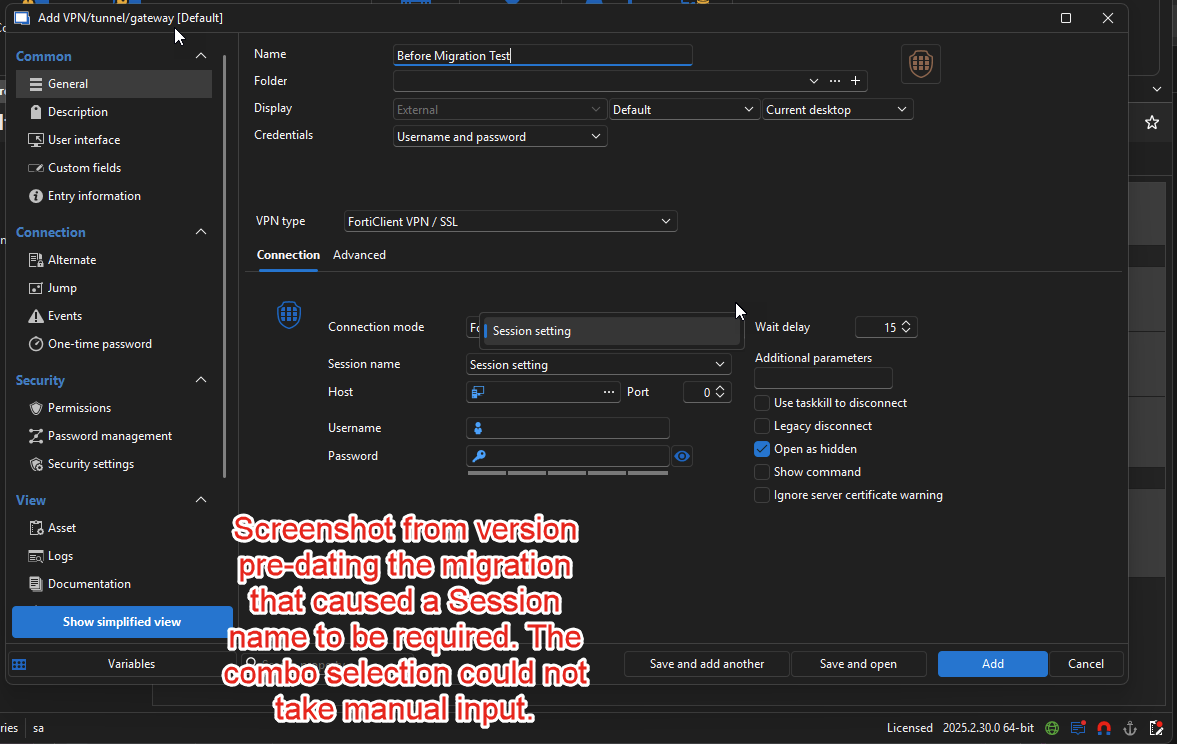
Regards,
Jafran Majeau
91721c84-8941-46f3-b194-05307f74cb9d.png
@Jafran Majeau
Ok, then I would say it works as "expected". Thank your for that heads up and explanation about what and why things are.
So we can close that topic.
Cheers
Florian