Using Workspace should be logged within RDM
2 votes

Hi, we're using RDM in our company and we just found out that using Workspace to fill out e.g. website logins with creds that are within the team's vault does not log the use of said credentials.
Meaning a team member can freely use the creds via Workspace and not be logged, which is... not good from a company perspective. One aspect that made us use RDM in the first place is the extensive and great logging capabilites of e.g. the use or access of administrative creds.
Opening the entry directly via RDM logs the usage properly, but you can bypass said logging by just opening the website directly within your browser and using Workspace to fill out the login.
Funnily enough, using the globe icon within RDM to open the website externally also doesn't log.
This seems counterproductive, no?
Using Workspace to fill out logins within your browser should also be properly logged, as if you'd open the entry within RDM directly.
Kind regards, Kev
All Comments (8)
Hi,
When Devolutions Workspace is connected to RDM, the log entry is created when the autofill occurs.
In the entry logs, you should see the following message after the credentials are filled:
“Supplied username/password to Workspace browser extension”
Could you confirm which version of Remote Desktop Manager you are using, and which data source type it is connected to?
Also, which browser are you using with Devolutions Workspace?
Best regards,
Olivier Désalliers
RDMWBEXLog.png
Hello Olivier,
we're currently running Version 2025.2.23.0 locally, on a Windows SQL Server.
I've tested it with the usual browsers; Firefox, Chrome and Edge.
Kind regards,
Kev
Hi,
In the entry logs, do you see the following message for the entries that were filled using Workspace browser extension?
“Supplied username/password to Workspace browser extension”
Best regards,
Olivier Désalliers
Hello Olivier,
unfortunately, there are no such messages within the log, which is what made me contact support in the first place.
Chat-Support mentioned I should put in a feature-request, hence why I'm here.
Only messages within entry log are things that were done in RDM itself, like opening the session directly within RDM or copying creds. But no messages regarding Workspace.
Kind regards,
Kev
Hi,
We are currently trying to reproduce the issue using Remote Desktop Manager 2025.2.23.0 Windows
A log is produced only when the autofill action is performed. The presence of the entry in the Workspace Browser extension alone does not trigger any log entry: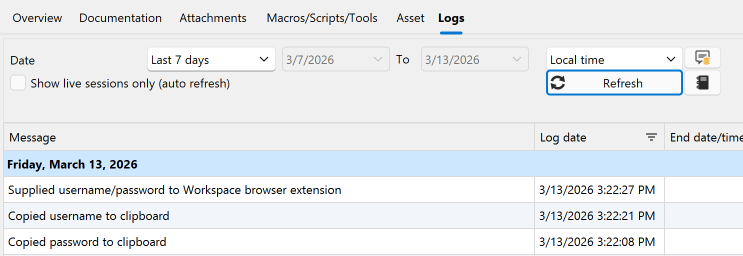
Is there a specific reason you are using version 2025.2.23.0 rather than a more recent release?
Does the issue occur with all of your data sources?
What credential mode are you using in the website entries (for example, Username and Password, Linked (Vault), Inherited, etc.)?
If the credentials are linked, inherited, or otherwise referenced, what credential type are you mainly using, such as Username and Password, Password List, or another type?
Best regards,
Olivier Désalliers
WBEXLogs.png
Hello Olivier,
sorry for the late response?
Is there a specific reason you are using version 2025.2.23.0 rather than a more recent release?
There were a lot of issues with up-to-date versions of RDM in the past, so we decided to update incrementally and in controlled waves.
We also need to supply the right version to the clients, as not every employee has local admin rights.
So it's more of a controlled enviroment, so no issues arise.
Does the issue occur with all of your data sources?
Yes, I just tried it with a local resource and our SQL Server data source
What credential mode are you using in the website entries (for example, Username and Password, Linked (Vault), Inherited, etc.)?
Linked with RDM, if that makes sense? Where could I find the option in Workspace exactly? When propted, it'll be linked to your running RDM instance
If the credentials are linked, inherited, or otherwise referenced, what credential type are you mainly using, such as Username and Password, Password List, or another type?
Different type of credentials, but mainly session entries for websites
Kind regards,
Kev
Hi,
By Credential mode, I’m referring to the Entry credentials options described here: https://docs.devolutions.net/rdm/commands/edit/entry-credentials-options/
Could you send me a direct message through my profile with a short video showing you autofilling a website using Devolutions Workspace connected to RDM? You can use a test data source, any website, and any test credentials.
Once the autofill is complete, also open the entry’s Logs tab in RDM in the same video.
Best regards,
Olivier Désalliers
Hello Olivier,
sorry for the late response.
I've found the issue while trying to record the short video.
It was properly logged, only under a different entry, because of a URL redirect.
It is actually logging properly. We're seeing "Supplied username/password to Workspace browser extension" in the other entry, which has the URL post-redirection.
Sorry for any inconvenience.
Kind regards,
Kev