Open RDM Sessions in use by other user not actualized or invisible
Open RDM Sessions in use by other user not actualized or invisible

Hi,
we just migrated to a newer version of DVLS Server 2026.1.6.0 and imported our old configuration, moving to SQL Express 2025.
Now the global session view shows each session as a double entry and in the general view they are not shown on mouseover. We tried everything from layout reset to cache emptying - no change.
What could we do to debug this and get the session view back?
Regards,
Thomas
All Comments (15)
Hello,
Thank you for your post. To better understand the specific issue, could you please provide a screenshot showing the double entry? Additionally, could you confirm the exact RDM version you're using?
Thanks,
Stephan
Hi Stephan, I include a screenshot.Each server connection is mentioned twice.
The server version was yesterday updated to 2026.1.7.0, RDM Client uses 2026.1.10.0
kind regards,
Thomas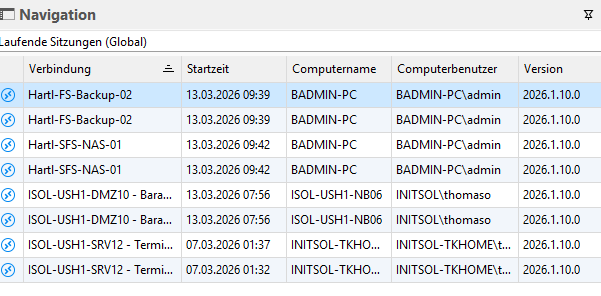
Screenshot 2026-03-13 145634.png
Hello Thomas,
Based on the timing (post-migration) and the symptoms (each “session in use” shown twice and the “in use” hover/status not updating), this most commonly points to the session/usage feed being aggregated twice on the client side (for example, the same DVLS data source being connected more than once), or to a real-time update channel issue (more frequent when DVLS is accessed through a reverse proxy/load balancer).
To narrow this down, could you please confirm the following:
- Does the double listing happen for all users/workstations, or only on specific clients?
- In RDM, do you have more than one DVLS data source configured/connected (including any legacy/old DVLS entry that might still be present)?
- Are you reaching DVLS directly, or through a reverse proxy/load balancer? If through a proxy/LB, does the issue change if you connect directly to the DVLS URL as a test?
In parallel, you can try these quick checks:
- Ensure only one DVLS data source is configured/connected in RDM, then fully restart RDM and re-test the global session view.
- If DVLS is behind a proxy/LB, verify the DVLS Access URI matches the external URL used to reach the instance (misalignment can cause odd client behaviour in some deployments).
References:
https://docs.devolutions.net/server/kb/knowledge-base/access-uri/
https://docs.devolutions.net/server/kb/knowledge-base/use-x-forwarded-for/
https://docs.devolutions.net/rdm/user-interface/content-area/
Best regards,
Patrick Ouimet
Hi,
I can confirm that the issue with missing showing sessions and the double listings occur on all workstations in our LAN and also remote connected.
We only connect one single DVLS Data source. The legacy entry pointed to the same DNS adress when we moved to the new server and did not change anything on the client. Maybe some older cache exists, but I havent found any double entry.
We are connecting to dvls directly to https://ds.initsol.de/dvls no LB nor proxy involved.
Kind regards,
Thomas
.
Hello Thomas,
As a next step, could you please try resetting the server cache on your DVLS instance?
You can find step-by-step instructions in the following documentation:
https://docs.devolutions.net/server/web-interface/administration/security-management/reset-server-cache/
Please let us know if the issue persists after completing this step, or if you have any questions along the way—we’ll be happy to assist further.
I reset the server cache as described, this did not make any difference. Issue persists
Is there maybe a setup documentation for this feature so I can check I I configured anything wrong? I was searching for this everywhere but I cannot find it. It used to "just work". But maybe something needs to be changed so I would like to check. I found that some users do not see anything in the open sessions view.
Ok, I tried to give all users administrator rights, then the sessions show up. Yet this is no solution. What am I missing in the rights settings?
Hello,
A shot in the dark, but could you verify whether session states are enabled under Administration => System Settings => Vault?
Regards,
Min
Hi,
Administration => System Settings => Vault
is really a huge shot in a huge dark - could you be more specific please, the configuration has multiple pages and subsections, I cannot even find "session states".
Maybe this is a reason why it is misconfigured - it's just impossuble to find anything in there.
If I search for "session" inside system settings it does not give me any hit.
Kind regards,
Thomas
Hi,
Regarding the Entry State, could you please verify whether this setting is enabled?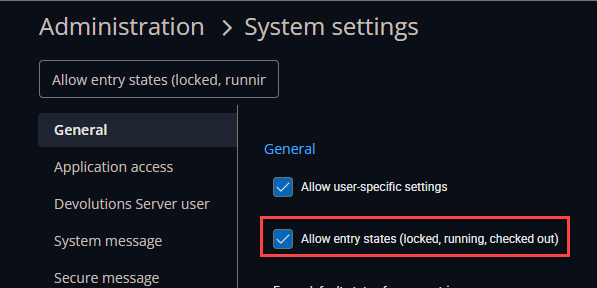
For the duplicate connections, could you confirm whether these are older sessions appearing twice, or if newly opened sessions are also duplicated?
It would also be helpful to know if, after manually marking these sessions as closed once, newly opened sessions continue to appear as duplicates.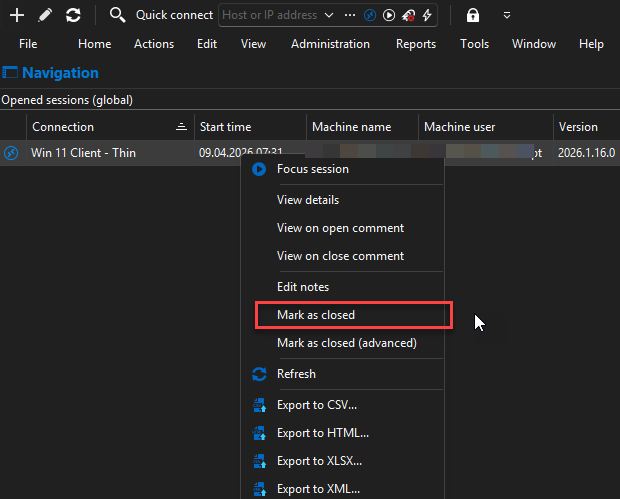
Additionally, we offer a feature that can automatically close old sessions after a specified period of time. You may want to check if this option.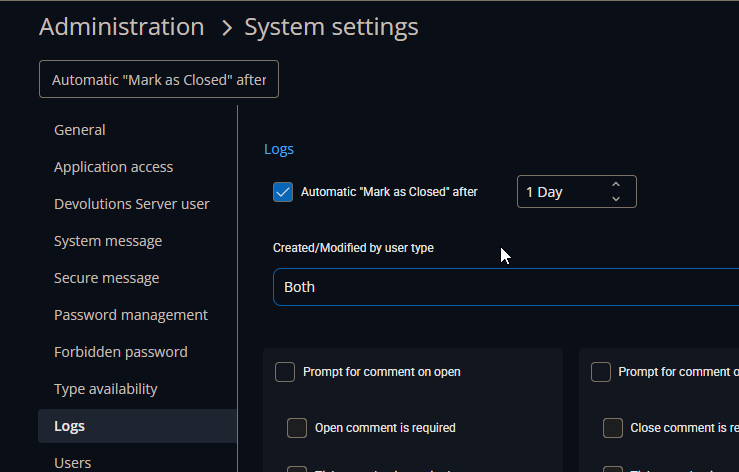
Thank you in advance for your help. Please let us know your findings so we can assist you further.
Best regards,
Stephan
7c8f8237-f0f6-40c1-a337-74edd20ae3e5.png
aba0e425-4d0c-4f9e-9605-5c2031de7da0.png
809b4fc2-8018-4756-9840-33dad1601770.png
Hi, Entry status was and is checked: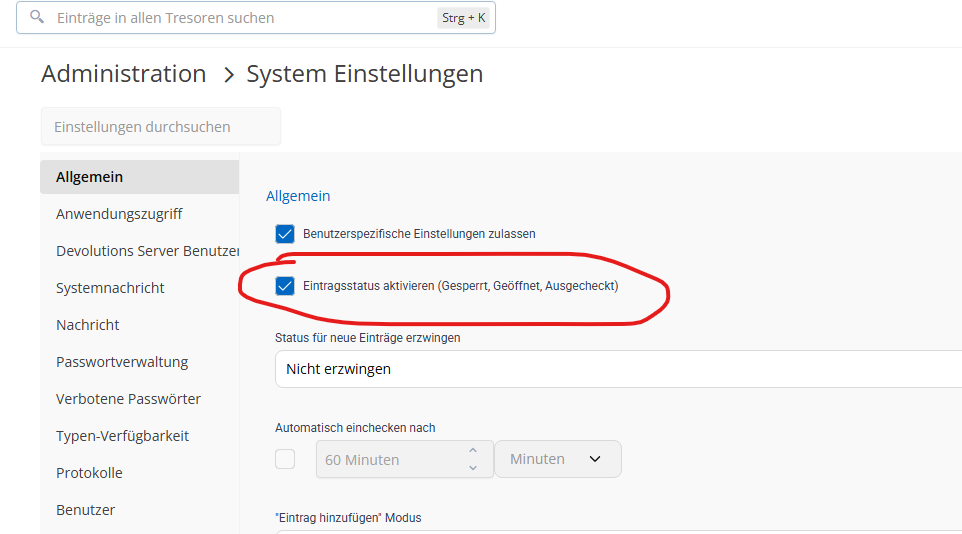
And the duplicates occur with new sessions every day. When we close they vanish.
The problem ist that in the sessions view they are visible only for administrators, and in the default view they are not shown at mouseover.
e1c689f2-3ec4-46ea-a90e-73ed93b26f77.png
Hello,
Thank you for your reply and patience.
Would it be okay if I contact you through the email listed in your profile to create a support case?
We would like to explore this issue further and possibly have a quick session to review it together.
Best regards,
Stephan
Hi Stephan, yes please.
support@ would be even better.
Thank you and kind regards,
Thomas
Hello,
Thank you for being so patient!
I'm pleased to inform you that a new version of RDM (2026.2.11.0) has been released, featuring the fix for your issue.
Latest Version: Download RDM
Please let us know if this works or if you encounter any issues.
Best regards,
Maxim Robert