Split windows
1 vote

When moving a tab to make a split window, it is dang hard to see the mouse and move it to one of the 5 options. Is there anyway to make this easier to see or a better way to move? Tell me how easy it is to move to one of the four arrows?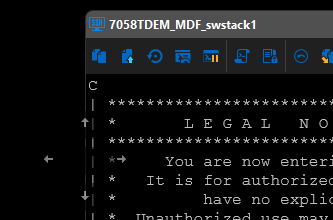
50fa59d5-cf20-4044-8f42-2aa66d93af6c.png
All Comments (3)
Hello,
I'll open a ticket to investigate this. Unfortunately, at the moment, we're dependent on a third party library for this part of the UI, so it's possible we can't change these colors easily.
Even if this third party library we use doesn't support this, though, doesn't mean we won't be able to improve this in the future. We've been migrating a lot of controls over to Avalonia which will give us better control over how we display our UI, but this part with the docking of controls will probably take us a little while to get to, as it's quite complex and touches most parts of the application.
I hope this gives you a little more context even if we're not able to address this immediately.
Regards,
Hubert Mireault
Maybe you didn't understand or I didn't understand you. When you pull the window down via the mouse, it is a little difficult to find and put it on the very small arrow like in the picture.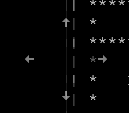
e83c2edb-2fdd-4550-88e2-8bf807e545fa.png
Maybe my explanation was lacking, but we're talking about the same thing. The docking feature as well as the arrows that show where the docking can be done are handled by the third party UI library we are using. I'm not sure whether they provide a way to customize the colors of these arrows so they are more visible when on a black background. We will have to investigate to see what we can do with this current UI library in the short term.
Regards,
Hubert Mireault