Context menu items intermittently greyed out (disabled) after period of inactivity - RDM 2026.1.10.0
Context menu items intermittently greyed out (disabled) after period of inactivity - RDM 2026.1.10.0

I am experiencing an issue where several options in the right-click context menu for sessions become disabled (greyed out) after the application has been open for some time. This behavior forces a restart of the application to regain full functionality.
I've attached screenshots showing the difference between the active and disabled states. For example, options like 'Add entry', 'Duplicate', 'Move', and 'Delete' become inaccessible.
I am trying to determine if this is a known bug in the current release or a new security/timeout feature that I need to configure.
Environment Details:
- Product: Remote Desktop Manager (Single User License)
- Version: 2026.1.10.0 64-bit (JIT)
- Framework: .NET 10.0.3
- Key Add-ons: .NET Extensions (v10.0.225.61305)
- OS: Windows 11 Pרם
Steps to reproduce:
- Open RDM and use it normally (all menu items are active).
- Leave the application running in the background for a period of time.
- Right-click on any entry/connection.
- Observe that several management functions (Add, Edit, Delete, etc.) are greyed out, while session commands (Open, View Password) might remain active.
Is there a specific setting related to session locking or UI refresh that could be causing this?
Looking forward to your guidance.
75db58dc-88f5-4631-9d35-191f8a7aebf9.png
All Comments (3)
Hi @aviado,
Thank you for the details.
Could you let us know what type of data source you are currently using in RDM? That information would help us narrow down the investigation.
Also, could you please update to version 2026.1.12.0 and confirm whether the issue still occurs there?
Could you also confirm whether this only happens after RDM has been left running in the background for some time, or if you have an automatic lock enabled and the issue appears after unlocking RDM?
We will be waiting for your results.
Best regards,
Alexis Geller Peiro
@Alexis Geller Peiro
Thank you for getting back to me. Here are the answers to your questions:
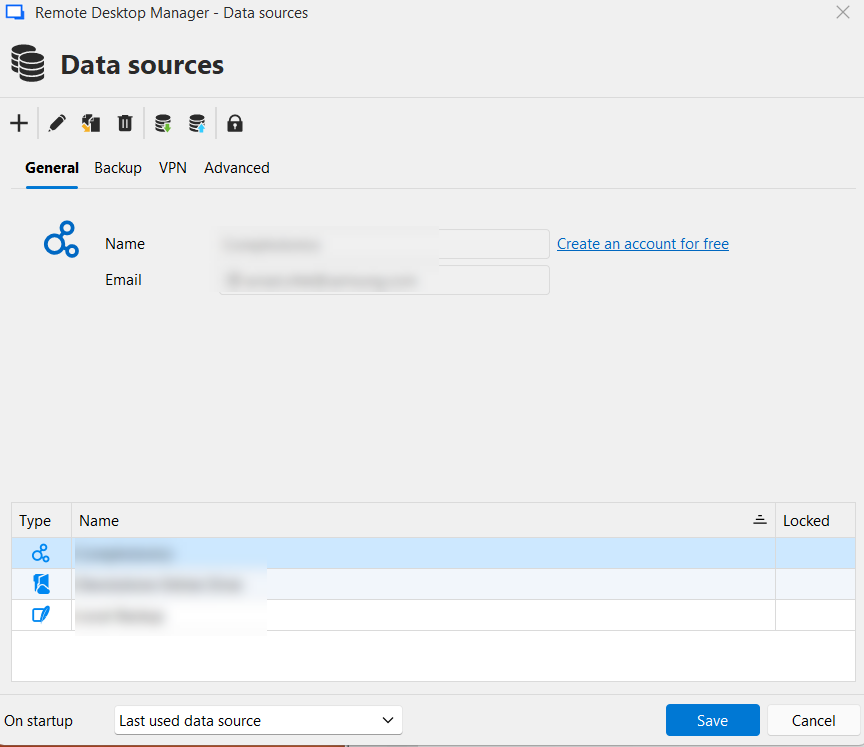
- Data Source Type: I am not 100% sure of the exact name/type of the data source I am using, but I have attached a screenshot of my "Data sources" window so you can see the configuration and the icon type.
- Version Update: I have updated RDM to the latest version you mentioned (2026.1.12.0 - screenshot attached), but unfortunately, the issue still persists in this version.
- Automatic Lock: Yes, I do have the automatic lock feature enabled. The issue with the greyed-out menu items appears after the application has been locked in the background and I unlock it to resume my work.
Please let me know if you need any further logs or testing on my end.
Best regards,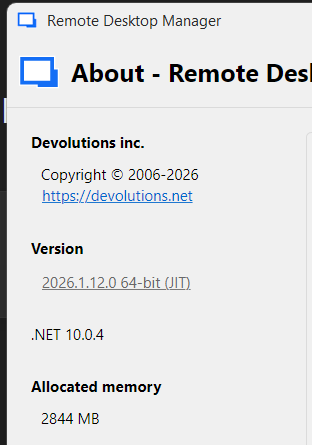
62b40f19-a2dd-4a6d-bb1e-d34970b29c7d.png
fddb6fda-9c0d-4d41-bcbd-ddc2044180f4.png
Hello @aviado ,
Thank you for the information.
This issue has already been identified, and our team is working on a fix as quickly as possible.
I appreciate your patience, and we apologize for the inconvenience.
Best regards,
Alexis Geller Peiro