RDM Free 2026.1 — SSH Terminal "Use SSH authentication agent" Does Not Reach 1Password SSH Agent
RDM Free 2026.1 — SSH Terminal "Use SSH authentication agent" Does Not Reach 1Password SSH Agent

Objective:
Use the 1Password SSH agent with RDM's built-in SSH Terminal entries to authenticate via SSH key, with 1Password managing the keys and prompting for authorization on connection.
Environment
- RDM Free 2026.1.10.0, 64-bit (.NET 10.0.3)
- Windows 11 Enterprise 24H2
- 1Password latest stable — SSH Agent enabled, "Integrate with other apps" enabled
- Windows OpenSSH Authentication Agent service: Disabled (1Password owns the pipe)
- SSH targets: Linux hosts with PasswordAuthentication no enforced
What Works
SSH from PowerShell and Windows Terminal works perfectly. 1Password intercepts the connection, displays the key authorization popup, and authenticates via publickey.
The OpenSSH pipe is active and uncontested:
PS> [System.IO.Directory]::GetFiles('\\.\pipe\') | Where-Object { $_ -match 'openssh' }
\\.\pipe\openssh-ssh-agent
PS> Get-Service ssh-agent | Select-Object Name, Status, StartType
Name Status StartType
---- ------ ---------
ssh-agent Stopped Disabled
What Does Not Work
Any SSH Terminal entry in RDM fails with "Permission denied: incorrect credentials or security settings prevent the operation to complete."
1Password never displays its key authorization popup. The 1Password agent does not appear to be contacted at all.
Configuration Tested
SSH Terminal entry configured per Devolutions documentation for agent-based authentication:
- Username: populated
- Password: empty (confirmed cleared)
- SSH key tab → Entry type: No private key
- Advanced tab → Use SSH authentication agent: checked
Credentials dropdown tested in both positions:
- Username and password — Connection fails with "Permission denied." No 1Password popup.
- None — RDM strips the username and prompts with an "Interactive authentication" dialog. After entering the username manually, connection still fails. No 1Password popup.
Question
How do I configure RDM Free's SSH Terminal entries to authenticate through the 1Password SSH agent? Is the "Use SSH authentication agent" option on the Advanced tab compatible with 1Password's SSH agent, or does it require a different agent implementation?
Thanks! -Ian
Recommended Answer
I have resolved it. I need to switch the SSH key agent from pageant to OpenSSH.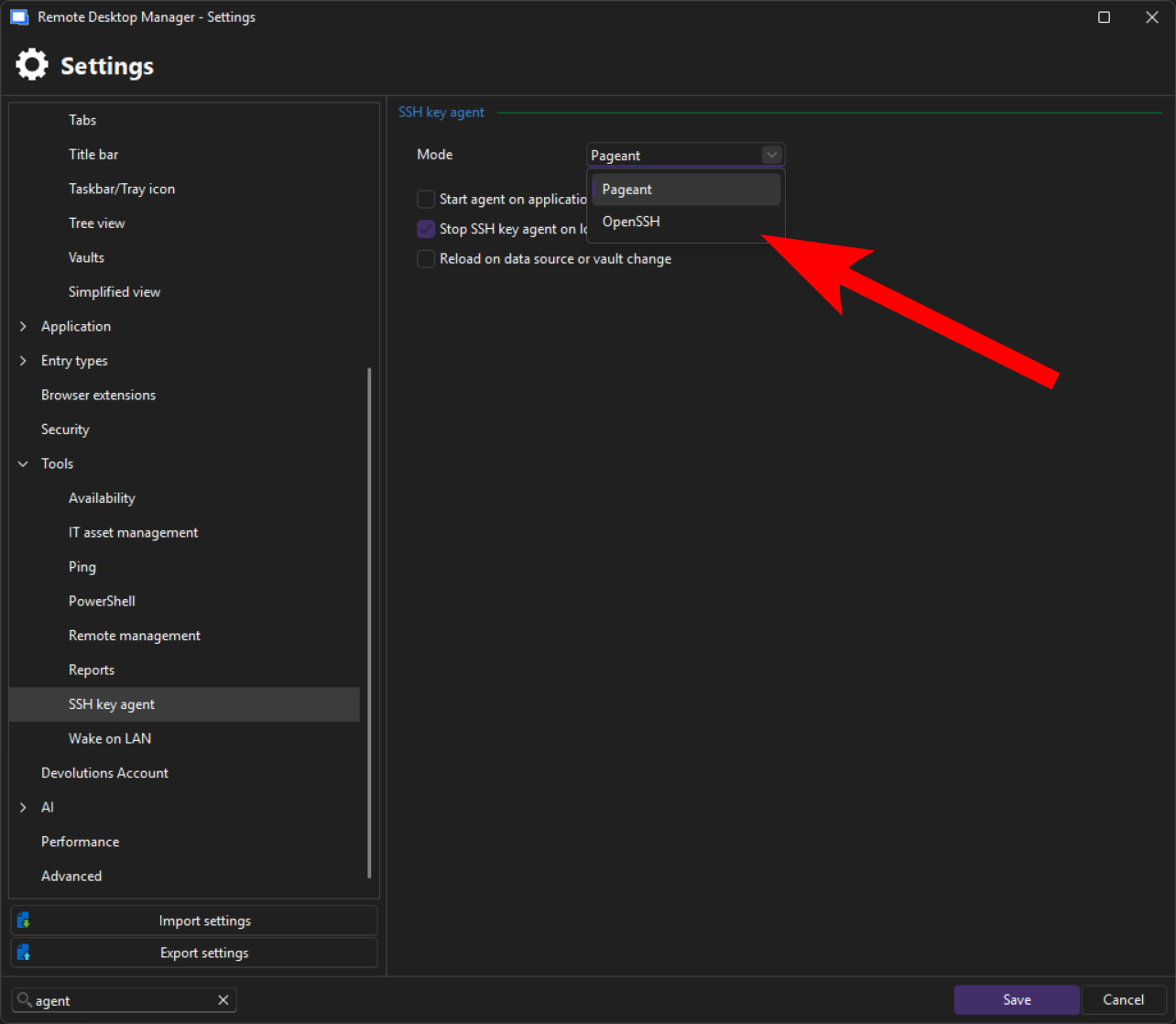
aaea0e4c-e6b0-4992-afb3-b870bb7e8f57.png
All Comments (2)
I have resolved it. I need to switch the SSH key agent from pageant to OpenSSH.
aaea0e4c-e6b0-4992-afb3-b870bb7e8f57.png
Hello,
Thank you for the follow-up.
I'm glad you were able to identify the issue and share the resolution. This will serve as a helpful reference for other customers who may encounter the same situation.
Thank you again for taking the time to share this information.
Best regards,
Jacob Lafrenière