Error during DB Upgrade

Has anyone expirienced an error simliar to this one while upgrading to the latest version?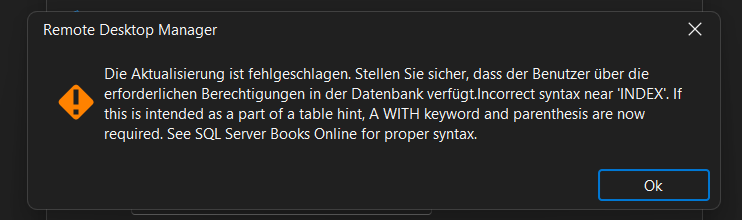
rdgs
mw
8936709b-8cc0-4909-aa6f-13a104d5e52c.png
All Comments (7)
We are working on a fix.
In your case if you are running:
- Running on SQL Server 2014 or lower
- Wait for a new version of the database upgrade that will be compatible
- Running on SQL Server 2016 or grater but with compatibility level < 130
- You have two options
- Wait for a new version of the database upgrade that will be compatible
- Bump up your compatibility level to the max of the server. With the following SQL script
- You have two options
DECLARE @level int =
    CASE CAST(SERVERPROPERTY('ProductMajorVersion') AS int)
        WHEN 12 THEN 120
        WHEN 13 THEN 130
        WHEN 14 THEN 140
        WHEN 15 THEN 150
        WHEN 16 THEN 160
    END;

DECLARE @sql nvarchar(max) =
    N'ALTER DATABASE [' + DB_NAME() + N'] SET COMPATIBILITY_LEVEL = ' + CAST(@level AS nvarchar(3));

EXEC(@sql);
Note
- SQL Server 2014 is already end of life.
- SQL Server 2016 will be EOL soon (mid-2026).
Stéfane Lavergne
The fix has been implemented and will be available starting v2026.1.11
In the meantime, if you want I can send you, via direct message, the .dll file that you can replace and make it work.
Let me know,
Stéfane Lavergne
I will wait for 2026.1.11 - when will it be released?
Next week sometimes.
Stéfane Lavergne
Good and bad news: v2026.1.11 is now available, but I discovered about an hour ago that my fix is only partial. The complete fix will be in v2026.1.12. In the meantime, I can send you the SQL script to perform the database upgrade manually. We’ve already sent it to a few clients and they’ve run it successfully.
As with any ad hoc SQL script, make sure you have a proper backup of the database before running it.
Let me know and I can send you the script.
https://forum.devolutions.net/topics/52384/version-20261110-march-11-2026
Stéfane Lavergne
Hello Stefane,
all fine - will wait for 1.12 - then all should go automatically, right?
rgds
Correct. Again, sorry for the inconvenience.
Best regards,
Stéfane Lavergne