RDM not working in Russia?

Hello everyone!
For the past ~six months, I've been experiencing a problem: when I launch RDM while in Russia, it freezes and fails to load my list of servers and passwords from the Devolutions Personal Hub cloud. The program simply freezes and stops responding.
The problem is only resolved when I kill the RDM processes via the task manager, and my device magically relocates to another country (the Netherlands, America).
I understand the global geopolitical situation and sincerely ask for help and advice: is my problem related to the fact that about six months ago (perhaps due to some software update) you stopped supporting clients from Russia, or are our regulatory authorities to blame for the current unavailability of your cloud in Russia (they always block something like Cloudflare and other providers)? If it's important, the current software version is 2025.3.30.0, and I install updates regularly (about once a month). Again, the problem has been going on for about six months.
I'm really tired of having to launch a VPN every time I work.
I hope my account won't be banned after posting my question, if this is a restriction for Russian users by Devolutions. :D
Thank you in advance for your reply.
All Comments (6)
Hello,
Could you help us debug this? It's not intentional. We do not sell our product in Russia, and it's not possible to complete a transaction from there, but we have never blocked anything on our side. Could you specify exactly which version you are using?
Regards,
David Hervieux
Yes, of course, I'll try to provide all the necessary information.
The fact that there's no blocking on your end is already good news.
You know, I just updated my previous version 2025.3.30.0 and manually installed the latest version available on the website (with the new logo when launching the program) – 2026.1.9.0.
The behavior has changed slightly – this time, without a running foreign VPN service, after waiting 30-40 seconds, the list of directories and connections somehow managed to load. But when I tried to connect to a known working server via SSH by double-clicking, the upcoming console window simply froze, and the program again stopped responding. This time, the list was likely loaded from the cache, but connections still didn't work. As usual, I went into the Windows task manager (I have Windows 11), killed all RDM processes, launched the VPN, and the connection to the same server via SSH (which was obviously accessible from my computer when connecting from Windows cmd) started in a couple of seconds.
Hello again,
I'm curious to know if you use a local data source (just for a test) and set the value No internet connection inf File->Settings, if you get the issue? Perhaps there is a DNS call blocked somewhere.
Regards
David Hervieux
Hello,
I would also be curious to know if you experience any issues when trying to access the data in your Hub Personal through the web without using a VPN at https://hub.devolutions.com/
Best Regards,
Michaël Beaudin
You know, this is probably the fastest way to diagnose problems.
It looks like the government is blocking us with CloudFlare.
Your site https://login.devolutions.com/ opens fine with a VPN, but without a VPN, it just displays a white window in the browser. I assume the storage data center is also located there. It's strange that this forum, albeit barely, opens without a VPN.
The thing is, I pinged login.devolutions.com and received a response like "Exchanging packets with login.devolutions.com.cdn.cloudflare.net [104.18.32.119] with 32 bytes of data:", which clearly mentions the cloudflare domain. Regarding local storage, launching RDM again without a VPN froze the main program window for about 2-3 minutes, after which a clear error popped up: "Unable to connect to server. Connection timed out." The program continued, loading a list of cloud storage servers from the cache. When selecting local storage again, the program seemed to work very quickly.
I think we've figured it out. The problem is Cloudflare's total blocking; this is a known issue. It's likely that nothing can be done about it, so we're left with using RDM through a VPN. In any case, thank you very much for your support!
Thanks for letting us know.
As a side not, we have a feature that could reduce your annoyance a little bit when starting RDM.
We have a VPN tab that can be configured in your data source configuration. If the VPN you are using is a type we support in our entry types, you could create it as an entry and then export that entry to a .RDM file.
Once that is done, you can add it to your data source configuration and it should launch before you first connect to the data source.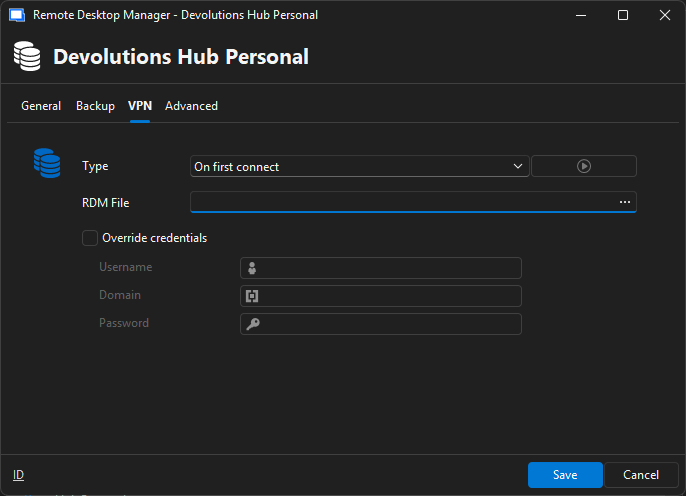
Best Regards,
Michaël Beaudin
0fae99e9-c956-4a97-96e2-3ab9a3a5a0d8.png