SSH "Cipher Only Support MAC" error

I am running Remote Desktop Manager on Windows. I've tried several times to upgrade from 2025.1.41.0 to the latest version. Every time that I do, all of my SSH connections break. When connecting via terminal to another server (multiple types and varieties of servers) I receive the error "Cipher Only Support MAC".
I've tried absolutely everything I can think of to resolve this:
- In the Algorithm support settings, I've checked every algorithm. I've confirmed on three different SSH servers that the algorythms listed are all supported.
- I generated a new SSH key.
- I've changed the server and client to different SSH ports.
I've tried upgrading 4-5 times, and every time give up and rollback to 2025.1.41.0, where I do not have an issue.
I've checked the release notes on the next version up, but do not see anything breaking related to SSH Ciphers.
Any ideas or suggestions would be appreciated.
All Comments (13)
Hello,
Thank you for reaching out to us regarding this,
Could you please specify the version of RDM you are currently using?
What type of data source are you using?
Additionally, could you provide us with a screenshot of this error?
Best regards,
Samuel Dery
Hello,
Thank you for responding so quickly.
I tried upgrading several times to the latest version. Today that was 2025.3.30.0 and I still encountered the issued. 2025.1.41.0 is the last known version where my SSH connections worked.
My data source is a local data source.
Attached is a screenshot, it pops up briefly in the lower right corner and then closes. Note that the error code does not appear to be a real error code, it increments by 1 every time I receive the error.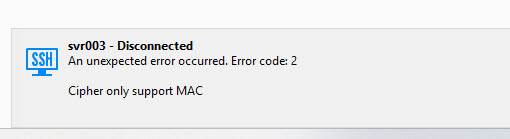
I do not believe that this is a server side issue because I connect to over 30 SSH servers, many of different types.
2026-02-24_18-49-11.jpg
Hello,
Thank you for your reply,
Can you follow this knowledge base article to generate some logs of the issue:
https://docs.devolutions.net/rdm/kb/how-to-articles/send-ssh-logs-verbose/
Let me know,
Best regards,
Samuel Dery
Hello,
I have emailed in the logs per your knowledge base article above.
Note that the logs are equally unhelpful (at least for me). Please find a sanitized version of them attached.
Thank you,
Ryan
224167-sanitized.log
Hello,
Thank you for your reply and for the logs
Could you go into your SSH Entry Properties under the "Advanced" section, then press the "..." button on the right side of the "Algorithms support" field? I would like to see a screenshot of the "Mac" section.
Let me know,
Best regards,
Samuel Dery
Please find attached a screenshot of the MAC section. I believe these are the default values.
I have also previously attempted checking all options in this section with no change in outcome.
Thank you,
Ryan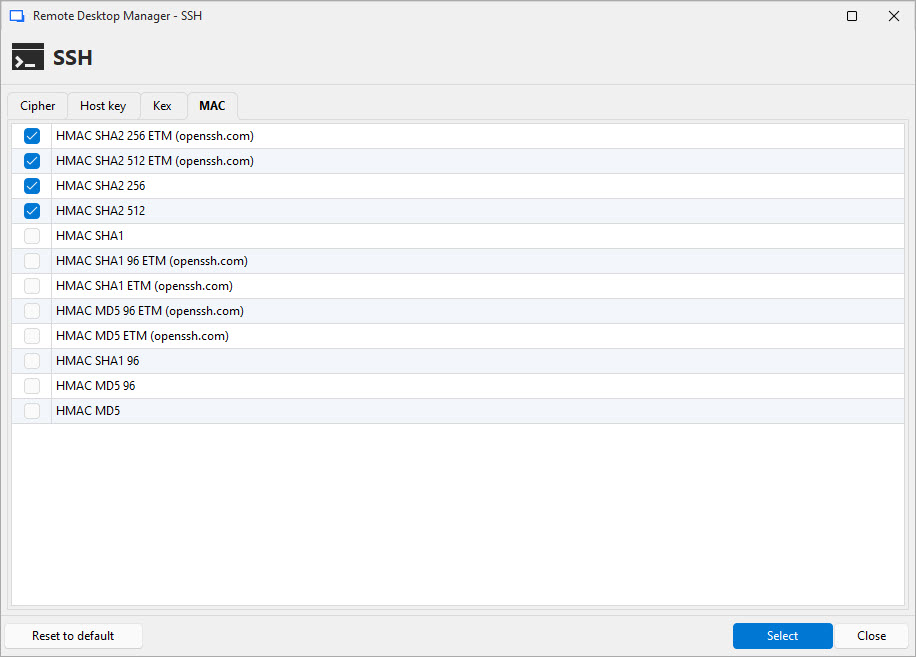
2026-02-27_11-47-49.jpg
Hello.
Thank you for your reply,
Can you enable all algorithms across all sections and generate new logs showing of the error?
Are you able to connect without issue from outside RDM on the same workstation?
Let me know,
Best regards,
Samuel Dery
Certainly, I've enabled all algorithms in all sections and tried again.
Below is a sanitized version of the log, I will also email the plain log. I see no difference, the log stops at 'Cipher only support MAC'.
Yes, i can connect without issue from outside RDM. Also when I roll back to RDM 2025.1.41.0, I am able to connect successfully with the same configuration file.
I've also tried creating a new RSA key instead of Ed25519, installed it on the server and client but still see the same error.
Ryan
224167 - sanitized.log
Hello Ryan,
Thank you for your reply,
No problem, I sent you a response via email in our case.
Best regards,
Samuel Dery
I spent several more hours troubleshooting this issue and have determined the cause and a workaround. (Though I can not explain why this is occurring.)
My SSH keys were generated and exported (with a passphrase) from 1Password. I then imported these encrypted private keys into RDM.
For some reason RDM doesn't like keys created with 1Password and I receive the above error with any key where the private key was generated there (Ed25519 or RSA). When I generated and tested a new key, I had been doing so with 1Password and this key also saw the issue.
Today, I generated another set of keys using windows and imported them into RDM and 1Password. These keys worked without issue.
I do not know why the 1Password keys generated keys stopped working in RDM after version 2025.1.41.0, but it appears that I have a workaround.
Hopefully this helps anyone else seeing the error or perhaps provides you some avenue to understand fix the issue. It appears completely reproducible, as when I tried creating new keys in 1Password they all had the same error.
@Ryan K I reviewed the last log you submitted and I think the problem is 1Password's key encryption for which RDM (2025.2 and later) is not ready.
Usually, keys are encrypted with AES-CTR, but 1Password seems to encrypt using CHACHA-poly (or AES-GCM) and I have to admit I did not know it was possible.
The good news is: I know why and where it is broken, so I will make a fix a soon as possible.
Regards
Denis Vincent
That is awesome! Glad there is an explanation.
I assume that at one point those other algorithms were supported? (Explaining why it worked and then stopped working after upgrading.)
I guess the positive is that this forced me to rotate my keys everywhere. :P
Ryan
Hello,
The fix should be available starting from the upcoming RDM 2026.1.16.0.
Please do let us know if the issue persists after updating to the above-mentioned version.
Best Regards,
Michaël Beaudin