Folder default collapsed / pin collapsed
1 vote

I’d like to request a folder-level property in Remote Desktop Manager that allows a folder to be pinned as collapsed by default, including during search results.
The goal is to prevent specific high-level or noisy folders from auto-expanding unless explicitly clicked open, while still allowing their contents to be searchable.
My specific example is having Client folder, which has a Handover folder inside along with the actual live credential entires. When I search my client I would like to see all the live credentials and servers but don't need a page of old credentials to be expanded unless I specifically click on it. I would like to be able to edit the folder properties on individual folders and select to keep this folder pinned shut unless I manually intervene. Forcing ALL folders to remain closed on search would not be helpful in this case.
I believe this would significantly improve navigation usability in large vaults.
All Comments (1)
Hello,
From what I understand of your environment, is it safe to assume that the entries within these folders should not be shown during searches? If that's the case, then you can set the "archived" status on your entries. You can then ensure you have the appropriate option to filter out entries that are marked as archived when searching.
This is the option you have to enable in the filter settings: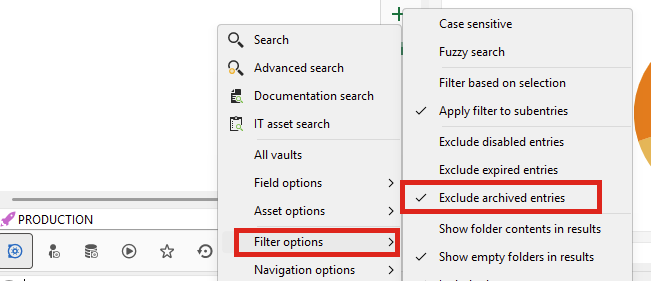
Here's an example of the results: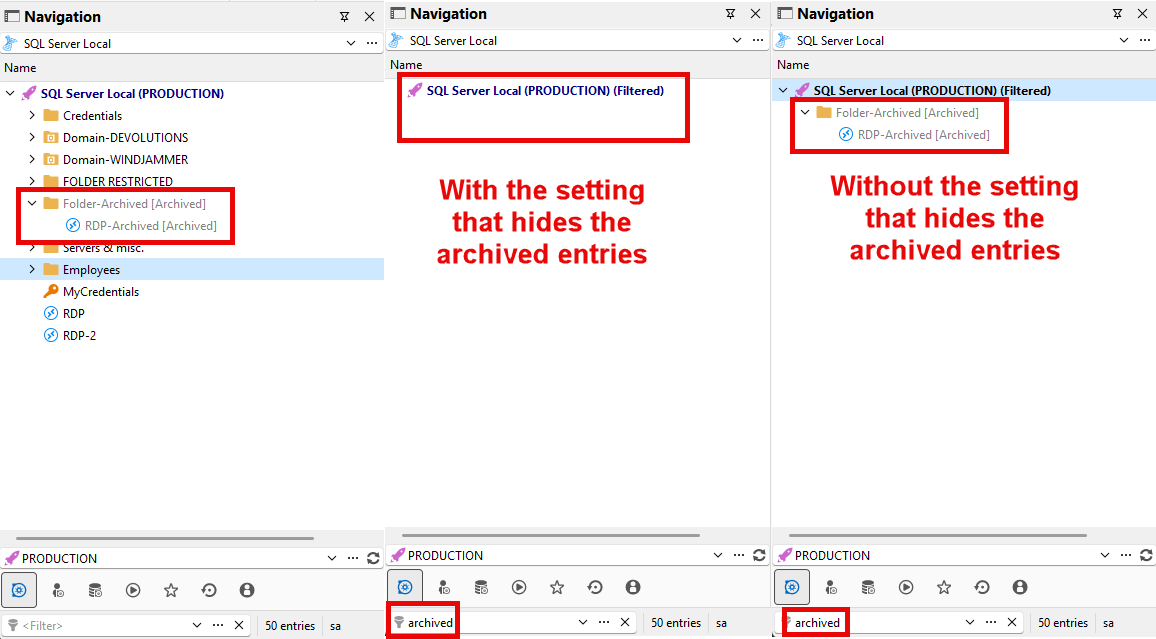
Let me know what you think about this solution.
Regards,
Hubert Mireault
ea6c706c-d470-4a76-bf49-8eb739619efb.png
29af8ff1-bc9b-4bbd-becd-2b281589d257.png