New Entry type: Entry Shortcut
1 vote

Hi Guys,
In RDM it is possible to add an Entry type "DataSource (shortcut)" and a "Vault (Shortcut)".
Would it be possible to have the same Entry type but to link to other Entry in another Vault?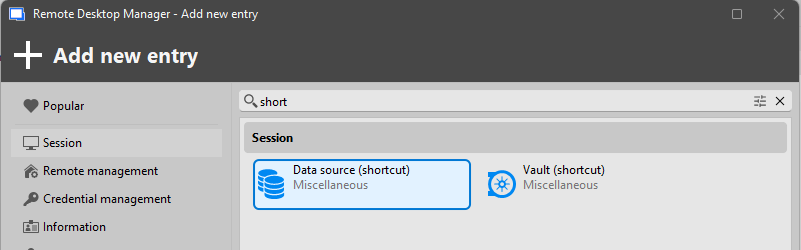
Thank you very much
05b2fd31-99a0-4260-b333-a4a23a63a298.png
All Comments (11)
Hello,
I'd like to clarify a few things with you to make sure I understand your needs.
Are you looking for a simple entry like the "Vault (shortcut)" where the only action you can perform with it is to 'execute' it and switch to that vault + entry? Do you also need this to be available for all of your users?
I'm asking for two reasons.
The first is that the favorites were recently reworked to improve the behavior with entries from different vaults. It's now more convenient to perform actions on these entries. The negative here is that favorites are only for your users, so all of your users would need to favorite the required entries and access them through their favorites tab.
The second is that seeing all of the information of an entry in a different vault implies fetching the information contained within that vault which may take more time. Going about it with a simpler implementation would save on this processing.
The simplest way to support this feature would be to create an entry like you suggest, but I'm wondering if there may be a more appropriate way.
Regards,
Hubert Mireault
Hi Hubert,
Yes, an Entry Like a shortcut would be fanstatic, it would switch to that vault and entry would make the job.
Your suggestion (the second part) of showing the information of the entry would be nice as well, I understand the performance issue that could come with.
For me, the first option would do the job. It would make sense as you already have a shortcut for Vaults and Datasources. Why not for a normal Entry?
Perfect, thank you for your feedback, we'll open a ticket and see what we can do. I'm thinking maybe we could rework the shortcut entries to be more versatile and have three different mode (datasource, vault, or entry) rather than 3 different entry types.
Regards,
Hubert Mireault
I am needing to link to entries created in another vault, am I correct that this is not currently possible?
We have different teams who maintain separate vaults but have need for some overlapping entries. Maintaining these entries in each vault separately is currently a manual process, prone to drift.
RDM has all sorts of synchronizers built for third-party systems, but there is no way to synchronize or link entries between different RDM vaults itself?
Hello @awarre,
Thanks for the feedback. There's a feature you might be interested in.
We have recently added the "Linked (external vault)" setting to certain configurations, for example the credential section of an entry. This can allow you to use a credential from a different vault easily. It's still not supported everywhere, but if you see a dropdown that currently supports the "linked (vault)" choice, we could most likely add the "linked (external vault)" value to allow choosing from a different vault.
I understand that this is only for linking inside entries, and your needs seem to be more broad. Could you give me an idea of what you mean by these overlapping entries that have ot be maintained in different vaults? If I had a better grasp of the way you structure your vaults and entries, it would help tremendously so I could find an appropriate solution for you, whether it already exists or we need to develop it.
Regards,
Hubert Mireault
@Hubert Mireault Thanks for the response!
Yes, linking to external vaults for credentials is very useful, but that's not really what I mean in this case.
A basic scenario would be:
A desktop support team needs Read Only access to a specific set of servers, including some host entry information and an RDP sub-entry. They have access to a Desktop Support vault. The server infrastructure team maintains their own set of hosts/entries for these servers they maintain with Administration access using their own Server Administration vault.
It would be useful to have a mechanism to either manually link and/or automatically synchronize entries/folders across vaults. This can currently be done manually, or similar functionality could be achieved through granular permissions in a single vault, but that defeats a primary purpose of vaults as restricted information/access silos.
With RDM VMware and Microsoft Hyper-V Synchronizers for example, you can reference VMs on a host server and map them with specified templates to desired folders. However, RDM doesn't have this ability to synchronize data across vaults using a similar mechanism with itself.
Does that make sense? The main goals are to reduce maintenance and preserve access vault association to specific teams/roles/etc.
Thanks for the details!
I see a handful of solutions but nothing that does it exactly like you describe. It might still be a good starting point for you, so I'll go over these ideas.
As you mention, the first thing that comes to mind is centralizing your data to one vault. With the "view" permission and the concept of shortcuts, it's even possible to have different groups of users have different access to these entries. It would be possible to give the desktop support team read-only access in their own folder, while giving the server infrastructure team full access in their folder. From what I understand of your situation, this is basically what you want to achieve, with the downside of being in the same vault, meaning that it can fill up fast, depending on your network infrastructure.
Another idea I see, is the vault shortcut entry, and the "entry shortcut" entry asked for in this thread. The server infrastructure vault could have shortcut entries pointing to the appropriate vault, or, with the "entry shortcut" entry we don't yet have, pointing to a specific entry or folder. The negative here is that you do need to go to the "original" vault through that shortcut, and if you have multiple vaults that would need to point to the same machine, it would become much more difficult to maintain, as you would need to recreate these shortcut entries in each vault that needs access to them.
Apart from these two ideas, I don't think we have anything already built-in to support this.
One more question I would ask, is why the need to duplicate these entries across two or more vaults? I'm assuming it's because the infrastructure team must handle multiple vaults similar to the desktop support team one, so having all of this information in one vault is simpler for them, rather than navigating to multiple different vaults, is that correct? If that's the case, I'm wondering if improving the multi-vault search aspect of the application could also help out for this kind of scenario.
I'm not dismissing the idea of synchronizers, but as they are currently built, they are one-way synchronizers (they pull the data, but don't push it). I would have assumed you'd need it to be both ways, in case the infrastructure team needs to modify something in the entry's settings to solve an issue for the desktop support team.
Regards,
Hubert Mireault
@Hubert Mireault I hadn't run into the concept of shortcuts, this is very close to something workable for me. However it doesn't look like shortcuts work well with variables since each "shortcut" is more of multi-context entry reference and inherits its own variable context, including parents, sites, etc. Anything using $PARENT_NAME$ (just one example), breaks when a shortcut is created in another context. Shortcut isn't an ideal name, since it seems to imply a relationship with Windows shortcuts which are a reference to the parent object, not a multi-context object.
The main reason to have the entries across vaults is to separate control and security scopes between teams. My understanding is this is one of the main purposes of vaults.
I guess if vaults could be presented in a single nav pane rather than requiring vault switching that would improve ease of use.
Apologies for all of this, I'm just trying to figure out the best ways to organize, secure, and present information in RDM. The Academy videos are great for learning what Devolution's products can do, and how to do it, but I can't find anything you guys have giving best practice or even example guidance for organization of entries based on scenarios.
You've given a lot of useful information, thank you.
Hello,
As you say, when it comes to variables, the context of where the shortcut entry is used from will mean the variables will be affected. Like you mention, $PARENT_* variables, or $FOLDER_* variables will take the parent/folder from the context of where you are running the shortcut. So, if the folder structure is not the same, it will most likely resolve to the wrong values, or to an empty value.
The main reason to have the entries across vaults is to separate control and security scopes between teams. My understanding is this is one of the main purposes of vaults.
I guess if vaults could be presented in a single nav pane rather than requiring vault switching that would improve ease of use.
That's a good understanding of the purpose of vaults, yes. But, as you realise, at the moment it comes with the downside of them being more or less isolated, with limited ways to interact from one vault to another.
As for presenting them all in the same navigation pane, this is an idea we've bounced a few times over the years. We've been reworking and improving our architecture over the last few major versions to allow for multiple different improvements, and this is one that's getting closer to being feasible. Nothing concrete on that end for now, though.
I understand I've not given you a concrete solution at the moment, but I don't think there's an easy one that already exists or that we can implement. We'll have to give this more thought internally and decide how we can address these workflows more efficiently.
Regards,
Hubert Mireault
@Hubert Mireault Really appreciate your responses.
Beyond changes to the application itself, I really think it would be useful for Devolutions to provide examples of best practices for organizing entries as I mentioned above. There are so many different ways to organize with the systems RDM provides. The more you learn about RDM, the more confusing it can be to know if what you're doing is a current/modern/good way of structuring the entries.
I've made the team in charge of our knowledge base and Academy content aware of your point here. I agree that not only having more best practices, but also communicating them through more concrete scenarios would be very interesting for our users. The reality of a Managed Service Provider (MSP) is not the same as an IT admin only handling their own network, for example.
Thank you for your feedback, it's very appreciated.
Regards,
Hubert Mireault
