MFA re-authentication

Hi, we are currently evaluating Remote Desktop Manager with Devolutions Server as the data source (for tier 1 servers). We are currently discussing to install RDM on the tier 2 office client and the admin is logged on with the normal tier 2 office account without admin rights and launches RDM. The user would then use the PAM module to check out his tier 1 admin user to log on via the Devolutions Gateway to a tier 1 server without entering his tier 1 admin password. MFA via Yubikey OTP is enforced in Devolutions Server.
When the user starts RDM, he needs to authenticate via Yubikey OTP. This works so far. However, when he closes RDM and re-opens, MFA is not being enforced anymore. Only when I log off from the data source and log on again. Is there a way to force MFA more often, at least every time RDM is started?
Thank you!
Joachim
Recommended Answer
Hello Joachim.
Yes, you are right - the Administrator menu is only accessible for Administrators. But the setting you mentioned at File => Settings => Security is different!
If you configure the setting highlighted in System Settings, MFA is set at the data source level, meaning it would be the same for MFA for RDM and the web interface, as the MFA is set on the user level.
https://docs.devolutions.net/server/web-interface/administration/configuration/server-settings/security/two-factor/#configure-multifactor-authentication-from-the-web-interface
Also if you set something in System Settings, it will be applied to all users, like a GPO.
If you set the MFA on the application level (this is what you are referring to) the MFA secures the RDM application itself, not the data source. So the MFA will differ from the MFA you already configured.
https://docs.devolutions.net/rdm/kb/how-to-articles/enable-2fa-users-sql-server/#force-with-group-policies-gpos
Also, with DVLS, you can set up the System Settings from the web interface:
https://docs.devolutions.net/server/web-interface/administration/configuration/system-settings/#rdm
Regards,
Min
All Comments (4)
Hello Joachim,
Indeed, you'll find these settings in RDM under Administration => System Settings => Security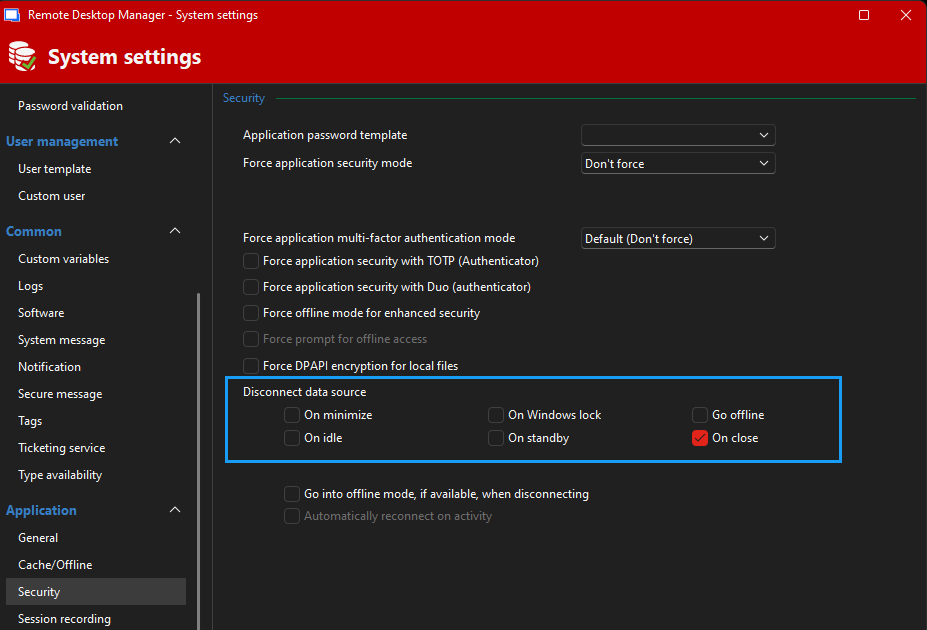
Regards,
Min
f56ed78b-a037-4596-add1-f9d44f9f193e.png
Hello Min,
thank you very much!
Best Regards,
Joachim
As far as I have seen, this dialog is only accessible if you are an administrative user and the settings under File -> Settings -> Security -> Lock are greyed out. But looks like you can also configure these settings via Group Policy which would be our preferred method:
https://docs.devolutions.net/rdm/kb/how-to-articles/group-policies/
Hello Joachim.
Yes, you are right - the Administrator menu is only accessible for Administrators. But the setting you mentioned at File => Settings => Security is different!
If you configure the setting highlighted in System Settings, MFA is set at the data source level, meaning it would be the same for MFA for RDM and the web interface, as the MFA is set on the user level.
https://docs.devolutions.net/server/web-interface/administration/configuration/server-settings/security/two-factor/#configure-multifactor-authentication-from-the-web-interface
Also if you set something in System Settings, it will be applied to all users, like a GPO.
If you set the MFA on the application level (this is what you are referring to) the MFA secures the RDM application itself, not the data source. So the MFA will differ from the MFA you already configured.
https://docs.devolutions.net/rdm/kb/how-to-articles/enable-2fa-users-sql-server/#force-with-group-policies-gpos
Also, with DVLS, you can set up the System Settings from the web interface:
https://docs.devolutions.net/server/web-interface/administration/configuration/system-settings/#rdm
Regards,
Min