Telnet connection failed

Hi there
We have some systems where telnet via RDM is not possible, the window closes right after open the entry without any message. Telnet to the same system with putty or mobaxterm works fine. I think a remote session would be the best for troubleshooting the issue.
Best regards, John
All Comments (7)
Hello John,
Thank you for contacting us on that matter.
Could you please provide us with the RDM version and the data source you are currently using?
Thank you for your collaboration.
Best regards,
Alexis
Alexis Geller Peiro
Hi Alexis
We are using RDM 2025.3.22.0 with DVLS data source.
Best regards, John
Hi Alexis
The issue is not urgent, but I would like to make some progress.
Best regards, John
Hi John,
Thank you for your patience.
I ran tests on my side and, so far, I’m not seeing the same issue when establishing a Telnet connection within RDM. This suggests that the behavior may be related to the environment or the client setup.
To help rule out any client-side factors, could you please try the workflow again using the latest Portable version of Remote Desktop Manager:
https://docs.devolutions.net/rdm/kb/how-to-articles/portable-rdm-installation/
If you encounter the same issue with the portable version, could you please share the entry settings you are using? This will help us better understand the configuration and investigate further.
Thank you for your cooperation, and I look forward to your update.
Stephan
Hi Stephan
Maybe I was not clear enough: Telnet as connection does work fine. It does not work on a specific device where another telnet client is working fine. I wan't to figure out why so I don't have to use another telnet app.
That's why I asked for a remote session because it's a very specific error and not a general one.
Best regards, John
Hello John,
We have reached out to you via email to schedule a session.
If we find anything worth sharing, we will update this thread.
Thanks
Stephan
Quick update on this:
We found that there was an issue with the exact user prompt string and the Password prompt string; they have to match the exact string your Host prompts with: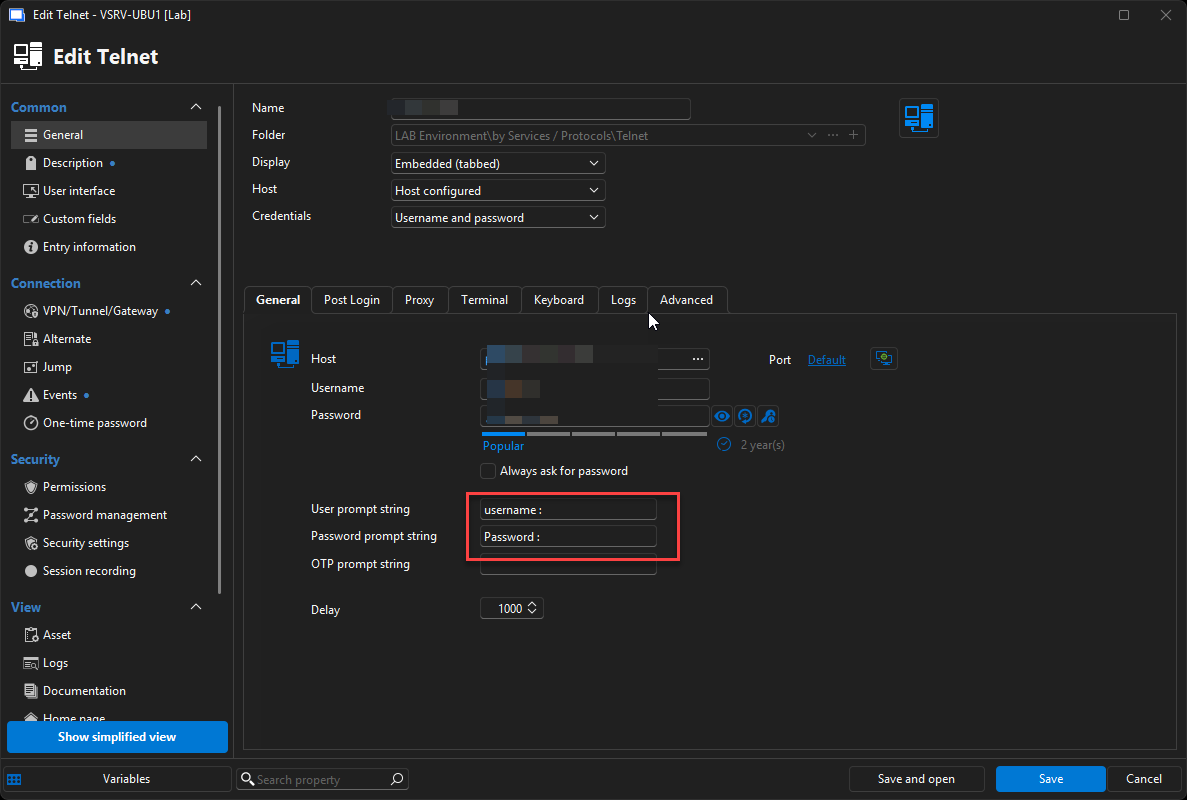
Alternatively, an "after Open Event" could also be a viable solution at this point:
https://docs.devolutions.net/rdm/kb/how-to-articles/entry-types-events-settings/#after-open
Thanks
Stephan
a067ca8d-4246-453a-8ffe-8588322390b4.png