How to automate Oracle Data Pump export script with input pop-up in RDM?
How to automate Oracle Data Pump export script with input pop-up in RDM?

Hi everyone,
I’m trying to automate an Oracle database export task using Data Pump (expdp) within Remote Desktop Manager (RDM), but I want certain fields in the script to be filled dynamically via an input pop-up before execution.
Here’s the script I currently use, which works fine when run manually:
expdp directory=bkp dumpfile=EXAMPLE_DUMP.dmp logfile=EXAMPLE_DUMP_expdb.log JOB_NAME=EXAMPLE_JOB schemas=EXAMPLE_SCHEMA EXCLUDE=TABLE_STATISTICS consistent=y
What I want:
- For RDM (or a script run from RDM) to open an input pop-up requesting the values for fields that change each time, such as:
- dumpfile
- logfile
- JOB_NAME
- schemas
- After filling in these values, the script should execute automatically with the provided input.
What I’ve tried so far:
- Running the script directly in RDM, but it doesn’t support dynamic interactive input.
- Looking for RDM script input parameters, but I couldn’t find clear examples for Oracle Data Pump.
Questions:
Does anyone know how to create this kind of interactive prompt in RDM to fill in script fields before execution? Or is there a way to automate this in RDM without manually editing the script every time?
Does anyone have a step-by-step guide or a valid link/tutorial showing how to create this kind of interactive input pop-up in RDM for scripts? Any example setup or instructions would be highly appreciated!
Thanks in advance for your help!
All Comments (1)
Hello albertopereira,
Thank you for reaching out to the Devolutions support team.
This could be done by setting parameters in a PowerShell session.
The option prompt for parameters before opening should let you set them to the desired value.
The arguments Arg[1]... can also be used in the script to set these values as a variable.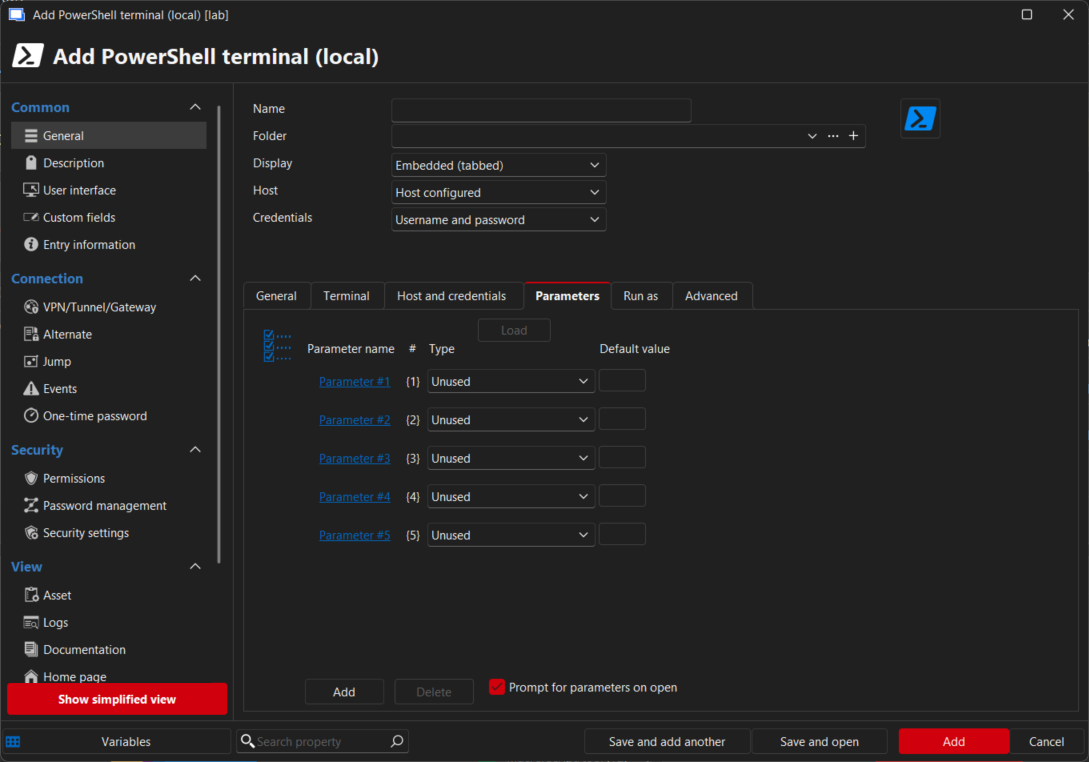
Best regards,
Patrick Ouimet
2026-01-12_08-15-22.png