opening vnc from windows PC connecting to remote macos vnc viewer using vnc password mode from windows pc
opening vnc from windows PC connecting to remote macos vnc viewer using vnc password mode from windows pc

From my windows 11 pro PC I want to open up a RDM remote vnc viewer that connects to a MAC that uses VNC screen sharing with password.
( I am also setting up a local to remote ssh tunnel on port 5900 - so the password is/will not passed over a non encrypted connection. )
What are the choices on the windows RDM setup side I need to make sure it calls the remote macos ( latest Tahoe on apple silicon cpu ) vnc screen share with the max 8 letter password?
Which windows vnc client works for this?
when i use the separate ultravnc vncviewer and use the -password argument it connects fine over a manual ssh local to remote tunnel of port 5900, but the windows RDM connections do not ask for the screenshare or do not pass the password, not sure which.
All Comments (1)
Hello
Just to make sure I understand correctly; you've configured either Screen Sharing or Remote Management in Settings > General > Sharing on the Mac, and set the option "VNC viewers may control the screen with password" and provided a VNC password?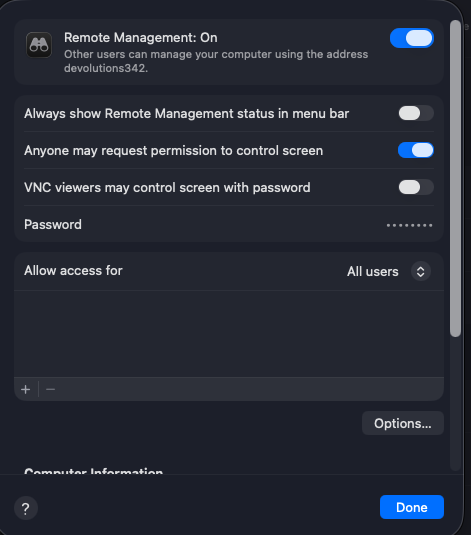
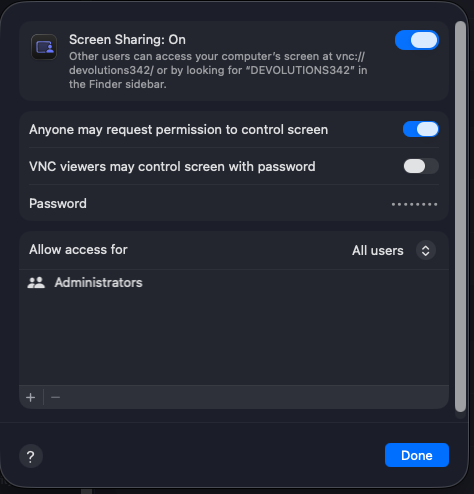
Further, you've set up an SSH Tunnel forwarding port 5900, and when you connect with UltraVNC viewer over that tunnel and provide the VNC password with the -password argument, you connect successfully?
Finally, when you connect with RDM using "Embedded" mode, the connection does not work? Is an error message displayed?
What kind of session did you create in RDM? Note that there are two options that could be relevant - either a VNC session or ARD (Apple Remote Desktop).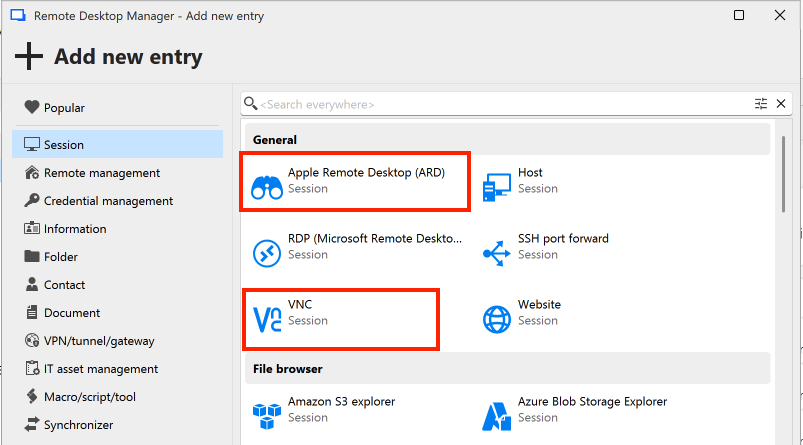
Thanks and kind regards,
Richard Markievicz
Screenshot 2026-01-05 at 13.20.00.png
Screenshot 2026-01-05 at 13.00.50.png
Screenshot 2026-01-05 at 13.00.33.png