Copying from SSH session that is inside of an RDP session

I utilize the Privileged Access Workstation (PAW) model. So, I normally work directly on my main PC that has MS office, email and full internet access. Then from there I RDP into my PAW where I have RDM installed and use it to administrate all of my servers and network from there. This works great for me, but I have run into an odd annoyance with copying text from the SSH terminal in RDM.
I can't seem to paste what I've selected and copied back into anything on my main computer. It pastes fine on the PAW (the PC that RDM is actually running on), and then I can reselect and copy the text from wherever I pasted it on the PAW, and then it will paste fine on my main computer, but not directly from the SSH terminal session. The problem only seems to happen with the native RDM SSH Terminal. It works fine from other types of sessions running in RDM. I can even run Teraterm and Putty SSH sessions in RDM and I have no problem with copy and paste back to the main PC with them.
Can you anyone help please?
Recommended Answer
Hi Richard,
Rebooting the PAW had no effect.
However, this PAW is a VM. I cloned that VM, changed the IP and hostname then added that new VM to the domain. Now, I can log into the new PAW as myself (same as the old PAW) and copying from SSH sessions in RDM works perfectly. RDP to both PAWs from my desktop PC, and SSH to the same Linux machine in exactly the same way and copying from SSH sessions still doesn't work right on the old PAW but works perfectly on the clone. Needless to say, I'm deleting the old PAW and using the clone from now on.
I'm sorry to have bothered you with this bizarre exercise, but it was just a weird glitch in that one installation that was inexplicably fixed by cloning the VM that it was running on. Thank you for your efforts and help in expanding my knowledge of your fine product.
All Comments (14)
Hello,
Thank you for contacting Devolutions Support.
I'm afraid this is not something that is supported, so I would be fairly limited in what I can do,
That being said, without the SSH Connection, you are able to copy text from the Remote Host to your Local workstation without issues, correct?
I'm wondering if you first copy the text from the SSH session to the Remote host and then copy it again from the Remote to your local machine, does it work as expected?
Let me know,
Best regards,
Samuel Dery
Hi Samuel,
Thank you for responding.
Yes, if I copy the text from the SSH session to the Remote host and then copy it again from the Remote to my local machine, it does work fine.
Plus, as I previously stated it works fine from all of the other types of sessions in this RDM installation. I only have the problem copying from the RDM native SSH Sessions.
Thanks,
Dion
Hello,
Thank you for your reply,
You can try to have a look at the Clipboard Diagnostic tool to see if anything is interfering with the Clipboard:
https://docs.devolutions.net/rdm/kb/troubleshooting-articles/clipboard-diagnostic/
That being said, as I mentioned, if you can copy from the SSH Connection to the machine where RDM is installed, I'm afraid I would be fairly limited in what I can assist you with in this case.
Best regards,
Samuel Dery
Thanks again for trying to help me with this. However, the Clipboard diagnostic tools didn't reveal any problems to fix. So, I guess I'm stuck with the problem, or go back to adding Teraterm to RDM and using that instead of the SSH terminal native to RDM.
Hello,
At the moment, I’m unfortunately unable to test this scenario directly on my side, as I don’t currently have an environment matching your PAW setup. To make sure we give you the most accurate information, I will reach out to our development team to confirm whether this behavior is expected or if there are any improvements planned regarding clipboard handling in the native SSH terminal.
I’ll follow up with you as soon as I have feedback from the developers.
Thank you for your patience, and please don’t hesitate to reach out if you have any additional details to share.
Best regards,
Carl Marien
Hi Carl,
Thank you very much. Your efforts are greatly appreciated.
Hello Dion,
To help us narrow this down further, could you let us know which application(s) you are trying to paste the copied text into:
- On the PAW (where RDM is running)
- On your local machine (main PC)
For example: Notepad, Notepad++, PowerShell, Command Prompt, Word, Outlook, browser, etc.
This information can help determine whether the behaviour is application-specific or related to how the clipboard is being handled across the RDP and SSH layers.
Thank you for your help, and I look forward to your reply.
Best regards,
Carl Marien
Hello
After discussing things with the terminal developer, Carl's question might not be relevant. We had thought that the terminal was putting rich text on the clipboard, which would prevent it from being pasted into certain applications, but after checking that isn't the case.
I can't see any reason why you have the behaviour described, and on my side I couldn't reproduce it. I actually made an extra hop in my test:
macOS (Windows App) -> [RDP] -> Windows 11 (mstsc) -> [RDP] -> Windows 11 (RDM) -> Windows 2k22 [SSH]
When I copied some text from the SSH terminal on the final hop, it propagated through all the clipboards.
That doesn't mean there isn't a bug or misconfiguration here, just that the answer is not obvious.
If you don't mind some troubleshooting; my suggestion is to download Inside Clipboard on your local machine and the PAW. It's a simple application that doesn't need installation or special privileges. After changing the clipboard, if you click the "Refresh" icon it will show you the formats and data held on the clipboard.
- On the PAW, copy some text from RDM's SSH terminal
- Refresh Inside Clipboard. What does it show?
- Go back to your workstation
- Refresh Inside Clipboard. What does it show?
To give a concrete example, here is what I see after doing the copy on the "PAW":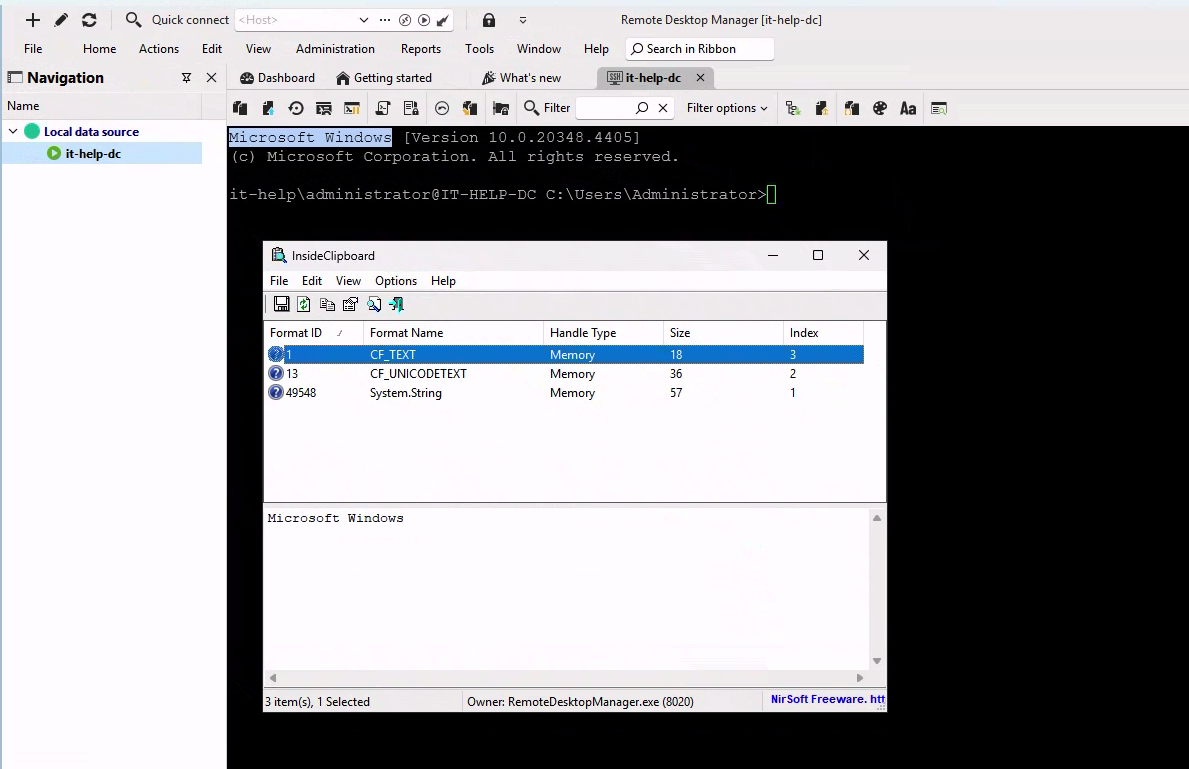
Note that RDM "owns" the clipboard and it's put the selected text in three formats (plain text, unicode and a magic .NET encoding.
Here is what I see on the "workstation" (where I connected with mstsc to the "PAW"):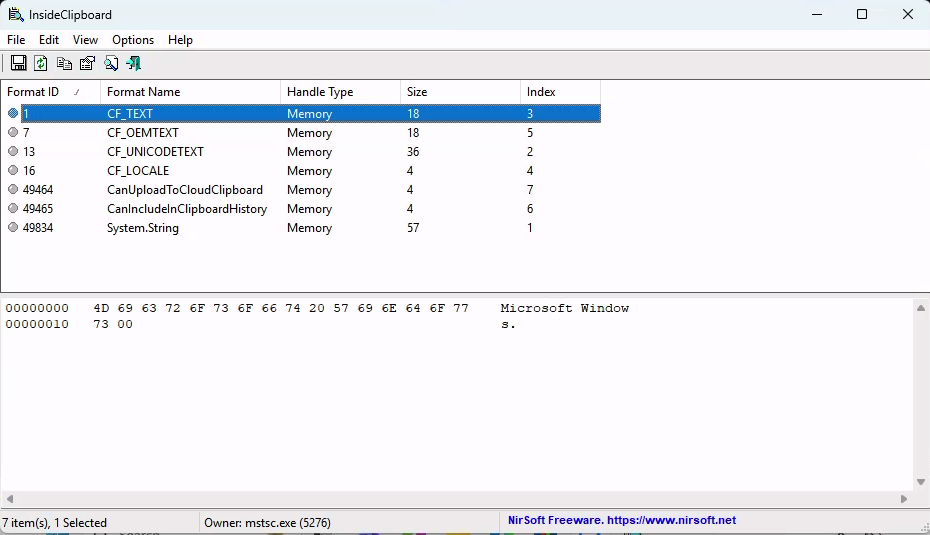
I have the same content in the same three formats, plus two formats added by RDP and two added by Windows. Note that the clipboard owner is mstsc.exe.
If you can reproduce that and let me know what you see, it may be helpful.
Let me know any questions
Kind regards,
Richard Markievicz
Screenshot 2026-01-07 at 14.54.36.png
Screenshot 2026-01-07 at 14.54.08.png
Hi Richard,
Thank you for looking into this. Here is what this test showed on my setup:
- On the PAW, copy some text from RDM's SSH terminal
I copied "xzcmp -> xzdiff" from a OracleLinux 9 session in RMS's SSH terminal
- Refresh Inside Clipboard. What does it show?
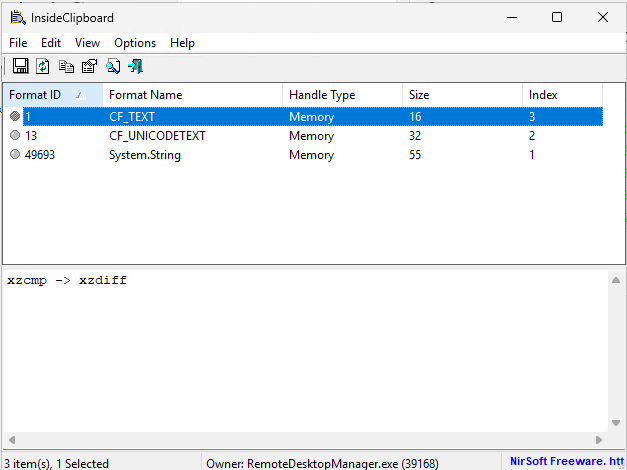
- Go back to your workstation
- Refresh Inside Clipboard. What does it show?
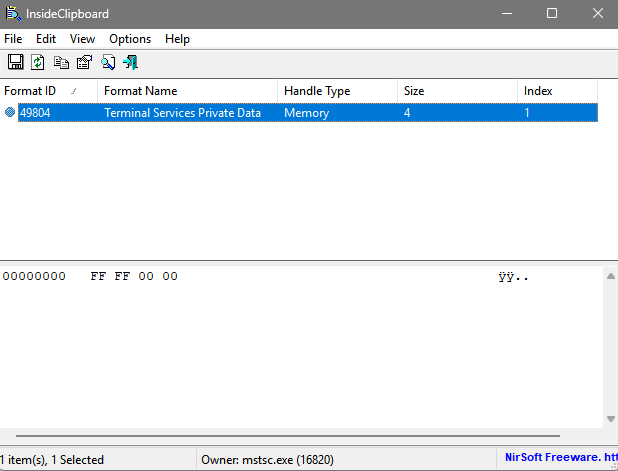
f5fc73a0-2da4-4076-903f-b299b5441012.png
3b1d3a3f-94ac-4c45-9f86-98cfc382de98.png
Hello
Thanks for the information. I confess this is something I haven't seen before.
Is it only the SSH Terminal that's affected? That seems unlikely, if you copy text from somewhere else inside RDM, does it propagate back to your workstation clipboard or it has the same issue?
Thanks and kind regards,
Richard Markievicz
Hi Richard,
Yes, I've only experienced the problem trying to copy from the RDM native SSH terminal. No problems copying from RDP sessions, TeraTerm, or Putty SSH sessions running in RDM.
I'm starting to think it is just a glitch in my particular installation. I'll try installing RDM on some other machine and see if can replicate the problem.
Hello
Ok, that's really strange. How this works is:
- When you copy from the SSH Terminal, it calls the .NET function Clipboard.SetText. This puts the selection on the clipboard as plain text, unicode text and an encoded .NET string format, and makes RemoteDesktopManager the clipboard "owner" (i.e. it was the application to put that data on the clipboard).
- This is all standard Windows / .NET, and we can see it's working properly because you're able to paste into other applications on the PAW
- Since you're in an RDP session; there is a (Windows) helper process running (rdpclip.exe). Its job is to monitor the clipboard for changes, and advertise those to the RDP client.
- What should happen next is, rdpclip sees new data arrive on the clipboard and it sends a message to the RDP client listing the new formats that are available. The client responds with an acknowledgement and puts these new formats in the client clipboard as "promises" (i.e. the formats are available but the data won't be accessed unless you do a "paste"). The clipboard "owner" on the client is mstsc.
- If you then paste on the client, the application you are pasting into decides which of the available formats it wants and requests the data from Windows. Windows sees the clipboard owner is mstsc.exe and asks it to fulfill the data for that format.
- mstsc sends a message to the RDP server saying "now I want the data for this format"
- The RDP server responds with the data, and mstsc hands it back to Windows. Windows returns the data to the application you are pasting into, and the paste is done.
That's how it's supposed to work, and it's the behaviour I see on my side.
In your case, rdpclip is not adding the formats to the client clipboard. Instead it's adding "Terminal Services Private Data". This is not something I've seen or know anything about (and there doesn't seem to be a lot of information out there). It appears to be some kind of internal bookkeeping used by mstsc.
I could envisage scenarios where copying from RemoteDesktopManager as a whole could be broken; maybe if it was running under a different privilege level, although that's pretty tenuous. It's really hard to see how this can fail for only a specific embedded session type.
I did find this issue which seems somewhat similar to what you describe. The user reports that was caused by GlobalProtect VPN, although I find that quite hard to explain.
Another suggestion I have is, if the PAW has a high uptime and you don't normally log out - try logging out and then reconnecting, to force rdpclip to relaunch.
I'm sorry I don't have any other ideas right now.
Thanks and kind regards,
Richard Markievicz
Hi Richard,
Rebooting the PAW had no effect.
However, this PAW is a VM. I cloned that VM, changed the IP and hostname then added that new VM to the domain. Now, I can log into the new PAW as myself (same as the old PAW) and copying from SSH sessions in RDM works perfectly. RDP to both PAWs from my desktop PC, and SSH to the same Linux machine in exactly the same way and copying from SSH sessions still doesn't work right on the old PAW but works perfectly on the clone. Needless to say, I'm deleting the old PAW and using the clone from now on.
I'm sorry to have bothered you with this bizarre exercise, but it was just a weird glitch in that one installation that was inexplicably fixed by cloning the VM that it was running on. Thank you for your efforts and help in expanding my knowledge of your fine product.
Hello
Thanks for following up. I'm sorry I can't provide an explanation from my side, but I'm glad it's working now. The only thing that occurs to me is that since this is a VM, I wonder if it's a local or remote VM, what hypervisor it runs on and what you use to connect to it. Because, if I've seen things trip up rdpclip before, it's often been virtualization software that does its own clipboard management or forwarding on top of what RDP is doing. Generally as soon as you get more than one application forwarding a clipboard remotely, weird things can start to happen.
Anyway - since it's working now it surely doesn't matter, but if you start getting issues again don't hesitate to post back and we'll try to investigate further.
Kind regards,
Richard Markievicz