Navigation panel shifts after failed connection attempt in RDM
Navigation panel shifts after failed connection attempt in RDM

I would like to request assistance regarding a navigation issue in Remote Desktop Manager.
When I connect to a machine that is still booting and does not respond, the session tab closes automatically. After the tab closes, the navigation panel jumps to the last machine I successfully connected to. Each time this happens, I have to scroll back through dozens of entries to retry the connection to the intended machine.
I would like to propose that the navigation panel should not automatically shift position when a connection attempt fails. If the panel moves on its own, it becomes difficult to keep track of the target machine and repeat the connection process.
Thank you!
Recommended Answer
Hi Stefano!
Thanks for the explanation.
Could you please check which option in Settings > User Interface > Tree view > "Auto-Select item on tab focus" is selected: always or never?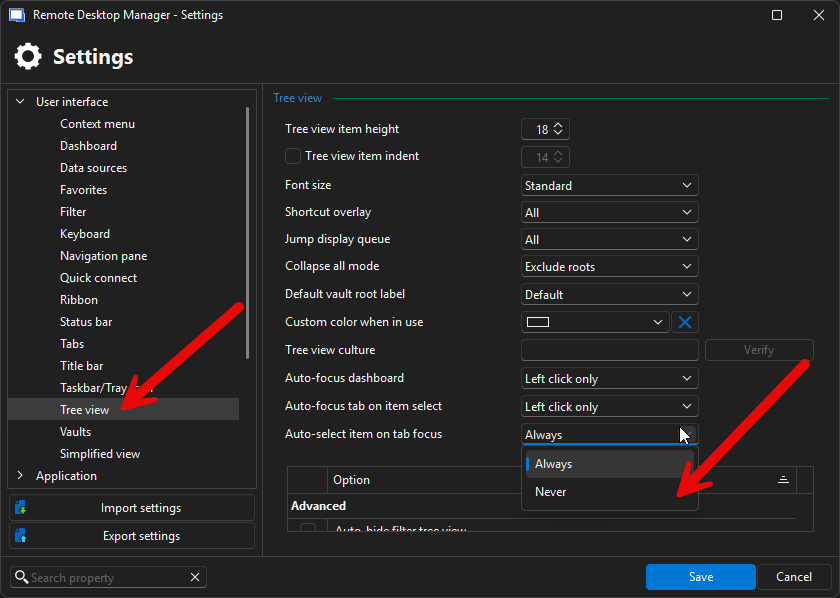
Maybe if you select never, this behavior won't happen.
Best regards,
Alexis
Alexis Geller Peiro
41e62f95-dddb-4da4-ad12-9cb69e9ee424.png
All Comments (4)
Hi Stefano,
Thank you for reporting this behavior. We attempted to reproduce the issue on our side but were not able to do so. To better understand what’s happening, could you please record a short video showing the steps that lead to the navigation panel shifting after a failed connection attempt?
You can upload the video using the following link: FOR-51812
Once we have it, we’ll investigate further.
Thank you in advance for your help!
Best regards,
Alexis
Alexis Geller Peiro
I apologize, but I know how to make a video without obscuring the names of all the hosts. To reproduce the problem:
1) Create a long list of hosts
2) Connect to a host at the bottom of the list, for example “zzzhost”
3) Connect to a host at the top of the list, for example “aaahost”
4) Reboot “aaahost” so that the connection breaks.
5) The only machine connected will now be “zzzhost,” and the navigation panel will be moved down until “zzzhost” is selected.
6) At this point, to reconnect to “aaahost,” you will need to scroll to the top of the list for each attempt until the connection is established.
thanks!
Hi Stefano!
Thanks for the explanation.
Could you please check which option in Settings > User Interface > Tree view > "Auto-Select item on tab focus" is selected: always or never?
Maybe if you select never, this behavior won't happen.
Best regards,
Alexis
Alexis Geller Peiro
41e62f95-dddb-4da4-ad12-9cb69e9ee424.png
Thanks, solved! It was set to always. I didn't know about that option. Out of curiosity, why did you decide to enable it by default? In the case of long host lists, it seems problematic to me. Thanks!