SSH terminal rendering bug (Broken BCE support)

Hi team,
[RDM 2025.3.25 on Windows 11]
I found a rendering issue in the RDM's SSH terminal emulator regarding handling of background colors, specifically during screen scrolling operations in applications like Vim.
When an application in terminal uses a non-default background color (e.g., a blue theme in Vim) and performs a scroll operation (Page Down / Page Up), the newly exposed areas of the screen are filled with the black background instead of the active theme color.
Steps to Reproduce:
- Open an SSH session in RDM (checked with Ubuntu Linux 24.04 and FreeBSD 15)
- Open Vim using
vim -u NONE(without user config loaded, so that it's not "my fault") - Load the blue theme so that background is not black (enter this command including colon):
:colorscheme blue<Enter> - Press "i" for insert mode, then enter some lines of text, such as 1<Enter>, 2<Enter> etc.
- Press Page Down to scroll down.
- Press Page Up to return to the first screen. Observe the issue.
Expected behaviour:
Background is blue in all lines.
Actual behaviour:
Background is black in the part of the screen where text is entered.
Additional info:
The terminal emulator in RDM advertises support for Background Color Erase (BCE) (mandatory in xterm emulation used in RDM), but fails to respect the active background color when new lines are generated during scrolling. The fact that it advertises BCE can be confirmed with infocmp|grep bce during an SSH session.
I can workaround this issue by using Vim's setting :set t_ut= which tells Vim to stop relying on the terminal's clearing/scrolling capabilities and instead repaint background using space characters. This confirms that RDM has the bug. It claims support for BCE (Background Color Erase), but it doesn't correctly implement it for screen refresh/scroll.
Please fix it, because applications other than Vim may be unable to workaround this issue. With Vim I can live with this temporary workaround, but I'd like RDM to work properly.
Thank you in advance!
P.S. To exit Vim, use <Esc> then :q!😉
Screenshot of the issue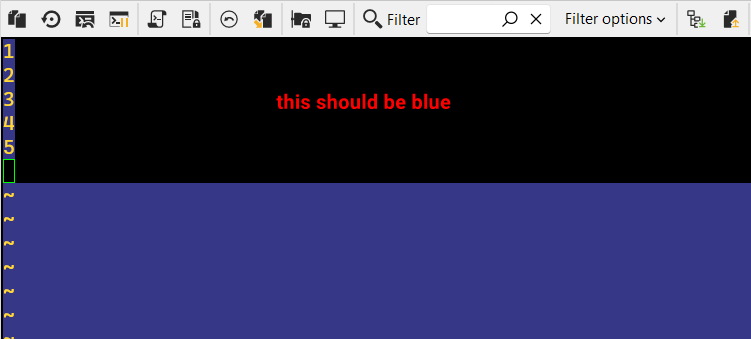
After turning off t_ut option.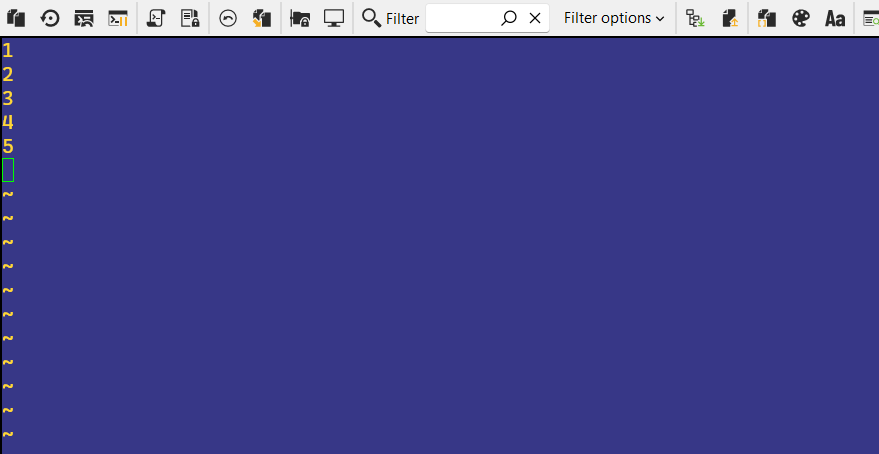
2025-12-03_15-16-16_RemoteDesktopManager.png
2025-12-03_15-16-40_RemoteDesktopManager.png
All Comments (1)
Hi @RDMTinkerer
Thanks for the detailed info! I will investigate this and should be able to fix it. I can't give you an ETA for now, but I think could be done by the beginning of next year.
Regards
Denis Vincent