Full-Screen RDP Session Window Disappears After Minimize

Hello,
I would like to report a reproducible issue with RDP (Microsoft Remote Desktop) sessions in Remote Desktop Manager.
Steps to reproduce:
- Open a Windows RDP session in RDM.
- Go to the Actions tab and enable Full Screen mode.
- Click the Restore Down (window) icon to exit full screen and return the session to the RDM dock.
- Enable Full Screen mode again.
- Minimize the session window.
Result:
The full-screen session window disappears completely. It does not appear in the Windows taskbar and there is no way to bring it back. The only option is to close the session from the RDM interface.
Expected behavior:
The minimized full-screen session should appear in the taskbar and be restorable.
Thank you!
All Comments (9)
Hello,
Thank you for reaching out. We tried to reproduce the issue you described, but we were not able to reproduce it on our side.
Could you please let us know which version of RDM you are currently using? If it is not the latest version, please update and try again to see if the problem persists.
We appreciate your help and look forward to your update.
Best regards,
Alexis
Alexis Geller Peiro
This also happens with the latest version. Could it be related to the fact that full screen mode is set as the default mode on my end? I am using the following version: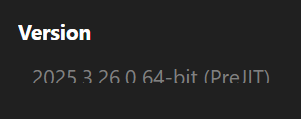
I noticed that when I click on full screen while the problem occurs, the window returns to dock mode and I can continue using the software.
548c502a-890b-4229-a2c6-60a38e117369.png
Hi Stefano,
I hope you’re doing well. Unfortunately, we’re still not able to reproduce the issue on our end. When you have a moment, could you please record a short video showing the problem and send it to us using the following link: FOR-51689
This would help us investigate the situation more effectively.
Thank you in advance,
Alexis
Alexis Geller Peiro
File uploaded! Thanks.
Hi Stefano!
Thank you for reaching out and reporting this issue.
With your video, we managed to reproduce the behavior you described, and we can confirm that it’s an issue that will be forwarded to our development team for further investigation.
We appreciate you bringing this to our attention.
Best regards,
Alexis
Alexis Geller Peiro
thanks!
Hello,
The issues you're encountering are with the MSTSC window of Remote Desktop Connection (a Windows component that takes over when using the Full Screen mode). This window is unfortunately outside our control. That said, we already have a few workarounds implemented to go around the issues you may encounter when using it. For instance, when doing the specific steps your provided and the window disappears while minimizing, you can forcefully bring back the window into RDM.
Simply click the Full Screen button again (while the correct tab is focused) in Actions (or when right clicking the tab of the connection). This will force back the window into RDM, and you can bring it back out to full screen from there if you want.
We are aware this isn't perfect, but as I've explained, we have very little control over this Microsoft component. At the very least this workaround should save you the trouble of closing and re-launching the connection.
Let us know if you encounter other problems.
Regards,
Jafran Majeau
I am sorry that it is not possible to resolve the issue, but I take note of it.
One idea could be to rename the Fullscreen button to Restore or something similar when clicked, so that it is easier for users to figure out how to solve the problem on their own.
Alternatively, you could give the button a “selected” appearance once it has been clicked for the first time, so that it is easy to understand that a second click on the same button will deactivate full-screen mode and thus resolve the display issue.
Thank you for your inquiry, and have a nice day!
Hello,
Those are good suggestions, we will take it under advisement.
Regards,
Jafran Majeau