Workspace deployment with settings

Hi, I'm new to the Workspace app. So far we used RDM for all our users. Now we switched to Workspace for the most of our users, because they don't need the full function set of RDM. I'm wondering now if there is a possibility to preconfigure settings for the Workspace app. As example the language, handling of the landing page, offline settings, usage data, clipboard and so on?
We use DVLS as our data source.
With RDM it was possible to generate custom MSI file and configuration files. But for the Workstation app I can't find any documentation except the URL for DVLS server.
Thanks for every response.
Padi
All Comments (9)
Hi Padi,
Thank you for your message and for switching to Workspace.
We are currently working on a task that will allow preconfiguration of the Workspace app, just as you described. Most of the settings you mentioned will be covered by this, including language, landing page behavior, clipboard usage, and more.
To give you a quick overview, the following options are already expected to be implemented:
- Language
- Reduce to tray on close
- Clipboard
- Use fav icons
- Data source entries sync on data source access
- Use embedded browser
- Locking options
Could you please clarify what you mean by "offline settings"? That will help us better understand your needs and ensure we include everything relevant.
Best regards,
Dany Galarneau
Hi Dany
I tested some things and figured out that the settings are stored in C:\Users\<username>\AppData\Roaming\net.devolutions\Workspace\shared_preferences.json.
So I made initial config for our deployment which I copy to the users profile:
{
    "flutter.configDone":false,
    "flutter.skipLockedView":false,
    "flutter.firstOpened":false,
    "flutter.lockingOptions":"{\"appIsLocked\":false,\"useBiometric\":false,\"usePIN\":false,\"useWindowsCredentials\":false,\"lockWhenPause\":false,\"lockWhenPauseTimestamp\":0,\"selectedPauseTime\":0,\"lockWhenInactive\":false,\"lockWhenInactiveTimestamp\":0,\"selectedInactiveTime\":0,\"skipLocked\":false,\"promptForBiometricOnSensitive\":false}",
    "flutter.androidNotificationsConfigured":true,
    "flutter.quickAccessWindowId":1,
    "flutter.windowMaximized":false,
    "flutter.startupLandingPage":"xxxx",
    "flutter.languageCode":"de",
    "flutter.countryCode":"",
    "flutter.shareAnonymousData":false,
    "flutter.removeSensitiveFromKeyboard":true
}
And also the Config.cfg, with the connection string to DVLS.
So far It works, the only thing which is not optimal is the "flutter.startupLandingPage" there I wanna have our DVLS instanc. Is this some how possible? I figured out that there is an ID set, but every time I install Workspace the ID is defferent for the same DVLS.
With "offline settings" I mean the option to "Go offline" under Setttings> Security and privacy.
Thanks in advance.
Padi
Hi Padi,
Thank you for your follow-up and for sharing your setup.
You're absolutely right that the shared_preferences.json file can be used for initial configuration during deployment. However, regarding the flutter.startupLandingPage setting: this approach won’t work reliably for DVLS data sources. The reason is that each time a DVLS data source is created, it receives a unique internal ID. As a result, the ID will differ across installations, even for the same DVLS instance.
As for the "Go offline" option under Settings > Security and Privacy—this setting won't be supported for preconfiguration. It is set to false by default, and enabling it requires the user to manually open the necessary vaults to sync data for offline usage. Since this process is user-driven and context-specific, it would not be meaningful to automate or enforce it via deployment.
Let us know if you have any further questions or needs regarding the configuration.
Best regards,
Dany Galarneau
Hi Dany
Okey so that means we already have maxed out the configuration for our needings. I think we will deploy it with this settings.
Anyway it would be nice if there would an option to preconfigure the default datasource for the users.
Padi
Hi Padi,
Thanks for your input. I checked with our development team, and unfortunately, the option to preconfigure the default datasource won't be supported within the custom installation settings we're working on.
Please let me know if you have any other questions or suggestions.
Best regards,
Dany Galarneau
Hi,
We will update the landing page setting to "last data source used." With this change, the page should automatically default to your data source directly, which should remove the need to configure the landing page to a specific data source.
Best regards,
Dany Galarneau
Hi Dany
Do you know all configuration possibilitys which I can made in the shared_preferences.json?
At the moment I'm stuggling with the "last data source used" settings. I'm testing on diffrent clients but the behavior is not always the same.
I planed to advice our users at first use of the Workspace, to "initial setup" our DVLS instance, so that they have to click on the dashboard or at the left side to the DVLS icon and after the initial setup it should use this DVLS instanc per default. This would be okey.
But now I found out, sometimes when Workspace opens it will connect to DVLS as you can see in my screenshot below, but nothing happens until you click on the icon on lift side (which should already been choosen). What could be the problem here?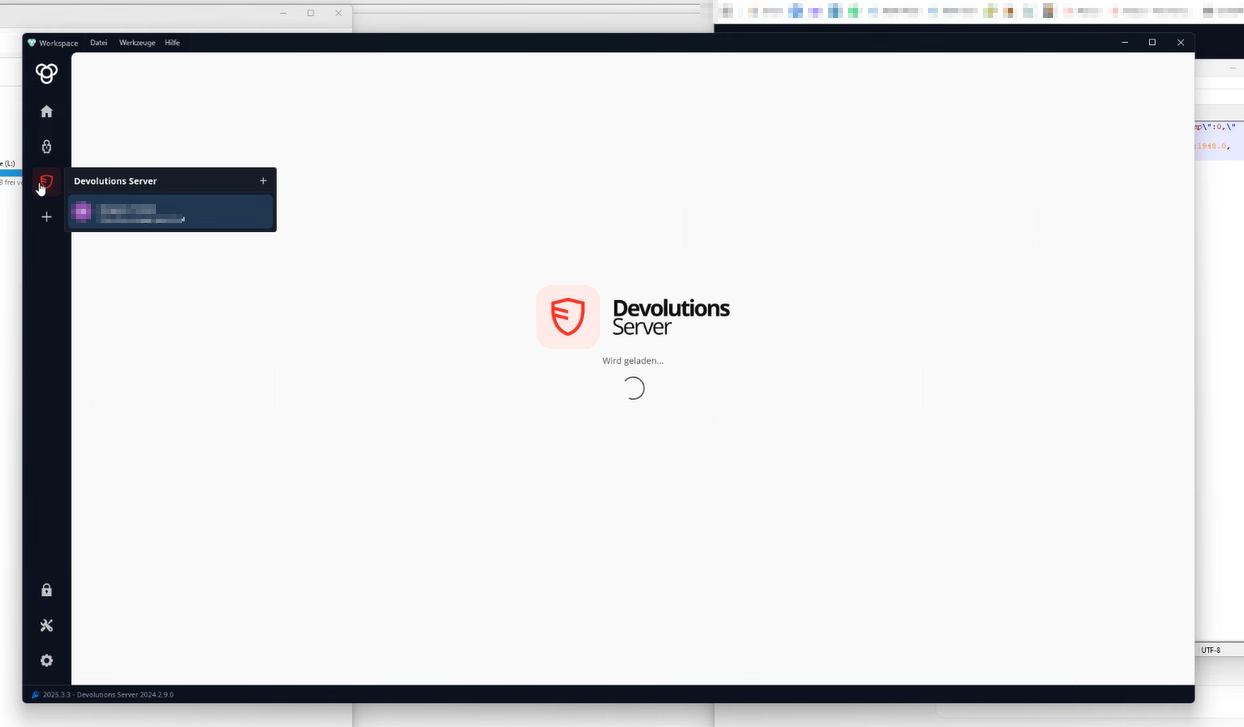
May this could be an problem with the access to the internet, because we saw, the if we open Workspace, the APP will make some connections, for example to Gravatar and so on.
Padi
grafik.png
Hi Padi,
Thank you for your message.
Below is a list of all currently supported configuration options available in the shared_preferences.json file:
Boolean values:
- autoSearch
- hubEmbeddedBrowser
- minimizeOnClose
- removeSensitiveFromKeyboard
- shareAnonymousData
- launchDirectly
- useEntriesAutoSync
- useEntriesSyncSpaceAccess
- openSessionsInWeb
- quickAccess
String values:
- languageCode (e.g., "en", "fr", "de")
- countryCode (e.g., "US", "CA")
- searchDelayTime (possible values: "TwoHundredMs", "FourHundredMs", "SixHundredMs", "EightHundredMs")
- startupLandingPage – in your case, this should be set to "1" to automatically load the last data source used
Integer values:
- themeValue:
- 0 = light
- 1 = dark
- 2 = system default
- treeviewSize:
- 0–2 (size presets for the tree view)
- highlightSpecialCharacters:
- 0 = false
- 1 = true
- resolveEntriesEnabled:
- 0 = false
- 1 = true
- useRichIcons:
- 0 = false
- 1 = true
- clipboardTimer:
- 0 = 30 seconds
- 1 = 1 minute
- 2 = 2 minutes
- 3 = 3 minutes
- 4 = 4 minutes
- 5 = 5 minutes
- 6 = never
Please let us know if you have any question.
Regarding the issue you're encountering with the DVLS instance behavior upon Workspace startup: we'll investigate this further and get back to you as soon as we have more information.
Best regards,
Dany Galarneau
Hi Dani
Wow thanks for the list perfect!
Padi