Unrecognized Guid format when using Open-RDMSession Powershell
Unrecognized Guid format when using Open-RDMSession Powershell

I'm attempting to open an embedded Website site session via an embedded script in a local Powershell session entry: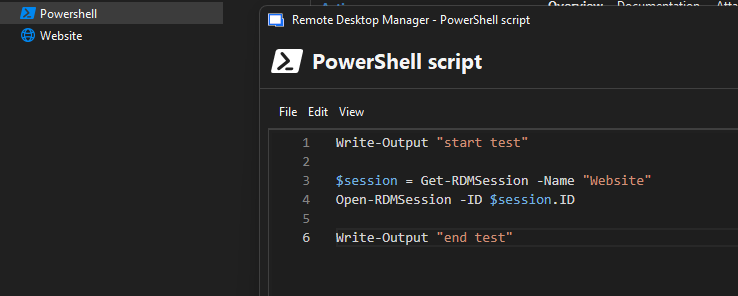
Powershell entry:
- LoadRDMCmdlet is checked
- Run as administrator, Run as mode GSudo
However, the code above results in this exception: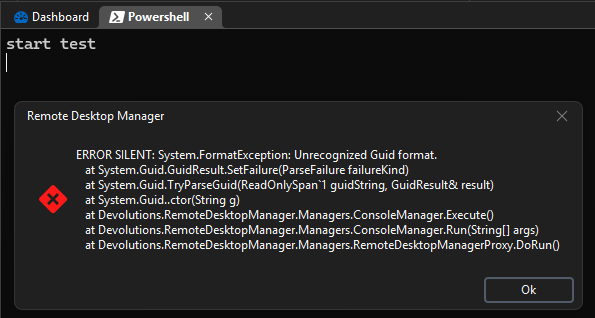
RDM Version 2025.3.23.0 (also didn't work on previous 2025.3.22.0)
Devolutions.PowerShell 2025.3.2
Any support would be greatly appreciated, thank you!
9007d767-bcf2-4340-8731-736598c5c8b1.png
cde3458a-762a-4432-87e6-e4497260c2f1.png
All Comments (11)
Hello,
Thank you for reaching out to us regarding this,
What type of data source are you using?
Additionally, could you provide me with some additional details on what you are looking to achieve with this? Is the end goal to be able to launch only a specific website entry using PowerShell or are you looking to start entries without using the GUI?
Let me know,
Best regards,
Samuel Dery
Hello,
Thank you for reaching out to us regarding this,
What type of data source are you using?
Additionally, could you provide me with some additional details on what you are looking to achieve with this? Is the end goal to be able to launch only a specific website entry using PowerShell or are you looking to start entries without using the GUI?
Let me know,
Best regards,
@Samuel Dery
Data Source is SQLite.
End-goal is to have the user execute a local Powershell session that generates a unique URL, and then have that unique URL opened up in an embedded website session.
I'm trying to get Open-RDMSession to work in general, so I'm just testing using a website entry that is statically set to https://google.com, before I attempt to use Set-RDMSession to update the WebBrowserUrl and then open the session.
Thank you for the reply!
Hello,
Thank you for your reply,
Does the following work for you?
Write-Output "start test"
# Exact name match
$entry = Get-RDMSession -LiteralName "Website"

# Get a real GUID
$guid = [guid]($entry.ID.ToString().Trim('{}() []"''').Trim())

# Launch
Open-RDMSession -Embedded -ID  $guid -Silent

Write-Output "End Test"
Let me know
Best regards,
Samuel Dery
Hello,
Thank you for your reply,
Does the following work for you?
Write-Output "start test"
# Exact name match
$entry = Get-RDMSession -LiteralName "Website"
# Get a real GUID
$guid = [guid]($entry.ID.ToString().Trim('{}() []"''').Trim())
# Launch
Open-RDMSession -Embedded -ID $guid -Silent
Write-Output "End Test"
Let me know
Best regards,
@Samuel Dery
That code outputs: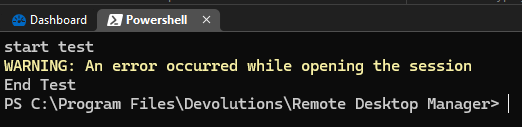
No exceptions generated in the Application logs.
It looks like this all boils down to passing the correct Guid format. I figured this code would have worked since you're trimming everything and then passing it to Open-RDMSession as a proper guid object.
Thank you for the assistance so far!
61806631-8fea-468c-9c23-d5327f6b42d3.png
Hello,
Thank you for your reply,
Indeed, I will investigate this further and keep you updated.
Best regards,
Samuel Dery
Hi @Samuel Dery,
Just following up to see if there is any update. I updated to RDM 2025.3.27.0 and still no luck. Thanks!
Hello,
Thank you for your reply,
I have a case open with our development team regarding this,
I'm afraid I do not have any news at this time, but I will keep you updated.
Best regards,
Samuel Dery
Hello,
Thank you for your reply,
I have a case open with our development team regarding this,
I'm afraid I do not have any news at this time, but I will keep you updated.
Best regards,
@Samuel Dery
Sounds good, thank you for looking into this!
Hello,
Thank you for your reply,
No problem, feel free to reach out if you have any additional questions regarding this,
Best regards,
Samuel Dery
Hi @Samuel Dery,
Just kindly checking back in to see if there is any update on resolving the unrecognized guid format exception. Thanks!
Hello,
Thank you for your reply,
No problem, our internal case is still in development. I'm afraid I do not have an ETA at this time, I have reached out to our development team to see if they have any updates, I will keep you updated regarding this,
Best regards,
Samuel Dery