Navigation pain auto closing

I have the left navigation pane not pinned for more realty.
when I click navigation button down left to open the pane:
it opens fine, But I have multiple servers in within multiple folders in a tree structure.
If I click the chevron to expand the folder. navigation panel hides again. open it again and the folder I expended is now expanded but if i do another expansion using another chevron within or another one at same level it auto hides again.
Its as if every expansion of a tree item thinks its opening a session or losing focus so it auto hides.
However, it does not happen on collapsing a chevron folder.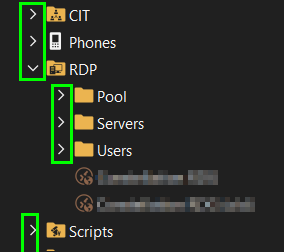
76681abe-dde5-41ec-b6f6-85a2705a9a96.png
a07a031a-eccc-46d0-9cc5-b197908cfc8d.png
All Comments (9)
Hello,
Thank you for contacting us on that matter.
Could you please provide us with the RDM version and the data source you are currently using?
Thank you for your collaboration.
Best regards,
Alexis Geller Peiro
Alexis Geller Peiro
Hello,
Thank you for contacting us on that matter.
Could you please provide us with the RDM version and the data source you are currently using?
Thank you for your collaboration.
Best regards,
Alexis Geller Peiro
@Alexis Geller Peiro
Looks like 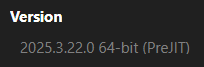
Still not sure what (PreJIT) is and how I got that version. Nor how to revert back.
local data source
94c972df-57ab-4eb1-bb9d-09282b773a74.png
Hi Patrick,
We were able to reproduce the behavior you described, and we will report it to our development team for further investigation.
Thank you for bringing this to our attention.
We will keep you updated as soon as we have more information.
Please don't hesitate to ask us any other questions.
Best regards,
Alexis
Alexis Geller Peiro
Hi Patrick,
The development team has informed us that the issue should be fixed with version 2025.3.23.0.
Could you please update your RDM and let us know if the problem persists?
Please don't hesitate to ask us any other questions.
Thanks in advance.
Best regards,
Alexis
Alexis Geller Peiro
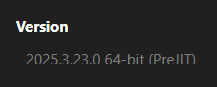
I am assuming this is the fix in release notes:
Fixed lost focus on navigation pane when navigating with keyboard
I am not navigating by keyboard, I am using mouse and the first few time opening and closing treed sections in nav pane worked fine. I connected to one server. waited for it to fully connect. The the issue started to come back.
Now it has cleared up again. I will monitor over the next couple days to confirm whether its intermittent or gone.
9eac6e62-7c9b-47c2-b862-41022145b78d.png
Hello Patrick,
we've managed to reproduce the issue and a ticket has been sent to the Engineering Team.
Best regards,
Antoine Mauger
I have the same issue, updated today to version 2025.3.25. It is still there, I found a workaround: if you just click once on one of the sessions in your list (not the folders) you are able to open and close the folders without the navi-pane getting closed.
Hello,
Thank you for being so patient!
I'm pleased to inform you that a new version of RDM (2025.3.26.0) has been released, featuring the fix for your issue.
Latest Version: Download RDM
Please let us know if this works or if you encounter any issues.
Best regards,
Maxim Robert
Hello,
Thank you for being so patient!
I'm pleased to inform you that a new version of RDM (2025.3.26.0) has been released, featuring the fix for your issue.
Latest Version: Download RDM
Please let us know if this works or if you encounter any issues.
Best regards,
@Maxim Robert
thanks I can confirm fixed