PowerShell GSudo integration with "My Privileged Account"

Hello!
I am trying to create a good workflow for staff now that I am trying to roll out Devolutions PAM.
Often myself or other need to open an elevated PowerShell terminal localy.
I have found a way to do so easily using the PowerShell Terminal (Remote) entry; however, this does not support window handles so starting processes using this method will not open a window in the current user context.
I have been having much trouble with PowerShell Terminal (Local). After some forum browsing it appears there is no clean way to open a PowerShell Terminal as another account (My Privilege Account pointed to Devolutions PAM account) and elevated at the same time using the default tools. (If this is incorrect PLEASE let me know!)
I can get this functionality to work using GSudo though! The "problem" comes in now that users have to check out the PAM account to launch it, then change windows to copy the password to authenticate with GSudo.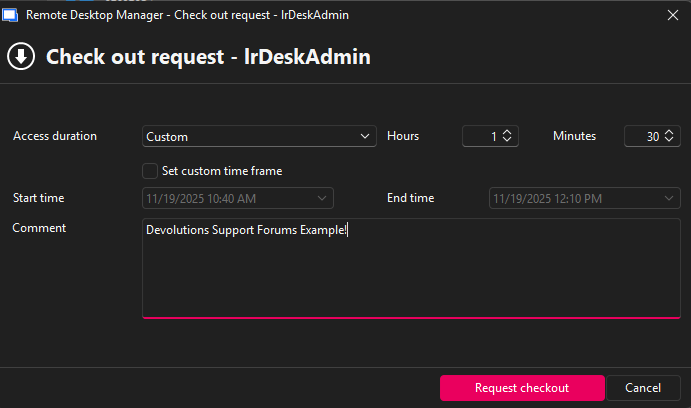
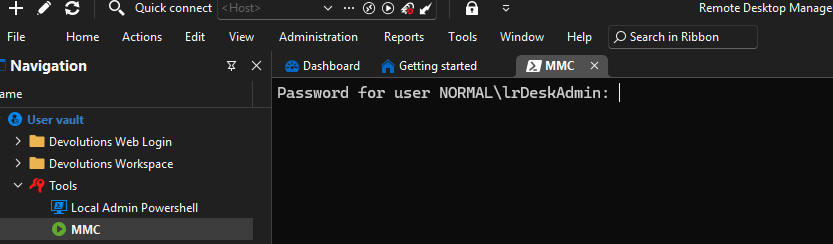
When I launch the terminal I get the checkout request for lrDeskAdmin but then am prompted for the password in the session!
If I put the password in the session launches as expected after the UAC prompt:
Entry Credentials are set to "My privilege account"
Run as is set to GSudo -> "My privilege account"
Connection -> Alternate is set to "My privilege account"
Management Tools -> Tools is set to "My privilege account"
All this in the end because I need to be able to run MMC.exe as lrDeskAdmin and have other PS functionality.
I am hopeful I just am over complicating things here, please let me know if anyone has a solution here!
Kind regards,
Laura Reeder
533544f6-86ea-44cc-9d7f-fac9a7f73860.png
b5974d44-fba9-413d-aad7-a305a7d131a3.png
f4837412-02b4-49c9-b33b-657ed4037840.png
All Comments (5)
Hello Laura,
We have an improvement coming in our next minor version, 2025.3.23.0, that should improve this flow somewhat. You shouldn't be prompted to re-enter the password, it will have been passed already. We are hoping to release this minor update later today or early next week, it's currently going through QA testing.
Once this version is available, I would appreciate if you can give us some feedback if the flow is still difficult to use.
Regards,
Hubert Mireault
Hello Laura,
We have an improvement coming in our next minor version, 2025.3.23.0, that should improve this flow somewhat. You shouldn't be prompted to re-enter the password, it will have been passed already. We are hoping to release this minor update later today or early next week, it's currently going through QA testing.
Once this version is available, I would appreciate if you can give us some feedback if the flow is still difficult to use.
Regards,
@Hubert Mireault
I am now on 2025.3.25.0 64-bit and the GSUdo works if I change the privilege account username format to SAM account name.
This does break other login formats though. I use User Principal Name as the login for websites as it is formatted with the @domain at the end allowing me to autofill SSO prompts.
Is there a way to redirect the login name per entry while using the "My Privileged Account" credentials? I didn't see this in website or Powershell (Local) but there is a good chance I missed something. Any guidance would be appriciated!
Hello,
Yes, this should be possible to achieve. In your entry (whether it's Website or Powershell (local)), you can go in the Advanced section and change the "username format":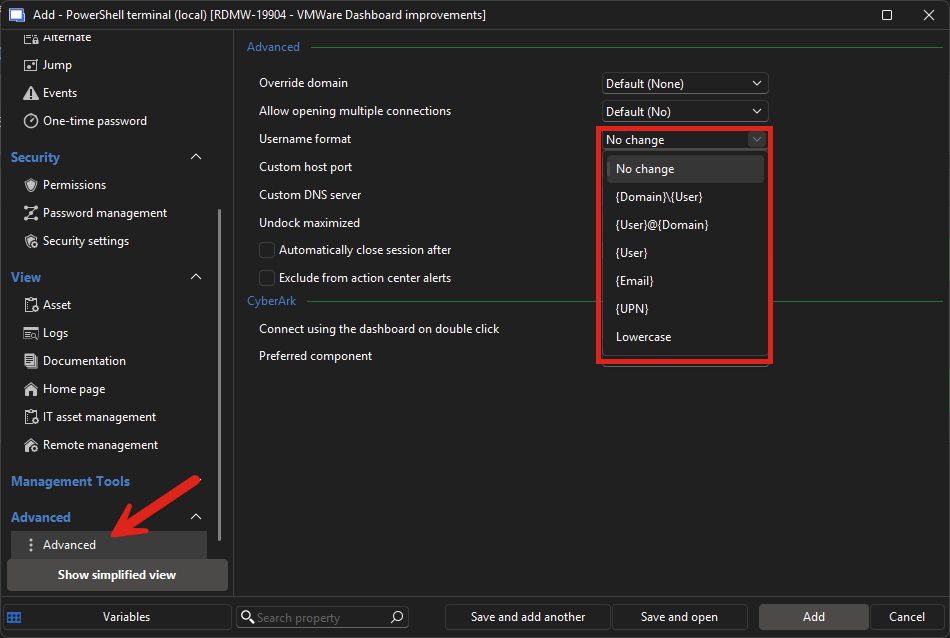
In your My Privileged Account, if the username/domain/password fields are filled out, RDM will then be able to use it in the specific format you configure on the entries.
Let me know if this works for you, as maybe in certain scenarios it may not be working perfectly. I will admit I didn't test it with Powershell (local) entries, but the code for it is generic and should apply no matter the type of entry where the setting is available.
Regards,
Hubert Mireault
6f39567b-2fad-4134-b29b-b6be0b51dfe0.png
Hello,
Yes, this should be possible to achieve. In your entry (whether it's Website or Powershell (local)), you can go in the Advanced section and change the "username format":
In your My Privileged Account, if the username/domain/password fields are filled out, RDM will then be able to use it in the specific format you configure on the entries.
Let me know if this works for you, as maybe in certain scenarios it may not be working perfectly. I will admit I didn't test it with Powershell (local) entries, but the code for it is generic and should apply no matter the type of entry where the setting is available.
Regards,
@Hubert Mireault
I had been setting it only in the PAM account entry, I didn't see these ones! Thank you so much, this works perfectly as intended!
That's great, I'm glad to hear this works! I'll mark this thread as resolved, but don't hesitate to ask if you need anything else.
Regards,
Hubert Mireault
