Credential importer for TeamPasswordManager csv needed
Credential importer for TeamPasswordManager csv needed
1 vote

Hi Team, we are currently in the migration phase from teampasswordmanager to RDM and want to import csv credential files. The RDM generic importer doesnt work for us. We need a new credential importer like "TeamPasswordManager (.csv)". A description of the format you can find here.
https://teampasswordmanager.com/docs/export/
All Comments (9)
Hello,
Thank you for reaching out to us regarding this,
Could you provide us with some additional details on the issue you encountered with the generic CSV importer?
You may need to adjust your CSV for it to work, we have the following knowledge base article regarding this
https://docs.devolutions.net/rdm/commands/file/import/generic-csv-wizard/strategies-file-format/
Best regards,
Samuel Dery
The RDM generic importer provides a lot of fields of our csv that can be matched. But there are missing filed like email / Access information / Custom fields / Expiry date (mm-dd-yyyy) that cannot be matched. In different existing RDM credential templates those infos are presented. In this situation we would need a credential importer like "TeamPasswordManager (.csv)" that converts all fields into one credential template.
Hello Frank,
Thank you for your reply,
Could you provide me with a sample of your .CSV file without any sensitive information?
With this, I will be able to perform some tests regarding the import.
Let me know,
Best regards,
Samuel Dery
thanks a lot for the offer - attached a sample in an ideal environment. I can also provide samples where e.g. "notes" has empty lines and line breaks in between. Let me know and i will prepare
1-Testprojekt with Info in all fields.csv
Hello Frank,
I have modified your CSV File. For the import, I used the Website entry type, since, from my understanding, it has all the fields you are looking for.
When performing the import, you will need to use the "Generate Direct Mapping" option and configure the Custom Fields with their matching columns like so: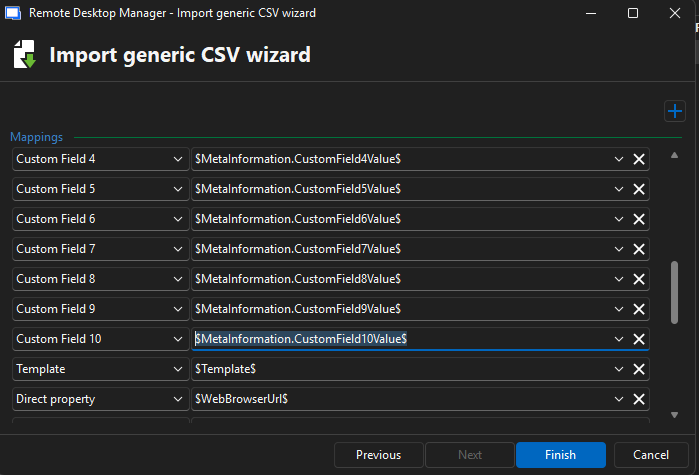
Let me know if this helps,
Best regards,
Samuel Dery
17ba88f8-1d9b-44d2-a826-b557795b72c0.png
1-Testprojekt with Info in all fields.csv
Hello Samuel,
i was not able to reproduce the path you mentioned. As we have 1000+ files to import we might need an importer that can handle muliple files in a manageable timeframe. We might have a short call to discuss.
Best regards
Frank
Hello,
Thank you for your reply,
No problem, we could have a remote session to discuss this, I will need to open a case for this,
Is the email used for your Forum account the correct one to use?
If not, you can send an email to service@devolutions.net to create the case. Make sure to mention this forum in your message so that there is no confusion.
Best regards,
Samuel Dery
Hi Samuel,
yes, the account-email is correct.
thanks
Frank
Hello,
Thank you for your reply,
I have created the case and sent you a scheduling link.
Best regards,
Samuel Dery