RDM connected via pre-authentication proxy is unable to access PAM credential password or launch entries linked to PAM credentials
RDM connected via pre-authentication proxy is unable to access PAM credential password or launch entries linked to PAM credentials

Hello,
Using RDM 2025.3.22 to connect to a DVLS 2025.2.10 data source via Azure app proxy. The vaults are accessible and entries are shown, however when attempting to launch an RDP connection with a credential set to a privileged account, it fails with an error about insufficient rights, however the same entry can be launched by the same user when connected directly to DVLS (i.e. when Azure App Proxy is not used).
If I navigate to a PAM vault. I can check out/in a credential, but there is no option to view/copy password.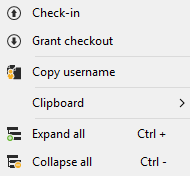

If I create an entry in the user vault of type 'Devolutions Server privileged account' and link it to a PAM credential, the actions to copy/view password become visible, but when attempting to do so, RDM prompts for a My Account Settings username to access the PAM account, into which I enter the same username used for the initial DVLS authentication, and leave the default option of saving to database.
After clicking save, RDM disconnects from the data source with error: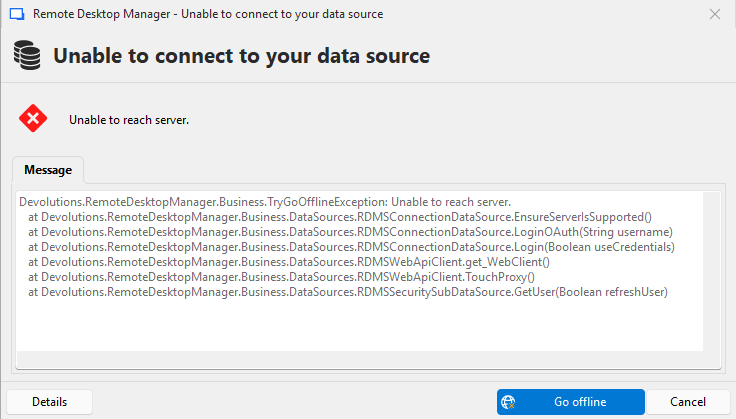
If I then go offline, and back online, then switch to the Shared vault, RDM seems to freeze for a minute, then when it becomes responsive again various things happen like:
1) shows connected but doesn't return results when searching for entries
2) shows connected but the navigation pane is empty except for the root object
If I close RDM and relaunch it, reauthenticate to the data source, it shows as not connected in the navigation pane. The only way I found to recover from this state is to remove the data source and re-add it. After re-adding and repeating the process it always prompts for the My Settings username for DVLS PAM, even though it should have been stored in the database during the prior attempt.
I tried to reproduce the behavior with the 2025.2.30 portable version of RDM to rule out the version mismatch as being the cause, but that version doesn't display any PAM accounts at all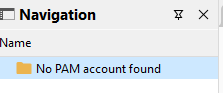
Unable to upgrade DVLS to 2025.3.x because of a separate issue related to domain attribute not being returned for PAM domain user type entries. (Domain attribute of PAM accounts not retrieved after updating to 2025.3.7)
Not sure where to go from here? Is PAM functionality supported when using RDM via Azure App Proxy?
Please let me know if you would like additional info.
Thanks
Joe
2961357f-6179-4b7b-894d-e62e4787471d.png
c594fcac-8e0c-4a31-9378-41f1a41c6554.png
a4456aa9-64cc-4aec-824e-921778e330e6.png
a31d94d7-3a0c-46c3-a14a-cde265d28465.png
1d424a68-1da1-45d5-b4aa-b1d4846963a6.png
3dc2ed0d-bcb7-4d03-85a4-d54b62342a1e.png
0b3a915c-9e59-4095-8cfa-cd15ab59aaa8.png
All Comments (1)
Hello Joe,
Thank you for reaching out to the Devolutions support team.
I'm still trying to reproduce this issue and will do more tests this afternoon.
Everything I have tested so far is working correctly.
Additionally, we can verify this during our session.
Best regards,
Patrick Ouimet