This user account's password has expired yet mstsc connects

Hi Devolutions Team,
I am having a problem RDPing to a site, all the servers on the site disconnect with the message "This user account's password has expired" - yet using Windows' builtin mstsc client it connects just fine with the very same credentials. I went so far as to change my credentials yet the message remains the same.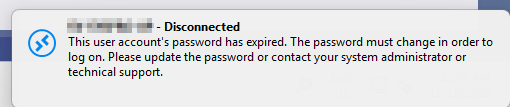
How can I provide session logs like is noted here for mac?
dcfae3ed-0283-4d48-b2de-56334cdc3c71.png
Recommended Answer
Thanks Stephan, I managed to resolve this and it was a stupid mistake on my part.
When I created a new RDP entry using the blank profile then it connected. So I went about comparing the two connections and initially I couldn't figure it out.. until I realised my mistake. I recently tidied up the folder structure where most of my folders have credentials linked to them and the RDP entries under each are set to Inherited. The new connection however was entered credentials. When I look at the credential entry the username, password, and domain, all looked correct. So I looked at the folder and saw somehow I had linked to an incorrect set of details. Changing this resolved the problem.
Like I said, stupid mistake on my part. I apologise for wasting your time with this.
All Comments (2)
Hello,
Thank you for reaching out to us.
To help us investigate this issue, could you please let us know which version of Remote Desktop Manager you are currently using, as well as the type of data source? If you are using Devolutions Server, please also include its version.
For RDP connection issues on Windows, we provide a troubleshooting guide that also explains how to collect and send logs:
https://docs.devolutions.net/rdm/kb/troubleshooting-articles/rdp-session-troubleshooting/
Additionally, could you try creating a new RDP entry using the default settings as much as possible? This can help determine whether a custom setting may be causing the problem.
Thank you, and we’ll be happy to assist further once we have this information.
Stephan
Thanks Stephan, I managed to resolve this and it was a stupid mistake on my part.
When I created a new RDP entry using the blank profile then it connected. So I went about comparing the two connections and initially I couldn't figure it out.. until I realised my mistake. I recently tidied up the folder structure where most of my folders have credentials linked to them and the RDP entries under each are set to Inherited. The new connection however was entered credentials. When I look at the credential entry the username, password, and domain, all looked correct. So I looked at the folder and saw somehow I had linked to an incorrect set of details. Changing this resolved the problem.
Like I said, stupid mistake on my part. I apologise for wasting your time with this.