Save SSH session output directly to a text file

Dear Remote Desktop Manager Windows,
I need the function to save the SSH session output to a text file.
I'm doing this in one of the ways right now:
1) I press the "Copy all to clipboard" button, I manually create a new text file, manually copy it there and manually create it. It's inconvenient.
2) I'm using a logging mechanism,but it's also not exactly what I need.
Is there a way to save data from an SSH session output directly to a text file?
Best regards,
Mark
All Comments (8)
Hello Mark,
The logging feature sounds like what you need. Did you make sure to configure it in the "printable output" mode?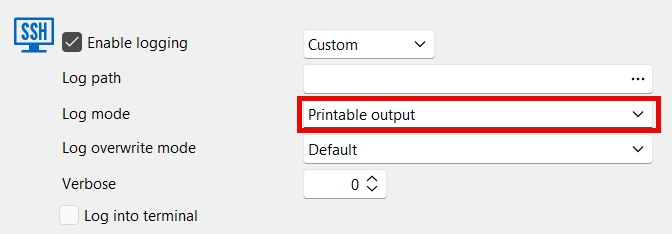
If yes and this is still not what you need, could you let us know what's missing and what else you would need for this feature to work for your scenario?
Regards,
Hubert Mireault
fb7922f6-c05a-4459-b36d-5da54de90809.png
Dear Hubert,
Thank you, this feature is very convenient, but not exactly what we need.
I'll explain our task: we have several dozen devices that periodically (once every few weeks) need to be logged in via SSH and save the output of several commands from them. Now we go to all the gateways sequentially, save output from each device to clipboard and manually paste it into a text file. For each device, we create its own new .txt file, which contains only the output of the required commands.
Constant logging is not necessary in our scenario, and manually enabling logging only once for each device is also not very convenient.
For our purposes, it would be convenient to have a button or menu item like "Save output to text file".
If there's a way to implement this functionality in future versions, we'd be very grateful. Thank you!
Best regards,
Mark
Hello Mark,
I discussed with our terminal expert and there's two ways I could see us improving the behavior to allow this more easily. Unfortunately, neither of these ways are "built-in" to the SSH protocol so it's not something you can already do with the application. I also think the first solution isn't much more convenient than what's already available, but I'd like your opinion on these ideas.
1. We could add a button in the SSH toolbar to run a command and send the result to a local file. On our end, this is easy to do since we have a way to send a command and get back its result. The down sides of this solution is you would have to configure where to save this local file (similar to the log configuration), and you could only do this one command at a time. I think that overall, that would make it less convenient than the existing solution with the log settings.
2. We could allow configuring the logs in the entry settings but keeping the "Enable logging" setting unchecked. This means you could configure log informations in your entries so that when you want to enable the manual logging, some of the information would already be filled in. This would still need you to configure certain information, and it would be stored in the entry which may not be what you want.
Those are the two solutions I can see, let me know what you think and if they would be useful to you. If you have any additional ideas, please let me know, as I may have forgotten a simpler solution or a more efficient way to work.
Regards,
Hubert Mireault
Dear Hubert,
Of the two suggested solution options, we like the second one better, thank you.
If you may implement save logging settings (log path type, log path, log mode, log override mode) for each SSH entity separately and then enable/disable logging with press one button, it will be quite convenient for us.
An alternative option, in our humble opinion, would be to add another item to the menu in the screenshot "Copу all to file".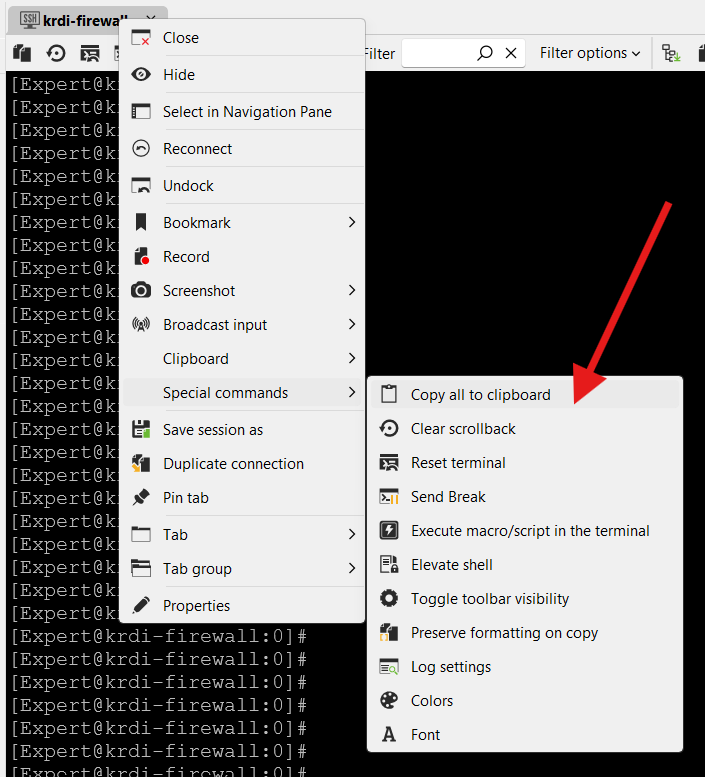
Best regards,
Mark
Screenshot 2025-11-18 143450.png
I think your suggestion of adding a new button "Copy all to file" would be really simple for us to add, so if it would work for you, that's perfect. I will open a ticket for this and see if we can squeeze this in-between two larger features.
Regards,
Hubert Mireault
Hello,
I wanted to let you know this new button "copy all to file" will be available starting with our next minor update, 2025.3.26.0. Let us know if you encounter any issue with the feature once this is available.
Regards,
Hubert Mireault
Hello,
Thank you for being so patient!
I'm pleased to inform you that a new version of RDM (2025.3.26.0) has been released, with the feature included.
Latest Version: Download RDM
Please let us know if this works or if you encounter any issues.
Best regards,
Maxim Robert
Dear Hubert and Maxim,
I have tested the latest version and confirm that the use RDM has become much more convenient and my wish has been fulfilled very quickly and efficiently.
Thank you.
My extension request can be closed.
Best regards,
Mark