Filter field in Navigation pane auto-clears

I've had this problem for a number of releases now. I just updated to 2025.3.21.0 this morning and confirmed it's still present.
Not a high impact thing, but very annoying.
When filter setting "Filter options > Apply filter on enter" is OFF/FALSE, the filter dynamically searches as I type into the filter field.
In that mode, initially I'm able to type and the filter starts filtering, but after 1-2 seconds the filter field clears itself, undoing the search. Typically I'm typing six or seven characters, I get three or four charcters entered and the filter clears, disrupting my search.
Once I get past that initial 'auto-clear', I can enter the filter string again fully and it doesn't clear, so all works.
This seems to last for a short period of time... then later, on trying filter again, again the filter field is cleared the first time.
Would love to see this corrected as it bugs me daily!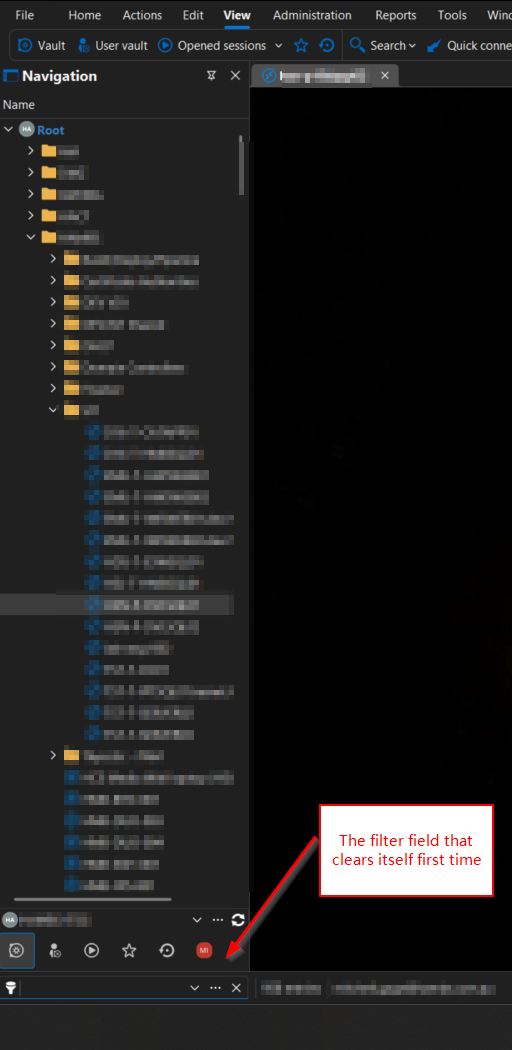
2025-11-13 08_16_34-.jpg
All Comments (6)
Hello,
Thank you for your post.
I am currently trying to reproduce this issue and have already deactivated "Apply filter on enter," but I am not experiencing the same problem so far.
Could you please share which data source you are using?
Are you running RDM locally or on a terminal server?
Thanks for your help,
Stephan
Data source type is 'Devolutions Hub Business'
RDM is being run locally on my laptop.
Some other info dumped from RDM "My data source information"
Database v1.0
Is DB owner ■
Is System DBA ■
Offline mode Read-only 392.0 KB
Group policy settings Read/Write
System settings Read-only
User settings Read-only
Data source configuration Read-only
Vault Allow offline
General
Is administrator □
Is the vault owner □
Allow offline mode ■
Allow drag and drop ■
Backup Configured □
Caching mode File
Has master key □
Is auto-refresh ■
Is Multi-factor configuration □
User vault Default
Version 2025.3.21.0 64-bit
Remote Desktop 10.0.26100.1
.NET version .NET 9.0.10
Hello,
To help us determine whether the problem is related to Remote Desktop Manager itself or something specific to your environment (such as configuration or hub-related behavior), please try using the portable version of RDM 2025.3.21 and see if the same issue occurs.
You can find instructions on how to download and run the portable edition here:
https://docs.devolutions.net/rdm/kb/how-to-articles/portable-rdm-installation/
If the problem does not occur in the portable version, that will confirm that RDM is working correctly and that the issue is likely tied to a configuration or an environment-specific factor.
Please let us know your results, it will help us move forward with the investigation.
Best regards,
Alexis
Alexis Geller Peiro
Thanks for the reply Alexis.
Using the portable version is much better - the issue I reported doesn't occur, and the filter speed seems much faster overall too.
The issue has occurred again for me - now in the portable version.
I think I understand the issue better now, with reproduce workflow as follows:
- Set Filter Options >> Focus Main Vault when filtering to TRUE
- When in any vault other than Main Vault, start typing filter string
- Typing triggers RDM to now switch to Main Vault (because of the setting in step1)
- The switch to main takes a couple of seconds (for us anyway), and after Main Vault is activated, the filter string is cleared
- Typically this is after 4-5 characters have already been typed by the operator
Hi Mitchell,
Could you check under File > Settings > Filter whether the clear filter on vault change option is enabled? If it is, please try disabling it and see if the issue still occurs afterward.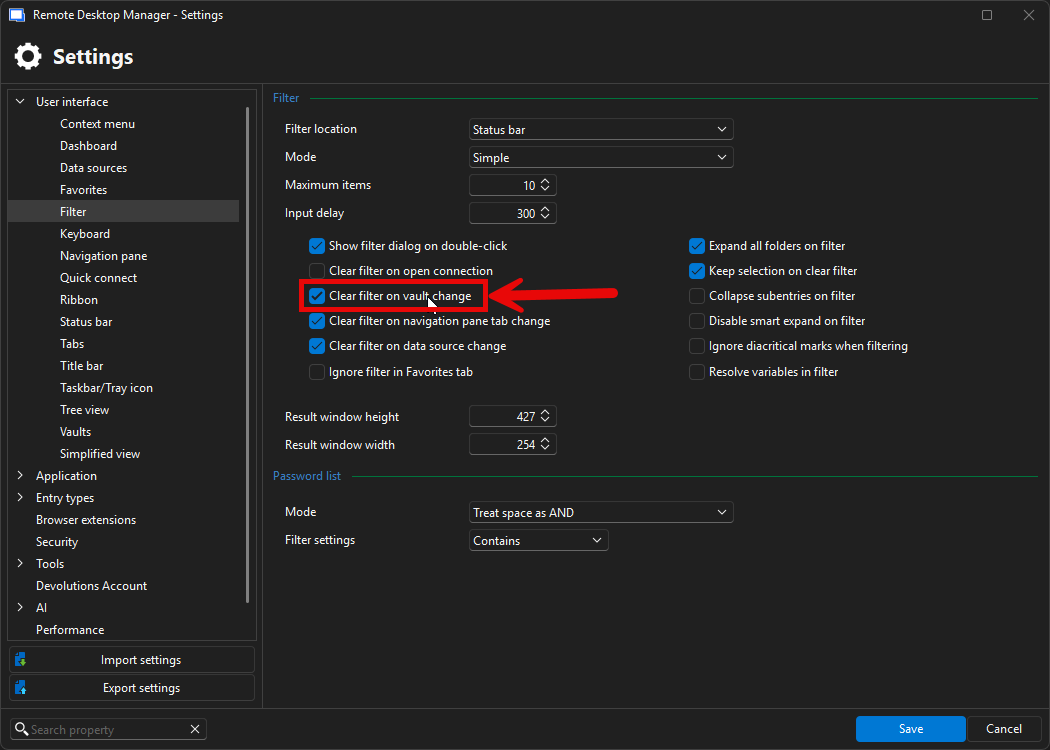
Please let us know your results, it will help us move forward with the investigation.
Best regards,
Alexis
Alexis Geller Peiro
b6fbb6c3-e131-4d64-9739-109be5bd4803.png