RDP - account is not authorized for remote login

Hello!
After updating to version 2025.3.21.0, the "quick connect" connection stopped working on a template that had been used without any problems for long time.
Using QC I'm getting following error:
"The connection was denied because the user account is not authorized for remote login"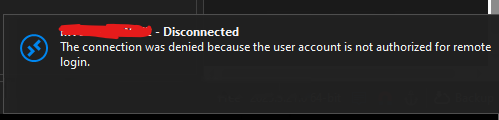
I will add that I use CyberArk PSM, so the template in the server address has psm.contoso.com and in the alternate shell:
"psm /u user@contoso.com /a $QUICK_CONNECT$ /c RDP-FullScr"
Reinstalling RDM to the older version 2025.1.34 immediately resolved the issue without any additional steps. Interestingly, on the new version, if I save the connection using the same template, I can connect to the target server correctly - only QC has this problem...
PS. Yes, I tested option "Public mode" in Advanced tab - noting changed.
862c5588-9f99-428a-92dd-06585f579f06.png
All Comments (4)
Nothing? Problem is still occurring one the new version 2025.3.22.0 (November 13, 2025). I would be glad to provide more info if needed...
Hello arystoteles15,
Thank you for reaching out to the Devolutions support team.
This issue has been reproduced, and an internal ticket has been opened.
As a workaround, you can still use the RDP entry for your alternate shell or connect with the PVWA entry with the PSM connection.
Best regards,
Patrick Ouimet
@Patrick Ouimet, thank you and team for getting onto this issue! I will wait patiently for the new version then.
Hello,
The new version of RDM is now available, could you update your RDM to the latest version and see if your issue still occurs?
Please note that a database upgrade may be required depending on the version of RDM that you are currently using.
For more information on that matter, please consult this link:
https://docs.devolutions.net/rdm/windows/installation/database-upgrade/
Best regards,
Patrick Ouimet