Execute Command From Pallete
1 vote

Please enhance Execute Command From Palette with the following:
- I use this feature often and need to click on the button to bring up the search bar, it would be helpful to have the search bar always appear ( as an option as others may not like the space it takes up ), this would be similar to the text search bar but for executing commands.
- Add all types of scripts to this function, example: Autohotkey scripts, PowerShell scripts, any script that RDM supports.
- Add this Windows servers to support powershell, .bat, .cmd, etc
- Essentially, any script that RDM supports
Thank you for the consideration...J
All Comments (4)
Hello,
There's a few things that may help you that already exist in the application.
First, there is a customizable keyboard shortcut for the command palette. By default, it's Ctrl-Shift-P but it can be changed in File > Settings > User interface > Keyboard: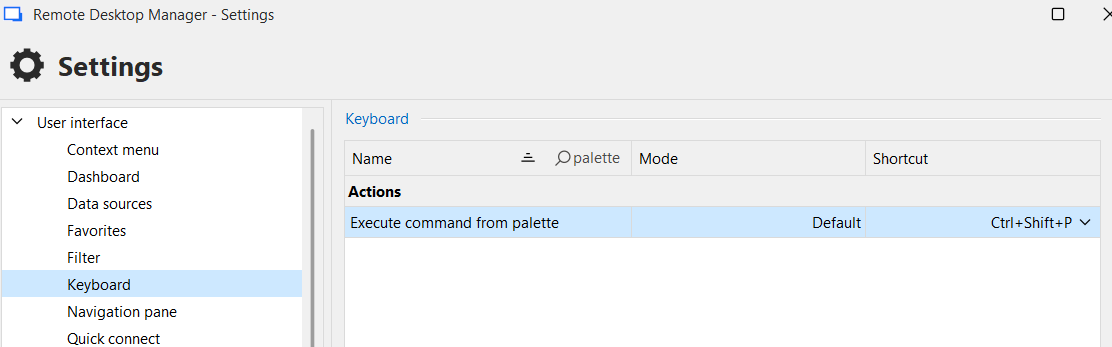
Second, we have a "quick search" feature. You can read more about it here: https://docs.devolutions.net/rdm/commands/view/search/quick-search/
This feature helps you quickly find and open entries, which includes macros. Maybe this is something you could use to quickly run these scripts on your entries.
For the command palette specifically, it's meant to be used with the SSH terminal, which means not all types of scripts are usable for it, and they are "pre-filtered" on strictly the ones that work with it.
Let me know what you think of the quick search, maybe we could add a way to have it only show macros and scripts, perhaps with a keyboard shortcut like the command palette.
Regards,
Hubert Mireault
5faad1d4-b85f-4a4b-9029-92d2ded3c25d.png
Hubert Mireault - thx.
ctrl shift p works, I would like to suggest to add the Execute palette search bar on the toolbar as a visible search bar instead of needing to click on button to have the search bar appear.
Adding the global search to the toolbar would also be helpful. Only gotchya I noticed with the global search is you need to select the host whereas the palette you do not ( thankfully ).
Steps...
Launch a ssh session
Click on palette and select the script and it runs
Launch a ssh session
Ctrl Space to Open Global
Select Select
Now You Need to Select the Host even though I already opened it
thx
Thank you for the additional details, you bring up good points. We will see what we can do to improve these workflows.
Regards,
Hubert Mireault
Thank you for the considerations, much appreciated...J