Delete all entries of a certain type

Hello
Is there a way to search for a certain entry type, like "Teamviewer entry" and delete all of them at once?
Thanks and best regards
Patrick
All Comments (5)
Hello Patrick,
Thank you for your post!
Yes, it’s possible to find and delete all entries of a specific type, such as TeamViewer entries. You can do this easily using the Advanced Search feature in Remote Desktop Manager. Simply filter your entries by the desired type (e.g., TeamViewer), select all the results, and then delete them at once.
You can find detailed instructions here:
https://docs.devolutions.net/rdm/commands/view/search/advanced/
Best regards,
Stephan
Hello Stephan
I just love RDM, you guys always have a soltuion! Thanks that worked.
I think I also found a bug, after I did a search for all the entries, it's not possible to change the Conncection type anymore. The dropdownlist wont show when I click on the downfacing arrow again, I need to close and reopen the search: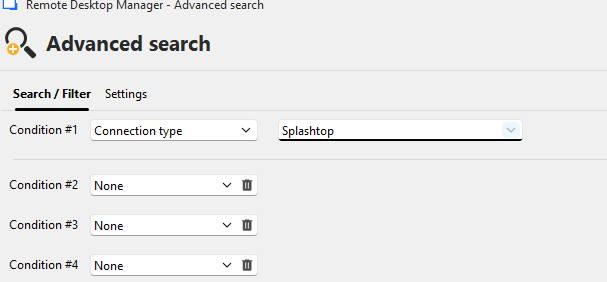
Is there also a way to find entries based on when they were last used. So we can find inactive entries and remove them.
Thanks and best regards
Patrick
654eda44-6388-417b-a1b1-8a4ccbaa0369.png
Hey Patrick,
Thanks for the feedback :D
Could you please confirm which version of RDM you are currently using?
On my end, this does not seem to be happening. I'm able to change the connection type after a search no problem.
Thanks
Stephan
Hi Stephan
I am on version 2025.3.15.0 and I am using RDM as a RemoteApp, just if that makes a difference.
Best regards
Patrick
Hey,
This indeed makes a difference.
I was able to see the same issue in RDM when using it through the Remote App.
I'll check with our development team and inform you of our findings.
Thanks for bringing this to our attention!
Best regards
Stephan