Variables in inherited host does not work with Devolutions Gateway
Variables in inherited host does not work with Devolutions Gateway

Hi
I have the following folder structure, with specific fields filled:
-- Folder of type Domain
* Name: domain.local
* Asset -> Network -> Domain: domain.local
---- Folder of type Server
* Name: 1 $COMPUTER_INFORMATION_MACHINE_NAME$.$COMPUTER_MACHINE_DOMAIN$
* Asset -> Network -> Host: Server1
* Asset -> Network -> Ip: 10.10.10.1
* Asset -> Network -> domain: $DOMAIN_MACHINE_DOMAIN$
* Host: $COMPUTER_INFORMATION_MACHINE_NAME$.$COMPUTER_MACHINE_DOMAIN$
* IP: $COMPUTER_INFORMATION_IP$
------ RDP Session
* Host: Inherited
This works fine for a direct connection, but if I set the RDP to connect through Devolutions Gateway I get the following error: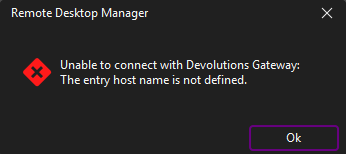
IF I change Server folder name to not include variables:
---- Folder of type Server
* Name: 1 Server1
RDM Initiates the connection, but fails with
RDM: 2025.3.16 x64
DVLS: 2025.3.5.0
DVL Gateway: 2025.3.2
Regards Lars
Remote Desktop Manager connected with Devolutions Server running newest versions.
------------------------Signature------------------------
Sorry if any of above sounds harsh or provoking, it is NOT meant as such, but I have Asperger's and don't always know.
My intentions is always to be friendly.
-------------------------------------------------------------
Screenshot 2025-10-29 150135.png
Screenshot 2025-10-29 145204.png
All Comments (1)
Hello Lars,
Thank you for reaching out to our forum. I checked whether we received any similar requests from other clients and also reviewed our internal resources. For now, it appears that this method is still not supported with the Gateway. I’ll contact our development team to confirm what still needs to be implemented on our side and will get back to you with an update regarding this scenario.
Thank you for your patience.
Best regards,
Michel Audi