Missing language

I've just installed latest version 2025.4.2.0 and noticed that my language (Serbian) is missing from the list of offered languages for translation. How can I fix this?
All Comments (20)
Can't tell you how to add a new language, however, I can tell you it will take some time to translate everything :-)
I'm the only one working on the Danish translation now and between job, kids, house and sleeping, Devolution is pushing out more text than I can keep up with. I think I got Danish up to 34% translated last week.
Can't tell you how to add a new language, however, I can tell you it will take some time to translate everything :-)
I'm the only one working on the Danish translation now and between job, kids, house and sleeping, Devolution is pushing out more text than I can keep up with. I think I got Danish up to 34% translated last week.
@anderslund1
Thank you for your reply. You have my sympathies. But, that is not what I'm asking. I can't even start translating because list of languages do not offer me my language.
Hello,
Thank you for reaching out to us regarding this,
I have reached out to our development team to see if this can be added to the Devolutions Localizer. I will keep you updated with any news I receive,
Best regards,
Samuel Dery
Serbian is now on the list. In the next version of the app, you will be able to add any language of your choosing.
Best regards,
Stéfane Lavergne
Looks like I still have an issue, working on it. Sorry
Stéfane Lavergne
all should work now, I've translated a string to test.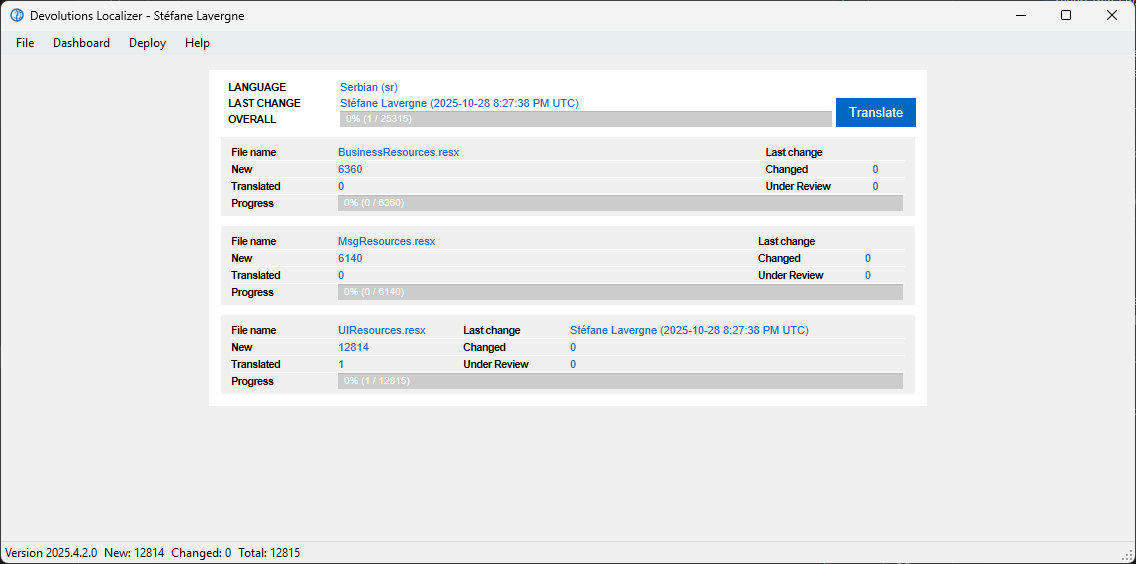
Stéfane Lavergne
977e400e-bc61-4298-b744-dd6629fd9c21.png
There's something weird going on with translation. Some strings that are translated and WERE displayed as translated are now displayed back in English, and some are in Serbian. Did I do something wrong?
You must press "Translate" for each string you have translated. If you just press "Next", it won't commit. And remember to press "Save" to save all the strings you have translated and have them sent to Devolutions.
Other than that, I don't know what issue you have run into.
Yeah, I definitely did that. As I mentioned, some strings were shown as translated, but now, for some reason, they reverted to English, but not all of them.
Oh, just remembered that I have some time seen that when you have translated some strings and then press Save, then if you have currently marked the last string you translated, that string might not be saved. It's just become a habit of mine to make sure I have pressed Next an extra time, before I press Save.
Hello,
Thank you for sharing Anders,
Hopefully this is helpful in your case Bojan,
Let me know if the problem persists
Best regards,
Samuel Dery
That's odd, I will look into it.
In the meantime, here is the documentation on the Localizer, more specifically the shortcuts. You should be able to translate, save, go to the next, and go to the previous, all with the keyboard. It will speed up things quite a bit.
P.S. Yes, the Bing translation is broken.
Best regards,
Stéfane Lavergne
That's odd, I will look into it.
@Stéfane Lavergne
I might not be entirely correct about my experience as I haven't seen it for a while, however, I do make sure that I have pressed next before saving. It might be that the translation is still marked as "New" after clicking the Translate button and only after clicking Next button, the status is changed to "Translated". Sorry, I can't remember how it goes but I do remember being annoyed about it years ago when I started translating here.
I'm definitely sure that something other is problem in my case. I went through whole translation done so far, and I added 1 to the end of each string, and I made sure to click Translate after each one, Save Changes and finally deploy translation. Yet, some of the strings are still displayed in English.
I've tried to post image here but couldn't for some reason. Anyway, here it is: https://ibb.co/gFtvWFRQ
Is it possible to start translation from scratch, or, at least, to reset some strings to untranslated?
@bojanmaksimovic,
Sorry for the delay in responding; I must have missed your other reply.
So, some backstory, in prior versions of RDM we had some strings in CamelCase (e.g., My Account, the names started with mnu, gb, ...) and some in Sentence case (e.g., My account the names started with lbl).
Now, Microsoft, over the last few years, has been moving away from CamelCase to use only Sentence case, so we are following suit. The advantage will be fewer values to translate via the Localizer app. As we don't need to translate mnuMyAccount & lblMyAccount.
Unfortunately, the Localizer app is forward-looking, so the values you are translating now are for v2026.1, and not v2025.3; some, as you see, will still work while others will not. Usually, we have a task to sync them up, but since the name changes, we've disabled it for this release. So yes, you can use the Build & Run task in the app, but not all translations will be applied.
v2026.1 should be released early March 2026. Until then, we've judged the work required to support both versions as just not worth the effort, unfortunately.
As I type this, I just got an idea. Instead of trying to fix it via our sync steps, if at least I could patch it for the Build & Run, then at least you would be able to test and validate locally. Hmm, I might be able to pull this off. I will think about it some more and let you know.
As for resetting, we can, if you want, clear all the translations. This action is irreversible. So make sure this is really what you want. Please let me know.
Best regards,
Stéfane Lavergne
Hi Stefane,
Thank you for clarification.
As I type this, I just got an idea. Instead of trying to fix it via our sync steps, if at least I could patch it for the Build & Run, then at least you would be able to test and validate locally. Hmm, I might be able to pull this off. I will think about it some more and let you know.
That would be great! Please do let me know as soon as you have any new info.
As for resetting, we can, if you want, clear all the translations. This action is irreversible. So make sure this is really what you want. Please let me know.
I thought about it as the last resort, but considering your explanation, I don't think it's necessary.
@Stéfane Lavergne
The advantage will be fewer values to translate via the Localizer app. As we don't need to translate mnuMyAccount & lblMyAccount.
@Stéfane Lavergne
Is this why I have seen the number of total translation strings getting lower or is it just because old stuff is removed?
Correct, in this example, we’ve deleted mnuMyAccount, so yes, the total has changed. From my understanding, we’re done with the cleanup, so the counts should have stabilized now.
Stéfane Lavergne
As I type this, I just got an idea. Instead of trying to fix it via our sync steps, if at least I could patch it for the Build & Run, then at least you would be able to test and validate locally. Hmm, I might be able to pull this off. I will think about it some more and let you know.
This won't work, at least not in this particular case. You see, the menu item should be called mnuMyAccountSettings but is actually named mnuMyAccountInfo (in v2025.3). So even if we create a fallback from mnuMyAccountSettings to lblMyAccountSettings, it still won't work.
Why mnuMyAccountInfo? It's the original name of the menu item from back when the UI read "My Account Info"
Stéfane Lavergne