Global algorithm support settings reset to default on application exit
Global algorithm support settings reset to default on application exit

I am trying to enable some older protocols globally in RDM, and they persist through the current session, but every time I exit the program and relaunch it, they all reset to the original defaults, disabling the additional ones I turned on. Is there a way to get these settings to stay permanently?
All Comments (3)
Hello,
I tried to reproduce the issue you mentioned regarding the older protocols resetting after restarting RDM, but I couldn’t recreate it on my end the settings persist as expected.
To better understand your setup, please confirm exactly where you enable the algorithmic support.
For reference, I set mine under:
File → Settings → Entry Type → Session → Terminal → Algorithmic Support
Once I have this detail, I can check if a different configuration path is affecting your case.
Best regards,
Carl Marien
Thanks for the reply Carl.
I go to File > Settings > Entry Types > Sessions > Terminal > Algorithm support
Then I check all the boxes on the Cipher, Host key, Kex, and MAC tabs. This is a lab environment and I'm more interested in the ability to connect to older and unusual gear than I am about using secure ciphers. I then click Save. Everything works fine as long as the app remains open. As soon as I exit RDM closing it completely and then re-launch it, the settings are reset to the defaults as shown below. I have done this same process multiple times on different days and the result is always the same.
I am a long time RDM user and have modified these settings before in the same settings menu location and never had this issue previously. This is a recent install on this particular computer, but I have been using this computer for a long time, and have used RDM on other computers for years. I did try a few other combinations of just checking a few boxes to see if there was one in particular causing the problem but that didn't seem to matter.
If it makes any difference, I am using RDM personal hub on this system. I think the application settings like this should be local and not part of the online database though, correct? 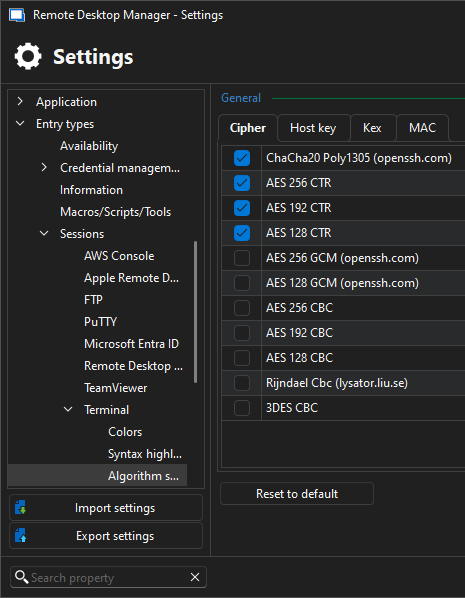
I may try a reinstall of the program to see if that fixes the issue. Everything else seems to work fine, so I'm not sure why this is giving me trouble. Let me know if you have any other suggestions.
2025-10-30_07-43-03.png
Hello,
If you need to reinstall the application, please refer to the following documentation instead of resetting RDM to its default settings:
https://docs.devolutions.net/rdm/kb/how-to-articles/reset-rdm-to-default-settings/
Best regards,
Carl Marien