Keep-Alive for SSH Terminal connection

I have an existing SSH connection. Is there a "Keep Alive" option to ensure that I do not get timed-out/auto-disconnected? According to this thread:
https://forum.devolutions.net/topics/1151/rdp-keep-alive
...it is to be found under "Experience" tab, however I do not see an Experience tab for SSH connections. I see "General", "SSH Key", "Proxy", "SSH gateway", "Post-login", "Before closing", "Terminal", "SFTP", "Keyboard", "X11 Forwarding", "Logs", "Macro", and "Advanced". Can anybody help?
All Comments (1)
Hello,
Thanks for reaching out.
The setting you are looking for has moved slightly since the post you found.
It can now be found in the Advanced section within the properties of the SSH entry.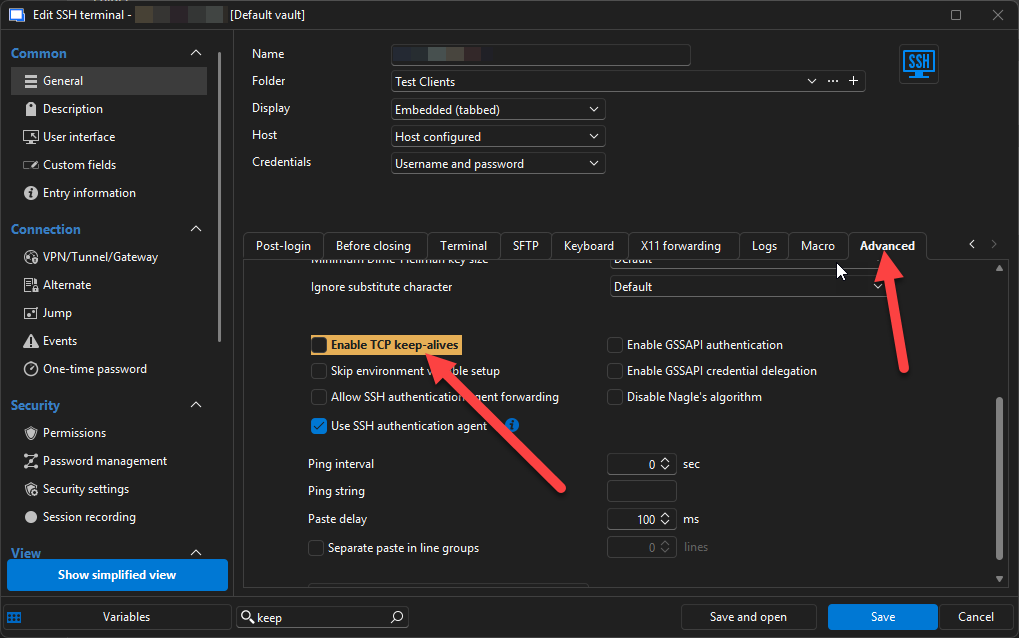
Hope this helps.
Best regards,
Stephan
2dec2ab9-a199-417c-b982-d336ae30c0aa.png