RDM Embedded (Tabbed) Terminal not starting + Other issues

I just noticed that for some reason, on my Windows install, I have been seeing a number of odd issues:
- I am unable to start a Tabbed Session on anything - Any time I start up a terminal, I can see that the Devolutions Windows Terminal process starts, and immediately crashes, with a WerFault.exe process showing up as well. This led me to the Event Viewer and in the Applications log I was able to see the following
WerFault appearing:
Event Viewer: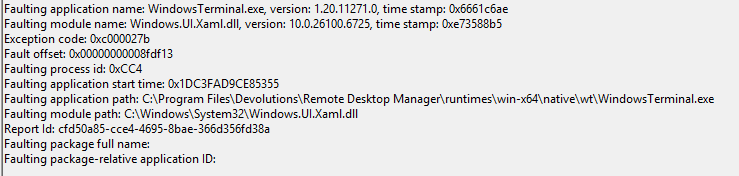
- I was unable to see any logs within the "Application logs" window, so I increased the log level to "3" and also selected "File". Now I get the following error:
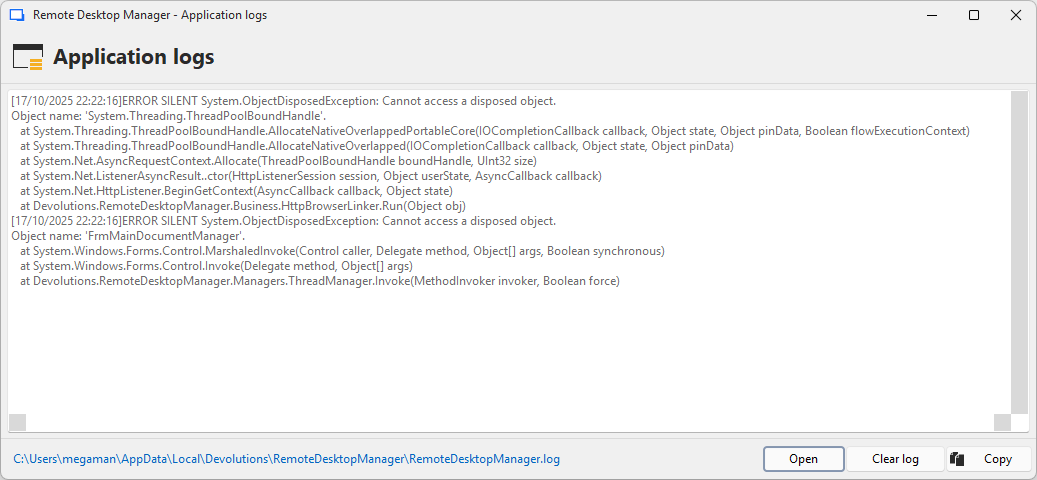
Not sure if all of this relates to .NET not being deployed correctly? I did test a clean install and it all works fine. RDM is the only program I'm having issues with for some reason.
I am running version 2025.3.16.0 with .NET 9.0.10 on Windows 11 25H2. The clean install I did was also set up with 25H2.
14582fc3-7459-4d18-8807-a75f71ac8ee3.png
865056f7-27f8-420e-9787-3597b8c0b736.png
9ebbed61-2a87-46c2-8a8c-be32e42fa084.png
Recommended Answer
Hello,
I have brought this issue to our developers, and we were able to verify that it is an issue on the side of PowerToys.
Unfortunately, there is nothing we can do at this time, as the PowerToys development team needs to address this problem.
You can find more information on the following GitHub links:
- [Issue 19492](https://github.com/microsoft/terminal/issues/19492)
- [Issue 19482](https://github.com/microsoft/terminal/issues/19482)
I apologize for the news. For now, your best option is to use the older version of PowerToys, as suggested in the GitHub threads.
Best regards,
Stephan
All Comments (13)
Found out that it is Microsoft PowerToys that is causing this issue - however, I also actively use PowerToys. What can I do to troubleshoot this?
Nevermind! I realized that it was just the latest version of PowerToys 0.95.0 - 0.94.1 works fine, which tells me there is an issue with some of the things they're doing.
Hello,
Thank you for the follow-up and for sharing your findings! I really appreciate the time you took to investigate and confirm that the issue is related to the latest PowerToys version (0.95.0). It’s great to know that 0.94.1 works fine in the meantime.
Your update will definitely be helpful for others who might encounter the same situation.
Hope you’re having a great day!
Thanks,
Stephan
Hi Stephan - Situation is a bit more complicated than that unfortunately. I have been looking at this for these past couple of days and in fresh installs of Windows 25H2, this issue comes up with Intel processors but not AMD ones. Would this be something possible to help me out on?
Hello,
Thank you for your reply.
Just to confirm — the issue occurs on a fresh installation of Windows 25H2 specifically on Intel-based systems? Could you also let us know if PowerToys is installed in this environment?
If it is, please try reproducing the issue after uninstalling PowerToys to see if the behavior changes.
Kind regards,
Stephan
Hi Stephan,
I have been testing this for a bit and can confirm the following:
- Issue occurs on fresh installs of 25H2 as well as upgraded versions (24H2 to 25H2 (Intel Core i7-13700H)
- The PowerToys version in use is 0.95.0+ (i.e. since that release onwards)
- The issue goes away if you remove PowerToys 0.95.0 or if you use the latest version to work (PowerToys 0.94.2)
- The issue happens whether it’s on Bare Metal or in a Virtual Machine
- I have an AMD (AI 9 HX 370) with a clean install and I’ve had no issues with both PowerToys 0.95.0+ and RDM (latest versions)
Let me know if you’d like for me to provide any additional info.
PS: I’m currently running PowerToys 0.94.2 for the foreseeable future, but can test any config if needed
Hey,
I'm currently attempting to reproduce this on my end.
To be more precise, could you share some details:
- RDM version
- Data source used (DVLS Version if applicable)
- Exact entry type you are using
Thanks for your help.
Greetings
Stephan
Hi Stephan,
Here is what I have been testing so far:
- RDM Version: I have used version 2024.1 up to version 2025.3 with PowerToys 0.95.0 and 0.95.1.
- Data sources: I've used both XML and SQLite
- Entry Type: Windows Terminal Session, both Embedded, Undocked and External
Hello,
Thank you very much for your patience and assistance with this issue.
I was finally able to replicate the same behavior on my end. I have opened a development task to investigate how we can address this.
I will respond here once we have more information to share.
Greetings,
Stephan
HI Stephan, Thank you very much! Glad to hear that you were able to replicate this issue. Please let me know if I can provide any additional info!
Hello,
I have brought this issue to our developers, and we were able to verify that it is an issue on the side of PowerToys.
Unfortunately, there is nothing we can do at this time, as the PowerToys development team needs to address this problem.
You can find more information on the following GitHub links:
- [Issue 19492](https://github.com/microsoft/terminal/issues/19492)
- [Issue 19482](https://github.com/microsoft/terminal/issues/19482)
I apologize for the news. For now, your best option is to use the older version of PowerToys, as suggested in the GitHub threads.
Best regards,
Stephan
Hello
Further to what Stephan wrote, this is a broad incompatibility between the most recent PowerToys releases and certain versions of Windows Terminal. There is an argument that we could update the version of Windows Terminal that we ship, but the issue is likely to come back as PowerToys sees further updates. They really need to fix it on their side.
Another workaround than installing an older PowerToys release would be to remove the PowerToys directory from your PATH environment variable. Let us know if you need guidance for that. Be advised that when reinstalling PowerToys (either during maintenance or updating to a new version), it's likely to put it's directory back into the PATH environment variable and need to be removed again.
Please let me know if something isn't clear or you have other questions
Kind regards,
Richard Markievicz
Hi Stephan and Richard,
Many thanks for the follow-ups. Yes it seems that this is something with how PowerToys is publicizing logical path in the PATH environment variables, which is causing this issue across the board, as it also blocks all of the standalone Windows Terminal deployments (based on the comments from the GitHub issue #19482).
The PATH manipulation trick no longer works for PowerToys 0.95.1, as it updates the PATH variable with its own. This also causes issues with their Light Switch add-on too. I do agree that this needs to be fixed in PowerToys itself rather than by Devolutions.
Thanks for confirming, and I'll continue to monitor this issue for when Microsoft fixes it.