Change Session icon on Vpn connect

Hi all!
Here's my issue/requirement.
- I have a "VPN/tunnel/gateway - Custom VPN (PowerShell)" session entry used to create an L2tp/Ipsec on windows client
- when I click on the RDM session it creates the VPN and connects correctly
- once connected I don't see the session icon change on RDM, I guess there is no iteration
Once the VPN is connected, I'd like to change the session icon so it's clear it's being used, for example, changing the color to green until the session is closed.
Is this possible?
Please help!
Thanks!
Stefano
All Comments (5)
Hello,
Thank you for reaching out to Devolutions Support.
I’ve contacted our development team regarding your issue. They’ve opened a bug report and will be investigating further.
I’ll keep you updated on any progress from our side.
Best regards,
Carl Marien
We also see this bug and would like it fixed. We are using 2026.1.19.0
Hello,
Thank you for your patience.
Our development team has reviewed the case. The Custom VPN (PowerShell) entry does not display an open state by default because this type of VPN does not report its connection status.
That said, you can get the open-state indicator by enabling "Detect connection with adapter" on the entry. This option is not perfect and is not enabled by default, but it has been confirmed to work in testing.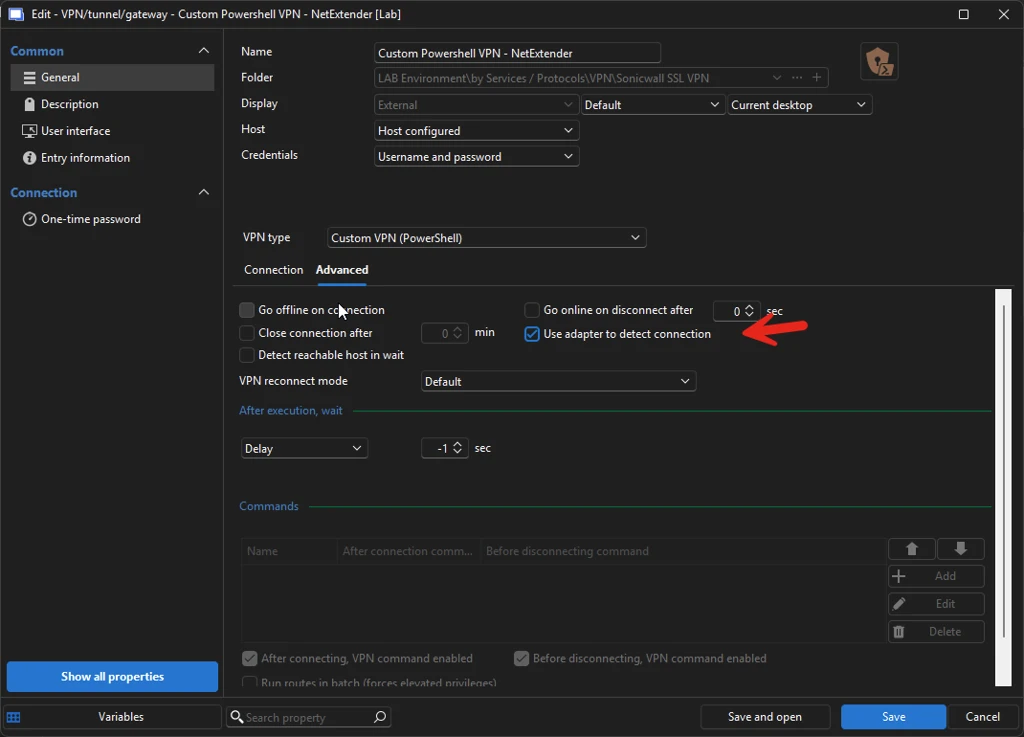
Best regards,
Carl Marien
image.webp
Thanks. We will try what you have suggested. Is there a way that the Custom VPN (PowerShell) entry can report its connection status? We also use a Custom VPN (CMD) entry and that successfully reports its connection status.
Hello,
Thank you for your reply.
At this time, I do not know whether the Custom VPN (PowerShell) entry can be changed to report its connection status in the same way as the Custom VPN (CMD) entry.
However, I can transfer this thread to our Feature Request forum so our team can review this as a possible improvement.
Best regards,
Carl Marien