Remove this "all" button

Hi,
I'm become sick to remove this button. (last version)
Is this "tutto" or "all" in english.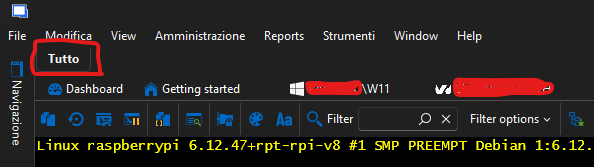
I don't understand how to remove it and have more space.
Please can you help me, to figure out?
EDIT: I figure out this, was "Always show tab group"
3 More things please:
1 - Is possible and how, to scroll between tabs, with mouse wheel ?
2 - Is possible to disable with a toggle for all remote the clipboard from host? So If i copy something on pc, D don't want that is possible to paste in all tabs, but only when i enable a toggle.There is in status bar a red toggle magnet, but seems doesn't works for this.
3 - If i wish to use tabs in more row, is possible that all tabs doesn't change any position, so If i click a tab in the first second row, i dont want that all tabs from second row, come up in first row.
b9ff8b9e-e982-4193-ace4-f24039bc1775.png
All Comments (3)
Hello,
Thank you for reaching out to us regarding this,
I'm glad to hear you were able to find the solution for your first issue,
Could you please specify the version of RDM you are currently using?
What type of data source are you using?
Additionally, could you confirm which type of entries you use in this case? I would need to confirm this for your 2nd problem.
You can set Keyboard shortcut for the "Select Previous Tab" and "Select the next tab" under "File" -> "Settings" -> "User Interface" -> "Keyboard" but unfortunately the mousewheel does not seem to be one of available options.
Would enabling the option "Use tab strip overflow (Disable multi-line tab pages)" under "File" -> "Settings" -> "User Interface" be what you are looking for?
Best regards,
Samuel Dery
Hello,
Thank you for reaching out to us regarding this,
I'm glad to hear you were able to find the solution for your first issue,
Could you please specify the version of RDM you are currently using?
What type of data source are you using?
Additionally, could you confirm which type of entries you use in this case? I would need to confirm this for your 2nd problem.
You can set Keyboard shortcut for the "Select Previous Tab" and "Select the next tab" under "File" -> "Settings" -> "User Interface" -> "Keyboard" but unfortunately the mousewheel does not seem to be one of available options.
Would enabling the option "Use tab strip overflow (Disable multi-line tab pages)" under "File" -> "Settings" -> "User Interface" be what you are looking for?
Best regards,
@Samuel Dery
Hi,
My current version is: 2025.3.15.0 64bit Windows 11 Portable Version.
Data Source: My external local .db
About mousewheel, should be more useful, but if is not possible...
Use tab strip overflow make me crazy. I don't want that if i select a tab from a first or second row, tabs change from first to 2nd rows, is crazy and no sense, because your mind and eyes have the expectation to find the tabs in the same area, and not in different rows every time. But I guess that also for that, there is no way to keep tabs in the same row , where they are.
But let me know, thanks for the support
Hello Robertus,
Thank you for your reply,
I see, I'm afraid it is not currently possible to assign the "Mousewhell" as a shortcut currently, if that is something you would like to see added I would recommend you create a feature request here:
https://forum.devolutions.net/forums/17/remote-desktop-manager--feature-request
This allows our community to submit/share ideas with our development, service desk, and management teams. It’s also an opportunity for our community to demonstrate an interest in your idea. We use this interest to prioritize the features we implement.
That being said, would you be able to provide me with a short recording of your last issue? I will send you a link in a private message so that you can provide the recording securely.
Let me know,
Best regards,
Samuel Dery