Search Top Ribbon changed after update to 2025.3.15.0

Hi,
After the update to 2025.3.15.0 the search icon in the top ribbon completely disappeared.
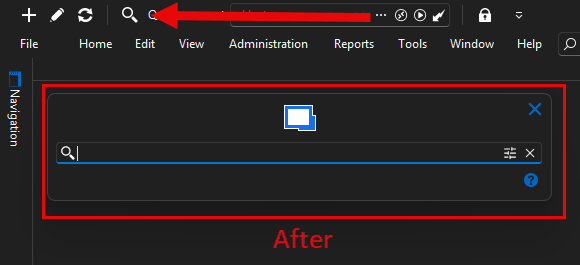
I reinstalled RDM and now it is back but the search view changed.
How can I get the old view back?
Any help would be appreciated. 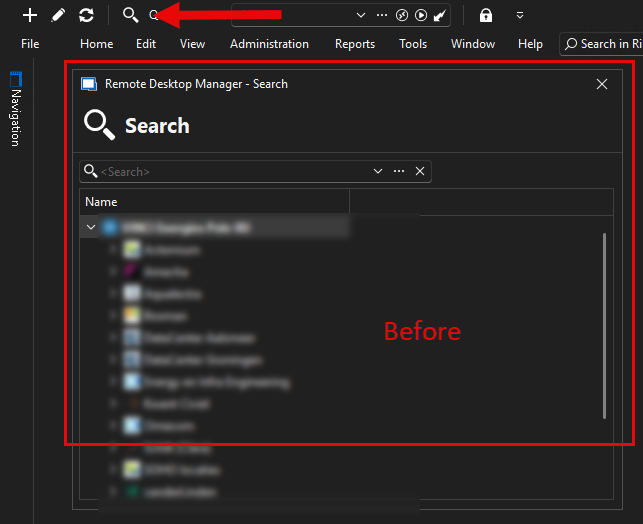
before.png
after.png
All Comments (6)
Hello,
We've made some changes to our searching but this window should still be accessible by double clicking the filter in the status bar. Could you confirm this works for you? If it does, we could make this window more accessible through an option if this is something you need.
Regards,
Hubert Mireault
I have hidden / minimized almost all status / menu / Navigation bars to get a bigger view of all remote desktop sessions.
After a reset of layout (I did not know where to find it ) I saw what you mean.
Double clicking the filter in the statusbar seems to work to get the view back.
But since I hide all bars, it's not usable for me.
If it is possible, I would like to have this windows accessible through an option.
Hello,
No problem, we'll add a setting to bring back the behavior associated to that window. I've opened a ticket.
Regards,
Hubert Mireault
Hello,
These issues will both be addressed in version 2025.3.16.0:
- A fix will be included to avoid losing the search menu when starting RDM
- A new setting to choose which search mode you want (Quick search or filter) will be available in File -> Settings -> User interface -> Title bar
Regards
Jonathan Del Signore
Hello,
These issues will both be addressed in version 2025.3.16.0:
- A fix will be included to avoid losing the search menu when starting RDM
- A new setting to choose which search mode you want (Quick search or filter) will be available in File -> Settings -> User interface -> Title bar
Regards
@Jonathan Del Signore
Thank you very much.
One thing I want to add: Since you've already reset the layout while the issue was present, you'll most likely need to reset it one last time after updating to 2025.3.16.0.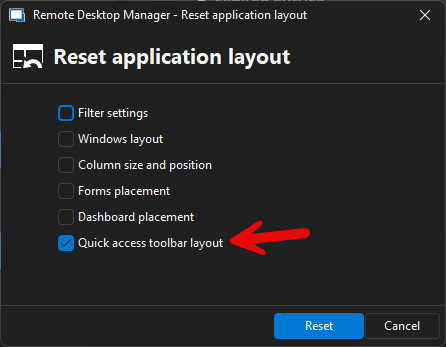
Sorry for the inconvenience.
Jonathan Del Signore
d9287bb5-9f72-46b9-bff6-3dcc0c469878.png