error when launch 2025.3.15.0

Hello,
I get this error after updating to 2025.3.15.0.
To reproduce it:
I launch RDM
I put the app password
and once I press "Open" on last opened sessions, then I get:
ERROR SILENT: System.IO.IOException: The specified registry key does not exist.
   at Microsoft.Win32.RegistryKey.Win32Error(Int32 errorCode, String str)
   at Microsoft.Win32.RegistryKey.GetValueKind(String name)
   at Devolutions.RemoteDesktopManager.Managers.PolicyManager.get_IsRDPRestrictedAdminModePolicyEnabled()
if I press OK, then the tabs start to open and connect.
All Comments (3)
Hello,
I believe you may have enabled debug profiling and this is why it shows up. This message should only appear for debugging purposes if this is enabled.
In your RDM, do you see the "bug" icon in your toolbar?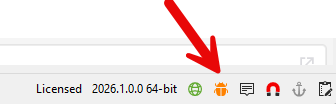
If you see it, click on it, and make sure to set the value in the Debug tab to 0.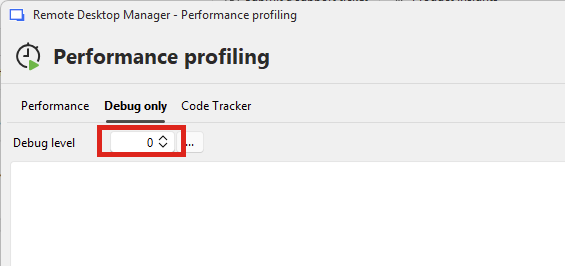
Regards,
Hubert Mireault
be6a2d77-19af-4006-83d2-e7275711c1a2.png
a207a59f-c4b4-447f-8128-39e7cf6652d4.png
Hi,
you must be right, I was under the impression the debug mode would be cleared after exiting RDM, but it is persistent.
thanks !
Perfect, glad I could help! I'll mark this thread as resolved.
Regards,
Hubert Mireault