How to Keep MS365 Login Separate in Edge Profiles Managed by RDM?
How to Keep MS365 Login Separate in Edge Profiles Managed by RDM?

I created an Edge profile in RDM to log in to MS365 with a secondary tenant and a separate profile. However, when I close and reopen Edge, it automatically opens with my main tenant that’s joined to AAD. When I switch back to the secondary tenant, I have to sign in again. What should I do to have a completely separate profile? Thanks.
Recommended Answer
Hello Joe,
This sentence rang a bell for me:
When launched, it signs in as same identity that is being used by edge outside of RDM
Could you check in File > Settings > Entry types > Sessions > Website, the setting for "Enable single-sign-on with Windows account" and set it to "No"?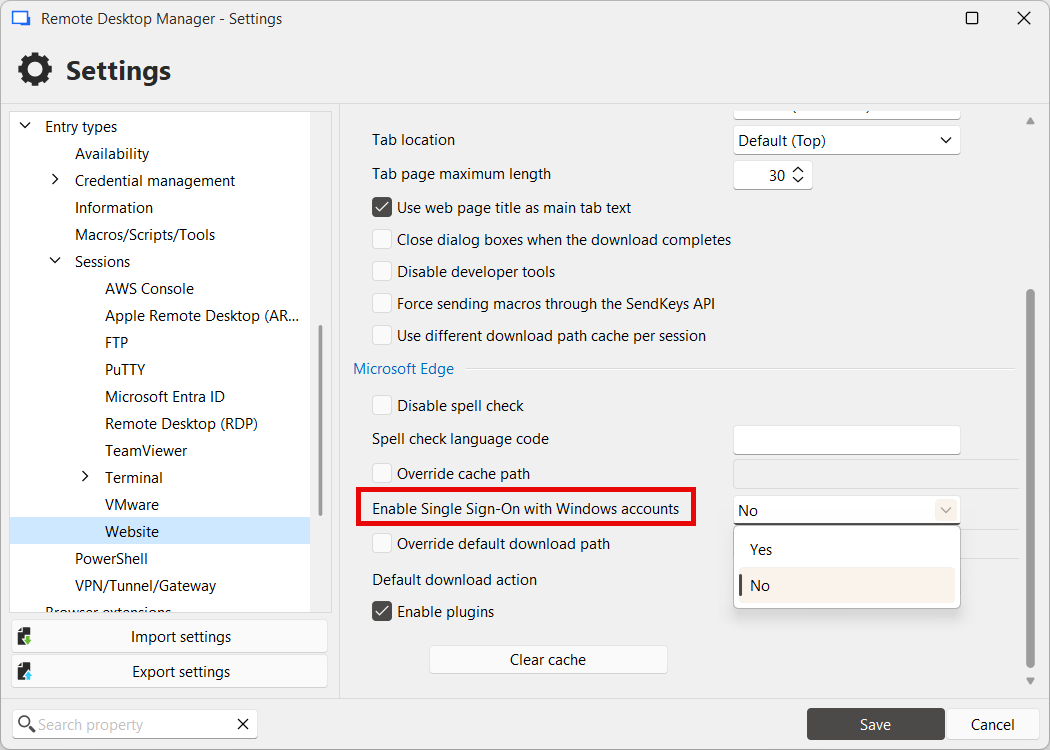
I believe when it's set to "Yes" (which is the default), it will use the single sign-on information that's used outside of RDM. Changing this setting might require a restart of the application to make sure it properly applies.
Let me know if this helps.
Regards,
Hubert Mireault
01f551cc-d87c-4f3b-881c-1e70e3e0a010.png
All Comments (8)
Hello,
Thank you for reaching out on this matter.
I tested this out on the latest version on my side and this works well.
Could you please confirm the version of RDM you are using, along with the data source type and its version?
Looking forward to your response.
Best regards,
Jacob Lafrenière
Hello Jacob,
Also having trouble getting this working with RDM 2025.3.20.
I can create a separate profile in edge running natively on the desktop outside of RDM and the profile is still available after browser relaunch. It can also be renamed via the profile settings wheel icon.
However then launching an embedded browser entry in RDM with the Edge profile defined, it opens using the users default profile, and the second profile created previously is not available. I can re-add the 2nd profile in the embedded session, but I dont see a way to rename it, and it seems to be lost after closing the session and reopening.
Is there a specific set to steps required to get this working?
Thanks
Joe
Hello,
Thank you for your patience.
Apologies — I forgot to include an important detail in my initial response.
The profiles in RDM are not linked to Edge browser profiles. They are used independently.
Here is an example:
- In RDM, a website entry set to Profile1 opens admin.microsoft.com using Domaine1.
- In RDM, a website entry set to Profile2 opens admin.microsoft.com using Domaine2.
- In RDM, a website entry set to Profile1 opens sharepoint.microsoft.com using Domaine1.
There are no Edge profiles to modify or switch from within the browser itself — everything is managed directly within RDM.
As an additional suggestion, you could enable autofill for credentials and set the website entries to open in incognito mode. This might work well in your environment.
Feel free to reach out if you have any further questions.
Best regards,
Jacob Lafrenière
Hi Jacob,
Thanks for explaining how the profiles are native to RDM and separate from the browser ones.
I'm still having trouble getting it to work as you described. I have website entry for https://admin.microsoft.com/ with a profile specified as CompanyAdmin. When launched, it signs in as same identity that is being used by edge outside of RDM. If I sign out of the website within the embedded session, and re-login with an alternate credential, then close the entry/session and reopen it, it goes back to signing in the default edge identity. If I understand correctly the expected behavior you described, shouldn't the entry profile retain the identity last used for the session?
Regarding the use of incognito and autofill, that works great for web pages that have a static username password fields, but its not compatible with sites that have a multi-step authentication process, such as the Entra ID portal. I have been able to build typing macros for these kinds of sites, but they aren't ideal as the login dialogs/sequence can be different between Entra tenants, for example when different MFA options are presented or browser session persistence is offered etc.
Please let me know if you would like any additional info.
Joe
Hello Joe,
This sentence rang a bell for me:
When launched, it signs in as same identity that is being used by edge outside of RDM
Could you check in File > Settings > Entry types > Sessions > Website, the setting for "Enable single-sign-on with Windows account" and set it to "No"?
I believe when it's set to "Yes" (which is the default), it will use the single sign-on information that's used outside of RDM. Changing this setting might require a restart of the application to make sure it properly applies.
Let me know if this helps.
Regards,
Hubert Mireault
01f551cc-d87c-4f3b-881c-1e70e3e0a010.png
Thanks Hubert, that fixed it which is great.
Do you think it would be possible for that setting to be configurable per entry, as opposed to at the application level? If so I will create a feature request.
Happy I could help!
I took a quick look at the code, and it's not difficult. We could simply add a new setting to the Website entry that, by default, points to the value configured in File > Settings. So, same pattern we often use already.
We'll see if we're able to add this to 2025.3 as well, but we'll have to coordinate between our different products, so it might have to wait until 2026.1 early next year.
Regards,
Hubert Mireault
sounds great, thank you Hubert. Will definitely be of benefit for users who want to have duplicate entries for the same site, one of which uses SSO and the other a custom profile for an elevated account.