Display OTP Options in Context Menu for linked Credential
Display OTP Options in Context Menu for linked Credential
1 vote

When linking a credential entry which holds otp seed to e.g. a website entry this entry does not display "copy otp" option in context menu
All Comments (3)
Hello,
You need to ensure your website entry has its OTP configuration properly set. In your case, if the main credential of your entry contains the OTP, you should be able to set it to "Current session credentials":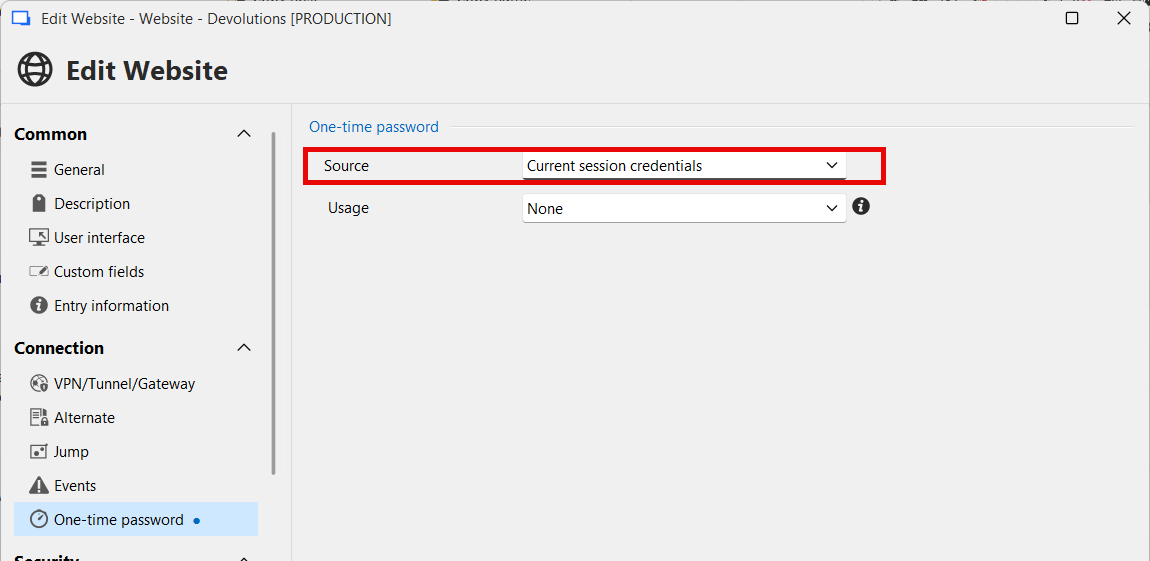
When this is configured, you should be able to see the view and copy OTP buttons in the dashboard and context menu.
Regards,
Hubert Mireault
0a54c765-9d35-42d8-97de-b166ba7db605.png
Thanks for the swift response. Tested: working. Maybe convert to feature request to at least ask if the otp source should be set when linked credential contains otp seed?
No problem, I've moved your thread to the feature request forum.
There's a few challenges that come with adding such a feature, namely that it would be inconsistent since not all entries handle OTPs the same way. In your case I assume you're using the Username/Password entry, which is the simple case. We also support OTPs in the Password List entry, which is more complex since there's a list of multiple credentials, for which there may or may not be an OTP configured on any number of these credentials. And finally there's external password managers which have the same challenges as the Password List entry, but with an additional challenge where fetching the OTP information may take more processing (since it's calling an external system).
We'll monitor this thread for additional feedback and ideas, and to help us prioritize an improvement in that area.
Regards,
Hubert Mireault