Reset scrollback on keypress like Putty
1 vote

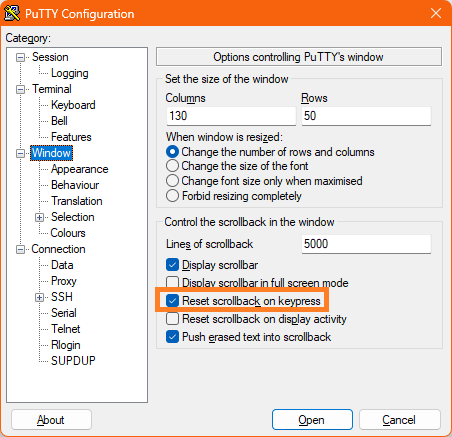 Hi, I find very useful the behavior in Putty related to setting "Reset scrollback on keypress".
Let's make an example. I scroll back an ssh session text watching at older rows (the upper side of the whole session text).
- with "reset scrollback on display activity" any new message from the device resets the scrollback and I lose the focus - a behavior which everybody I know really hates
With the setting "Reset scrollback on keypress" enabled I just hit any key on my keyboard and the session window jumps to current line without having to scroll using scroll-bar or mouse-wheel.
Can you deploy this kind of feature on RDM sessions?
putty-scrollback-on-keypress.png
All Comments (5)
Hello,
Thank you for the request. I've opened a ticket so we can add this.
Regards,
Hubert Mireault
Hello,
The "Reset scroll on keypress" setting will be available in our 2026.1 release.
Regards
Jonathan Del Signore
thank you, much better for my personal experience!!!
btw - pressing a single
- ALT
- ALT-GR
- STRG
- SHIFT
- CAPS
- "Windows-key"
is not to be expected as a keypress.
One use-case for example:
- scrolling up and trying to select a rectagular area using ALT+(Mouse-Klick and Mouse movement)
- this is impossible right now, since ALT is interpreted as keypress and scrolling is reset.
Hello,
I've opened a ticket to address this remaining behavior.
Regards,
Hubert Mireault
Hello,
The newest fix should be available starting from the upcoming RDM 2026.1.16.0.
Please do let us know if the issue persists after updating to the above-mentioned version.
Best Regards,
Michaël Beaudin