Add option to not close the undocked console when machine is restarted or shutdown
Add option to not close the undocked console when machine is restarted or shutdown
1 vote

I have such a workflow where I am using undocked consoles for my machines, and I want them in specific order in the windows taskbar/thumbnails.
Currently, when I now restart the machine, the console closes.
I would prefer if the console remained alive, even when the machine is shutdown. And when I start it up (using vSphere for that), that it works.
As it is, if I want specific order of machines (specific functions and tasks are running on each, and I have to juggle all the time, and muscle memory helps), I then have to close all, and open consoles in order again.
If this can work, it could simply be an option.
It is entirely possible this is already one of the options in the advanced tab, but I can't find it..
All Comments (8)
Hello,
Could you confirm what entry types you're using? We have the "Keep tab page opened on disconnect" available on certain entry types like RDP and VNC, but it's not available widely. I would like for us to be able to support it on more entry types, and knowing which type you're using would let us prioritize this.
From you mentioning vSphere, are you using the VMWare (Player, Workstation, vSphere) entry?
Regards,
Hubert Mireault
I do have this option turned on, but if I choose either "connect" or "connect when available", the window still closes, then reopens, which causes the order of windows to still change.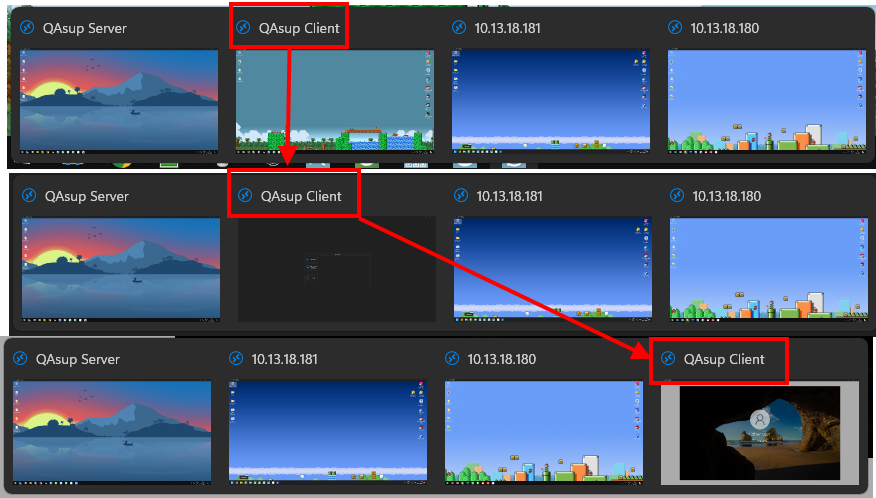
Untitled.png
Thank you for the details. From what I can tell from your screen capture, you're using Undocked mode with RDP entries. I've tested on my end and I was able to reproduce the behavior you're describing.
I'll open a ticket to see what we can do to improve this. We're already handling the order of the embedded tabs in RDM so the order doesn't change, so it would make sense to also handle the order there.
Regards,
Hubert Mireault
Actually, could you test just one thing, if you change the "reconnect mode" of your entry to "Smart reconnect", does it change the behavior for you?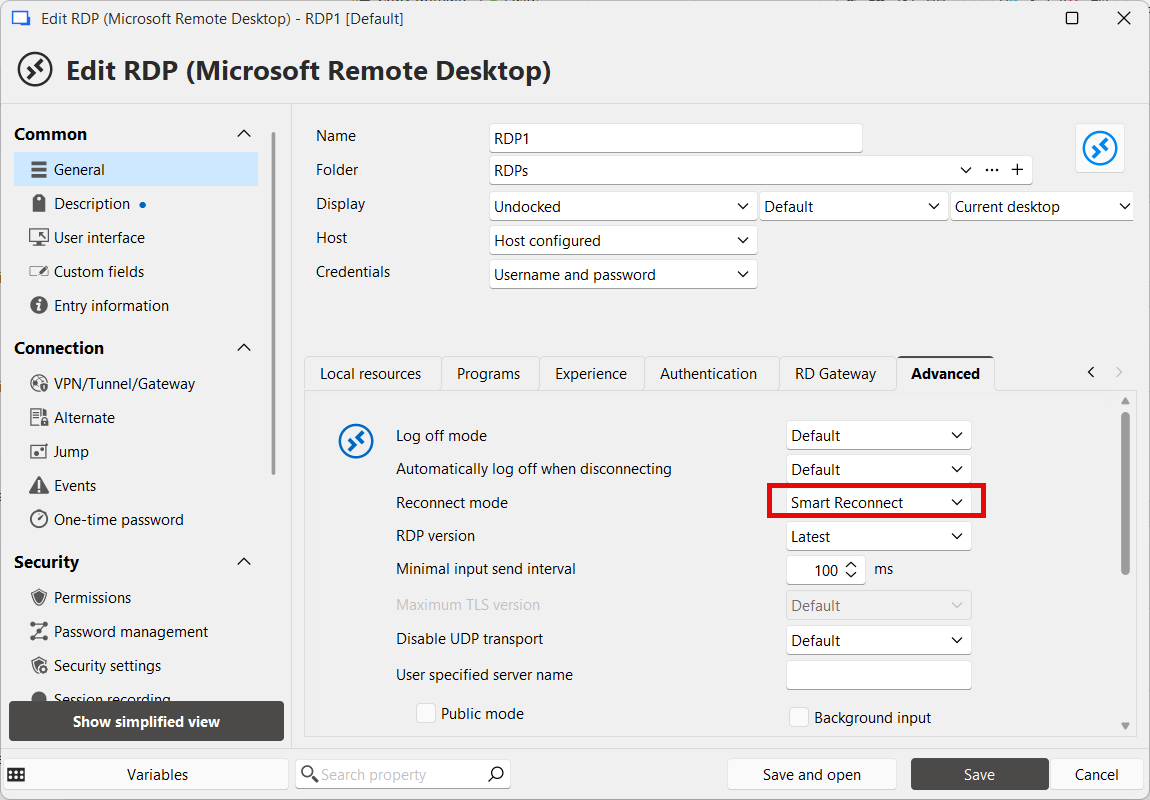
When I changed the reconnect mode, I wasn't able to reproduce reliably. Note that you will need to close your entry and reopen it for this setting to take effect.
I think there might still be an issue but I can't reproduce very reliably, so it might take another manipulation. Regardless, I've still opened a ticket on our side to investigate.
Regards,
Hubert Mireault
9dcbb1b7-17d1-4158-8b60-4546c6b27183.png
Nope. That option was already on (also a default, in application settings). But it was not on for all machines. I now turned it on for all of the ones I have running, but it still did not help.
The window gets closed and opened at the moment the machine is running and RDM is able to connect to it.
In the case of manual connect, right after I click it.
In case of the automatic option, soon as it connects.
Unfortunate, but thank you for the confirmation and the details on your tests and setup. As I mentioned we'll be investigating this as I believe it should be possible to standardize this behavior.
Regards,
Hubert Mireault
Hello,
We've investigated the issue you reported and have improved how reconnects are handled for undocked windows.
There are still a few scenarios where a full reconnect may occur, which will close and reopen the window, resulting in a change in the window order on the taskbar. These cases include:
- Performing a forced full reconnect (by holding the CTRL key while clicking the Connect button)
- Using a Devolutions Gateway VPN with the connection
- Having an RD Gateway configured in the RDP connection and the Reconnect mode under File → Settings → Entry Types → Sessions → Remote Desktop (RDP) set to Full reconnect
If any of the above conditions apply, the window will be closed and reopened due to architectural reasons. However, with our latest improvements, other reconnect scenarios should now preserve the window state, preventing the issue you’ve been experiencing. You can expect these changes with the upcoming 2025.3.16
Regards,
Jafran Majeau
Hello,
Thank you for being so patient!
I'm letting you know that version 2025.3.16.0 of RDM is now available with this feature included.
Please let us know if this works or if you encounter any issues.
Best regards,
Maxim Robert