SSH fixed terminal size option to not have content "jump" on the screen
SSH fixed terminal size option to not have content "jump" on the screen
1 vote

Hi
Would it be possible to extend the functionality when using a fixed terminal size on a SSH connection.
So that you have a option to not show lines outside the fixed size ? I can "simulate" it by setting "Max scrollback lines" to 0, but i would like the be able to scrollback. But just not have our apllication "jump around" visually.
I have attached 2 video showing what i mean.
For both cases i have this configured for the display on the SSH host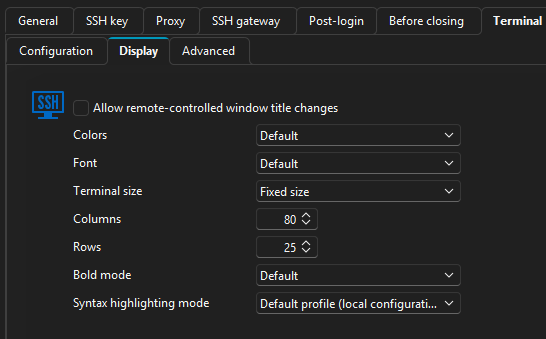
For RDM-fixed-size-ssh.mp4 i "Max scrollback lines" set to 2000
For RDM-fixed-size-ssh-without-scrollback.mp4 i "Max scrollback lines" set to 0
I would love if when using fixed size i had a option to have the display just stay in the topleft or have it dynamically change the fontsize like putty does it when configured for it.
I have recorded putty-fixed-size.mp4 to show what i mean for how putty does it.
Using putty inside RDM it works, but i would like to move to use the native SSH client instead.
885eeb46-2d37-42fa-9bb6-17ca28e316f9.png
putty-fixed-size.mp4
RDM-fixed-size-ssh.mp4
RDM-fixed-size-ssh-without-scrollback.mp4
All Comments (4)
Hello,
I've moved your thread to the RDM feature request forum, as this touches RDM more than Devolutions Server.
I've opened a ticket so we can add an option for this. We will post back here once we have an update.
Regards,
Hubert Mireault
Hello,
We've added a Mode option when setting the Terminal size to Fixed size. You will be able to change this mode to Fit, which should fix the issue you've been experiencing. This will become available with the upcoming 2026.2 version.
Regards,
Jafran Majeau
Great to hear, i cant wait to try it out :)
Hello,
Thank you for being so patient!
I am pleased to inform you that the requested feature has been implemented in version 2026.2.3.0 of Remote Desktop Manager. As of now, the latest version 2026.2.3.0 is only available in Beta.
We strongly recommend upgrading in a Staging environment before installing this version in the production environment.
https://devolutions.net/remote-desktop-manager/download/
The full 2026.2 release (non-beta version) will be available in June.
If you have any further questions, please don't hesitate to let us know.
Best regards
Maxim Robert